


fold.js is an open-source JavaScript library that makes web apps work properly on foldable phones such as the Samsung Galaxy Z Fold, Google Pixel Fold, Honor Magic V or Microsoft Surface Duo. It detects the hinge and the device posture (flat, book, tabletop), and gives you two-pane layouts that never put content under the hinge. It works with React, Vue, Svelte, Solid, Angular, Astro or plain HTML, weighs about 2 kB, and ships with a built-in foldable simulator so you can build without owning a device.
📊 New study: 94% of popular websites split a button across a foldable's hinge (77 sites audited on a Galaxy Z Fold, including Google, Amazon and Facebook, plus a run at the leaked iPhone Fold size: 86%).
▶ Try the live demo (works on desktop: the simulator is built in) · See an existing site fixed in one line
npx foldjs audit https://your-site.com # how foldable-ready is your site? Score out of 100 + HTML report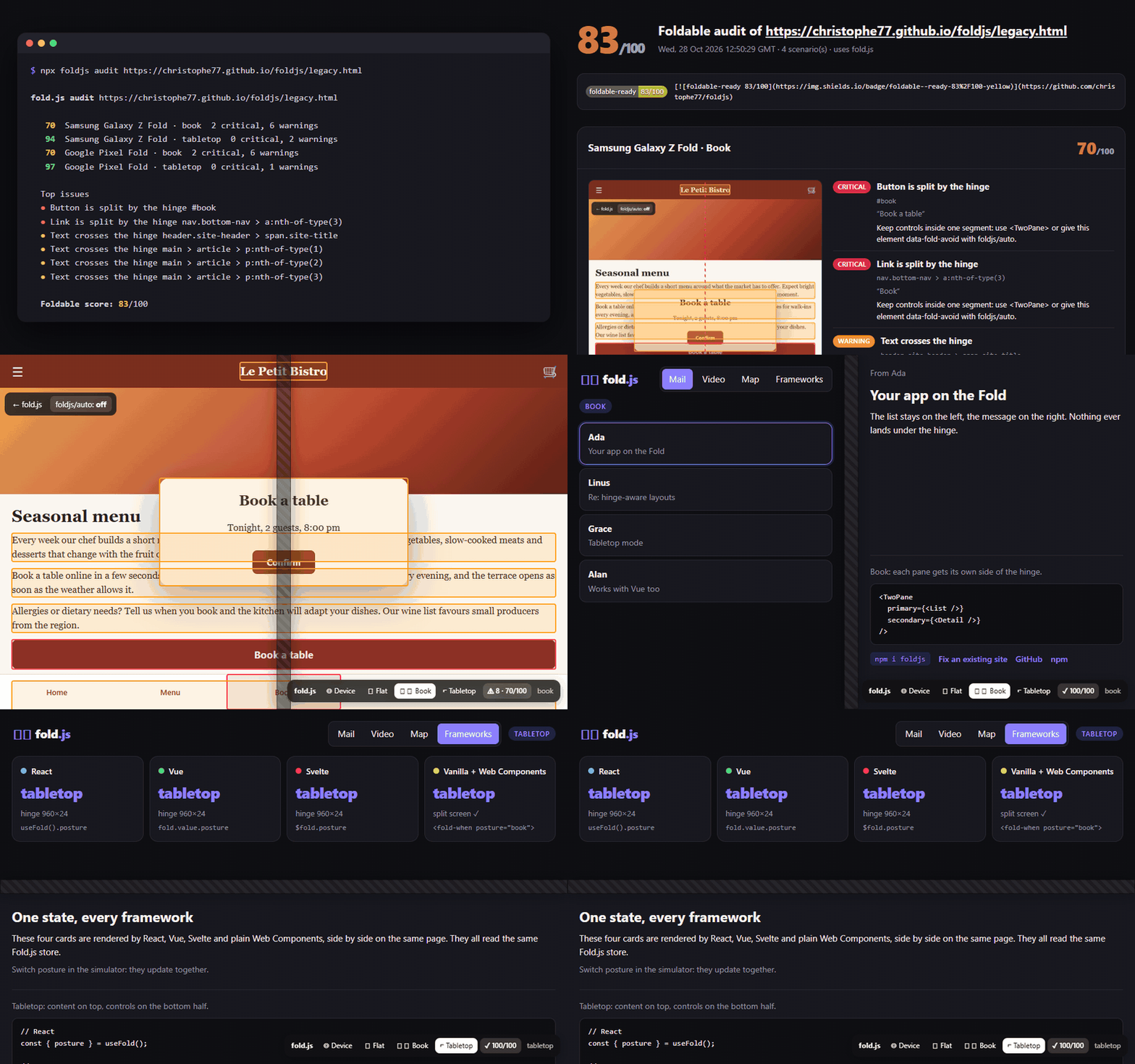
Most web apps treat a foldable phone as one big rectangle. Once the device is folded or spanned, text and buttons land under the hinge, and the half-folded "tabletop" posture is ignored. Chromium now exposes the right web standards (CSS Viewport Segments and the Device Posture API), but using them directly means pixel math, event wiring, SSR guards and no way to test without hardware. Microsoft's earlier dual-screen libraries (react-foldable, react-native-dualscreen) are archived.
fold.js wraps all of that in one small, framework-agnostic API.
- 🪟 Two-pane layouts: each pane on its own side of the hinge, stacked (or one hidden) on regular phones
- 📐 Posture detection:
flat,book(vertical hinge),tabletop(horizontal hinge),folded - 📏 Hinge geometry: exact position and size of the hinge and of each screen segment, in JS and as CSS variables
- 🧪 Built-in foldable simulator: switch postures from a floating panel or with Alt+Shift+F, on any desktop browser, with live outlines of everything under the hinge
- 🔍 Audit CLI:
npx foldjs audit <url>scores any site out of 100 on Galaxy Z Fold and Pixel Fold, with an HTML report, a README badge and a CI mode - 🪄 foldjs/auto: one script tag retrofits an existing mobile site (modals, tab bars, videos, text columns), no rewrite needed
- 🧩 Every framework: React, Vue, Svelte, Solid adapters, Web Components for everything else, and a CSS-only layer
- 🪶 Tiny and safe: about 2 kB min+gzip, zero dependencies, SSR-safe (Next.js, Nuxt, SvelteKit, Astro), TypeScript types included
npm i foldjs            # core, CSS layer, Web Components, simulator
npm i @foldjs/react # or @foldjs/vue, @foldjs/svelte, @foldjs/solidimport { TwoPane, FoldWhen, FoldDevtools, useFold } from "@foldjs/react";
export function Inbox() {
const { posture, hinge } = useFold();
return (
<>
<TwoPane
primary={<MailList />}
secondary={<MailDetail />}
fallback="stack" // single screen: "stack" | "primary" | "secondary"
/>
<FoldWhen posture="tabletop">
<PlayerControls />
</FoldWhen>
{process.env.NODE_ENV === "development" && <FoldDevtools initial="book" />}
</>
);
}@foldjs/react is marked "use client", so it works in the Next.js App Router out of the box.
<script setup>
import { TwoPane, FoldWhen, useFold } from "@foldjs/vue";
const fold = useFold(); // fold.value.posture
</script>

<template>
  <TwoPane fallback="stack">
    <template #primary><MailList /></template>
    <template #secondary><MailDetail /></template>
  </TwoPane>
</template><script>
import { fold, twoPane, foldWhen } from "@foldjs/svelte";
</script>
<div use:twoPane={{ fallback: "stack" }}>
<div data-pane="primary"><MailList /></div>
<div data-pane="secondary"><MailDetail /></div>
</div>
<p>Posture: {$fold.posture}</p>
<div use:foldWhen={"tabletop"}>Tabletop only</div>import { createFold, twoPane } from "@foldjs/solid";
const fold = createFold(); // fold().posture
<div use:twoPane={{ fallback: "stack" }}>
<div data-pane="primary"><MailList /></div>
<div data-pane="secondary"><MailDetail /></div>
</div><script type="module">import "foldjs/elements";</script>
<fold-two-pane fallback="stack">
<div slot="primary">List</div>
<div slot="secondary">Detail</div>
</fold-two-pane>
<fold-when posture="tabletop book">Only on a split screen</fold-when>import "foldjs/css";
import { init } from "foldjs";
init(); // optional: enables the simulator and non-native browsers<div class="fold-two-pane">
<div class="fold-primary">List</div>
<div class="fold-secondary">Detail</div>
</div>
<div class="fold-only-tabletop">Tabletop only</div>CSS variables on <html>: --fold-hinge-x|y|width|height, --fold-segment-0-width|height, --fold-segment-1-width|height.
Attributes on <html>: data-fold-posture, data-fold-spanning.
import { mountDevtools } from "foldjs/devtools";
mountDevtools({ initial: "book", position: "bottom-right", hingeSize: 24 });
A floating panel lets you switch between Device / Flat / Book / Tabletop and draws the simulated hinge on screen. Press Alt + Shift + F to cycle postures. In tests, demos or Storybook, drive it from code: simulate({ posture: "tabletop" }), then simulate(null) to go back to the real device.
The panel also shows a live foldable score and outlines every element under the hinge: red for split buttons and form fields, orange for text, modals, fixed elements and videos, yellow for images. Click the score to toggle the outlines and log each issue, with a suggested fix, to the console. Pass highlight: false to turn it off.
npx foldjs audit https://christophe77.github.io/fold.js/legacy.html 70 Samsung Galaxy Z Fold · book 2 critical, 6 warnings
94 Samsung Galaxy Z Fold · tabletop 0 critical, 2 warnings
70 Google Pixel Fold · book 2 critical, 6 warnings
97 Google Pixel Fold · tabletop 0 critical, 1 warnings
Top issues
● Button is split by the hinge #book
● Link is split by the hinge nav.bottom-nav > a:nth-of-type(3)
● Text crosses the hinge main > article > p:nth-of-type(1)
Foldable score: 83/100
Report: ./foldjs-report/report.html
It opens the page in headless Chrome at the real inner-screen sizes of the Samsung Galaxy Z Fold and Google Pixel Fold, in book and tabletop postures, and lists every element under the hinge. The HTML report shows annotated screenshots and a fix for each issue, plus a badge for your README:

| Option | Default | |
|---|---|---|
--device |
all |
galaxy-z-fold, pixel-fold, iphone-fold or all. iphone-fold uses leaked specs (904×640 CSS px, iPhone user agent) and is not part of all. |
--posture |
all |
book, tabletop or all |
--out |
foldjs-report |
Report folder (report.html + report.json) |
--min-score |
Exit with code 1 below this score, for CI | |
--dismiss-consent |
Close cookie banners (accepting, like most visitors) before the audit | |
--json |
Print the result as JSON | |
--browser |
auto | Chrome, Edge or Chromium path (or CHROME_PATH). No browser is downloaded. |
In CI (GitHub Actions runners ship with Chrome):
- run: npx foldjs audit http://localhost:3000 --min-score 90The audit checks the first screen of the page. It runs findHingeCollisions() from the core, so you can also call it yourself in a browser or in Playwright tests.
One line, no build step, no rewrite:
<script src="https://unpkg.com/foldjs/dist/auto.global.js"></script>Or from your bundle: import { autoFix } from "foldjs/auto"; const undo = autoFix();
On a foldable (and in the simulator), it applies safe, reversible fixes as inline styles, and removes them as soon as the device is flat again:
| Fix | Automatic | Option |
|---|---|---|
| Open dialogs and modals move to a single screen (right screen in book, top half in tabletop) | ✅ | modals |
| Cookie and consent banners move to a single screen (OneTrust, Didomi, Axeptio, Cookiebot, Quantcast, Usercentrics, Sourcepoint, tarteaucitron and homemade ones) | ✅ | consent |
| Fixed tab bars and toolbars get an empty slot under the hinge, so no item is split | ✅ | bars |
| Videos and iframes stay on one screen (top half in tabletop) | ✅ | media |
| Text blocks flow into two columns around the hinge | add data-fold-columns |
columns |
| Any element is pushed off the hinge (titles, call-to-action buttons) | add data-fold-avoid |
avoid |
| An element and its children are never touched | add data-fold-ignore |
Turn a fix off with autoFix({ bars: false }) or <script src="…/auto.global.js" data-bars="false">. See it on a typical mobile site: the foldable score goes from 76 to 100 in book posture, cookie banner included.
Safari does not implement the foldable web APIs, so a page cannot know where the iPhone Fold folds. fold.js handles it anyway: when an Apple touch screen measures 600 to 720px on its short side (regular iPhones are under 450px, iPads at least 744px, so only an unfolded iPhone Fold fits) and is held in landscape, it splits the viewport at its center line. <TwoPane>, use:twoPane, <fold-two-pane> and the CSS layer then show list and detail side by side, like on an iPad. In portrait, nothing changes.
It is on by default and only affects that case. getFold().virtual tells you when it is active. Change it with configure():
import { configure } from "foldjs"; // also exported by every adapter
configure({ virtualFold: "auto" }); // default: unfolded iPhone Fold only
configure({ virtualFold: true });   // any landscape screen at least 600px tall (tablets, desktop testing)
configure({ virtualFold: false });  // never
The iPhone Fold crease is reportedly much shallower than on earlier foldables, so content on the fold stays readable. The virtual fold is about using the wide inner screen well, not about hiding a gap. Preview it in the demo, and audit a site at the leaked iPhone Fold size with npx foldjs audit <url> --device iphone-fold.
import { getFold, subscribe, simulate, twoPaneLayout, bindTwoPane, findHingeCollisions, foldScore } from "foldjs";

getFold();
// {
//   posture: "book",                 // "flat" | "book" | "tabletop" | "folded"
//   spanning: "columns",             // "none" | "columns" | "rows"
//   isSpanned: true,
//   segments: [{ x, y, width, height }, …],
//   hinge: { x, y, width, height },
//   devicePosture: "folded",         // raw Device Posture API value
//   viewport: { width, height },
//   simulated: false
// }

const off = subscribe((state) => console.log(state.posture));

// What sits under the hinge right now (real or simulated)?
const issues = findHingeCollisions(); // [{ severity, kind, message, suggestion, selector, rect, element }, …]
foldScore(issues);                    // 0 to 100
Writing an adapter for another framework? subscribe and getFold are all you need, and twoPaneLayout(state) returns the styles every built-in adapter uses.
Run npx foldjs audit https://your-site.com. It tests the page on the Samsung Galaxy Z Fold and Google Pixel Fold in book and tabletop postures, gives a score out of 100 and an HTML report with screenshots of every element under the hinge. While developing, the fold.js simulator shows the same issues live.
Yes. Add <script src="https://unpkg.com/foldjs/dist/auto.global.js"></script>. It moves cookie banners, modals, tab bars and videos off the hinge automatically, and you can mark text blocks with data-fold-columns or elements with data-fold-avoid for more. For new screens, <TwoPane> gives the best result.
Call getFold() from foldjs (or useFold() in React and Vue). isSpanned tells you whether the viewport is split by a hinge, posture tells you how the device is held, and hinge gives the hinge rectangle in CSS pixels. Under the hood fold.js reads window.viewport.segments and navigator.devicePosture, with a fallback for older Edge builds.
Use the fold-two-pane class from foldjs/css, or the --fold-hinge-* and --fold-segment-* variables. On supporting browsers the CSS layer also uses the native env(viewport-segment-*) values and the horizontal-viewport-segments / vertical-viewport-segments media queries.
Book means the hinge is vertical and the two screens are side by side, like an open book: ideal for list and detail. Tabletop means the hinge is horizontal, like a half-open laptop: ideal for a video or camera on top and controls at the bottom.
Yes. The built-in simulator (<FoldDevtools />, <FoldDevtools> in Vue, or mountDevtools() anywhere) fakes the segments and posture on any desktop browser. Chrome DevTools device emulation (Galaxy Z Fold, Surface Duo) also works with fold.js.
Yes, with a virtual fold. Safari exposes no foldable API, so fold.js detects an unfolded iPhone Fold from its screen size and splits the viewport at its center in landscape. Two-pane layouts work out of the box; posture detection (book or tabletop angle) is not possible on iOS until WebKit ships the Device Posture and Viewport Segments APIs.
Chrome and Edge on Android foldables (Samsung Galaxy Z Fold, Google Pixel Fold, Honor, Oppo, Vivo, Surface Duo) support the native APIs. On every other browser, including Samsung Internet, Firefox and Safari on iOS, fold.js falls back to a normal single-screen layout and the simulator still works.
Yes. On the server the state is a flat, unsplit screen, and it updates on the client after hydration. It works with Next.js, Nuxt, SvelteKit, Remix and Astro.
For the web, yes. Those Microsoft packages are archived and rely on the deprecated spanning media query and getWindowSegments(). fold.js uses the current standards and supports more frameworks. It does not target React Native.
| Native APIs | With fold.js | |
|---|---|---|
| Chrome / Edge on Android foldables | ✅ Viewport Segments + Device Posture | ✅ Full support |
| Samsung Internet, Firefox, Safari | ❌ | ✅ Single-screen fallback, simulator |
| Desktop browsers | ❌ | ✅ Simulator |
| Package | Description |
|---|---|
foldjs |
Core API, CSS layer (foldjs/css), Web Components (foldjs/elements), simulator (foldjs/devtools), retrofit script (foldjs/auto) |
@foldjs/react |
useFold, <TwoPane>, <FoldWhen>, <FoldDevtools> |
@foldjs/vue |
useFold, <TwoPane>, <FoldWhen>, <FoldDevtools> |
@foldjs/svelte |
fold store, use:twoPane, use:foldWhen |
@foldjs/solid |
createFold, use:twoPane |
@foldjs/cli |
foldjs audit command (run it with npx foldjs audit) |
npm install
npm run dev        # demo on http://localhost:5173
npm test
npm run build
Issues and pull requests are welcome, especially reports from people testing on real foldable devices.
MIT