
Everyday apps that you and your agent use together.
Your agent sees what you see and works on it directly. You answer with a click when a click is quicker than a paragraph. Everything runs on your own machine.
What it brings · The apps · What is coming · Try it · Bring your own app
Agents are now good enough to do real work. They still receive that work one chat message at a time, and they still operate your software from the outside, one screenshot after another. AutoPhD does not make a better model or a better harness. It makes the software in between, and this is what you get from it:
| What you get | |
|---|---|
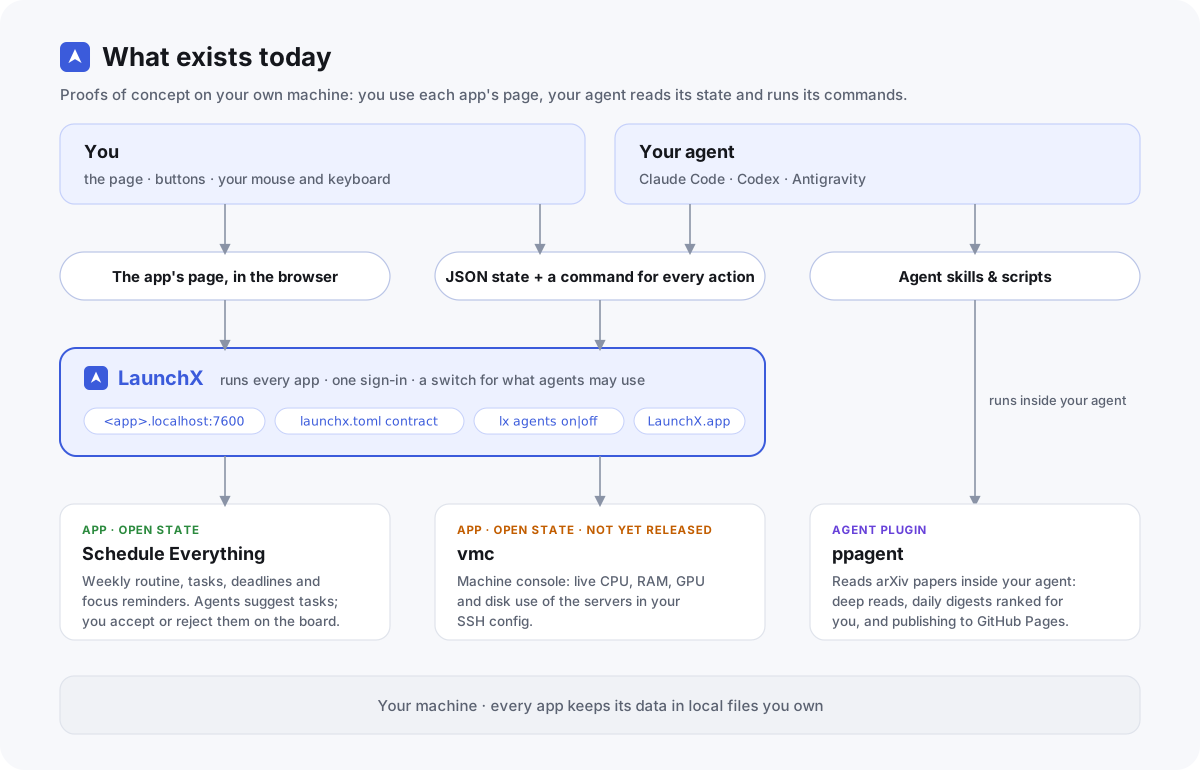
| Apps your agent can read | An app built on our contract hands its whole state to your agent as one JSON document and has a command for every action. Your agent knows what is on your screen without taking a screenshot, and does what you asked in one step. |
| More ways to answer than typing | What your agent proposes shows up on the app's own page. You accept or reject it with a button, drag it somewhere else, or flip a switch. The chat box is still there for what is best said in words. |
| The switches in your hand | Your agents are told nothing about an app until you switch it on for them. They propose; you approve. |
| One place to run it all | LaunchX starts every app, signs you in once and shows what is running, in a Mac app you drive with the mouse. |
| Your data stays yours | Everything lives in local files you own. There is no account to create, and the apps make no AI calls of their own: your agent talks to its own model provider. |
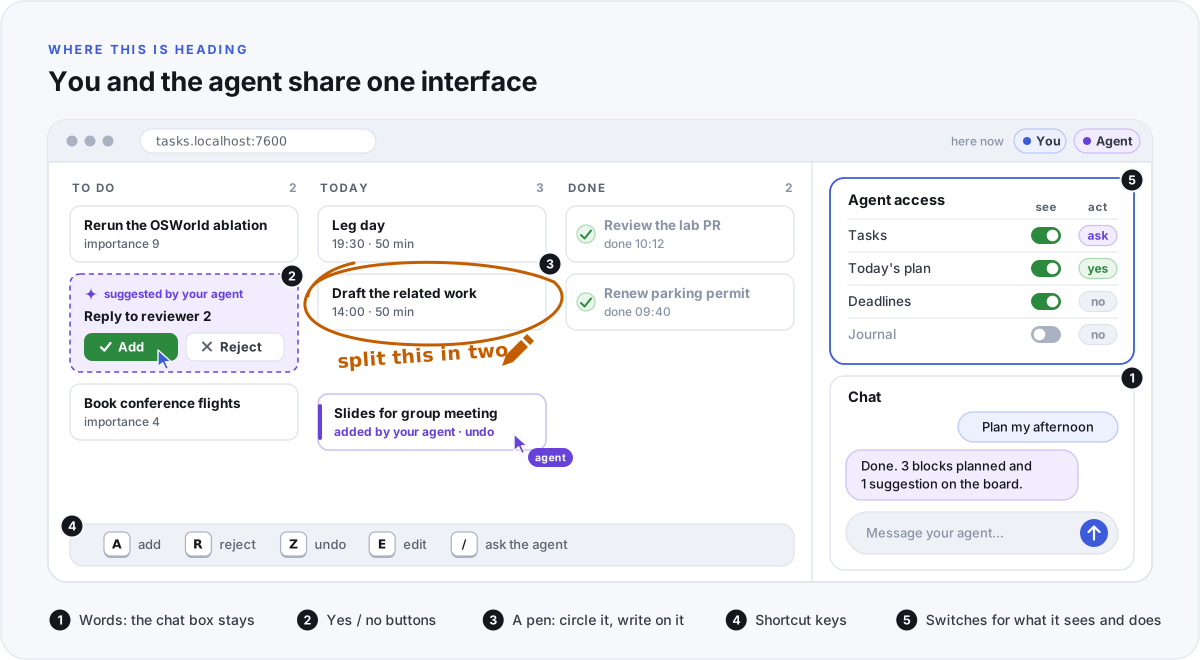
This is the experience we are building toward. The buttons, a switch per app and the chat exist today. The pen, the shortcut keys and a switch for each part of an app come next.
We start with the scenes of a PhD student's week, because that is the week we live. All of these run on our own machines every day.
| Scene | App | What you do | What your agent does |
|---|---|---|---|
| Planning the week | Schedule Everything | See your day on a timeline, get reminders that stay until you answer them, and click Add to my tasks or Reject on what your agent suggests. | Interviews you and writes your weekly routine, fills today's focus blocks from the app's JSON, and suggests tasks it finds in your email and calendar. |
| Reading papers | ppagent | Read an illustrated report on any arXiv paper, and a daily digest ranked against your research profile. | Fetches and reads the paper, writes the report, and publishes it to your GitHub Pages site. |
| Watching your servers | vmc (not yet released) | See live CPU, RAM, GPU and disk use of the servers in your SSH config on one page. | Reads the same numbers with one command. |
| Running it all | LaunchX | Start, stop and open every app with the mouse, sign in once, and switch each app on or off for your agents. | Finds the apps you switched on, with their commands and skills. |
- A pen and shortcut keys. Circle a thing and write on it. Accept, reject and undo with one key.
- Finer switches. For each part of an app, whether your agent can see it, and whether it may act, must ask first, or may not act.
- One connection for every agent. Each app describes its actions, and LaunchX serves the whole catalogue over MCP.
- Your apps on your phone. Remote and phone access, added once in LaunchX, for every app at the same time.
- One-line installs.
lx install <repo>for any app, andauto-phd.shto set up everything in one go. - More scenes. learn-by-quiz (learn new concepts and papers through quizzes shaped to how you learn) and a CV agent are in development.
-
Plan your week with your agent. Install Schedule Everything (it needs Rust), add its plugin to your agent, and say "build my weekly schedule".
curl -fsSL https://raw.githubusercontent.com/AutoPhd-org/schedule-everything/main/install.sh | bash -
Read a paper. Add ppagent to your agent and give it an arXiv id.
-
Run your apps from one place. Follow the LaunchX install steps, then open LaunchX and start your apps with the mouse.
Any open-source app can join the same launcher, the same sign-in and the same switches:
- Serve your app's page and API from one foreground process that reads
LAUNCHX_PORTandLAUNCHX_TOKEN. - Put the app's whole state at
GET /api/state, and give every action on the page a command. - Ship a
launchx.toml, then runlx add . && lx check <id>to test it against the contract.
The LaunchX contract has the details and two worked examples. Why the apps are built this way is in the LaunchX README, and the long version is the essay The Bottleneck Is Now the Interface. Ideas and questions are welcome in each repository's issues.