
Tip
For native system packages: Debian & Arch packages



Use your Android phone as a webcam on Linux, in a single file.
The AppImage edition of Android Webcam. It bridges
scrcpy with the v4l2loopback kernel module to create a virtual camera that works with Zoom,
OBS, Discord, Jitsi, Google Meet and more. scrcpy, its phone server and adb are bundled, so
nothing but the kernel module has to be installed.
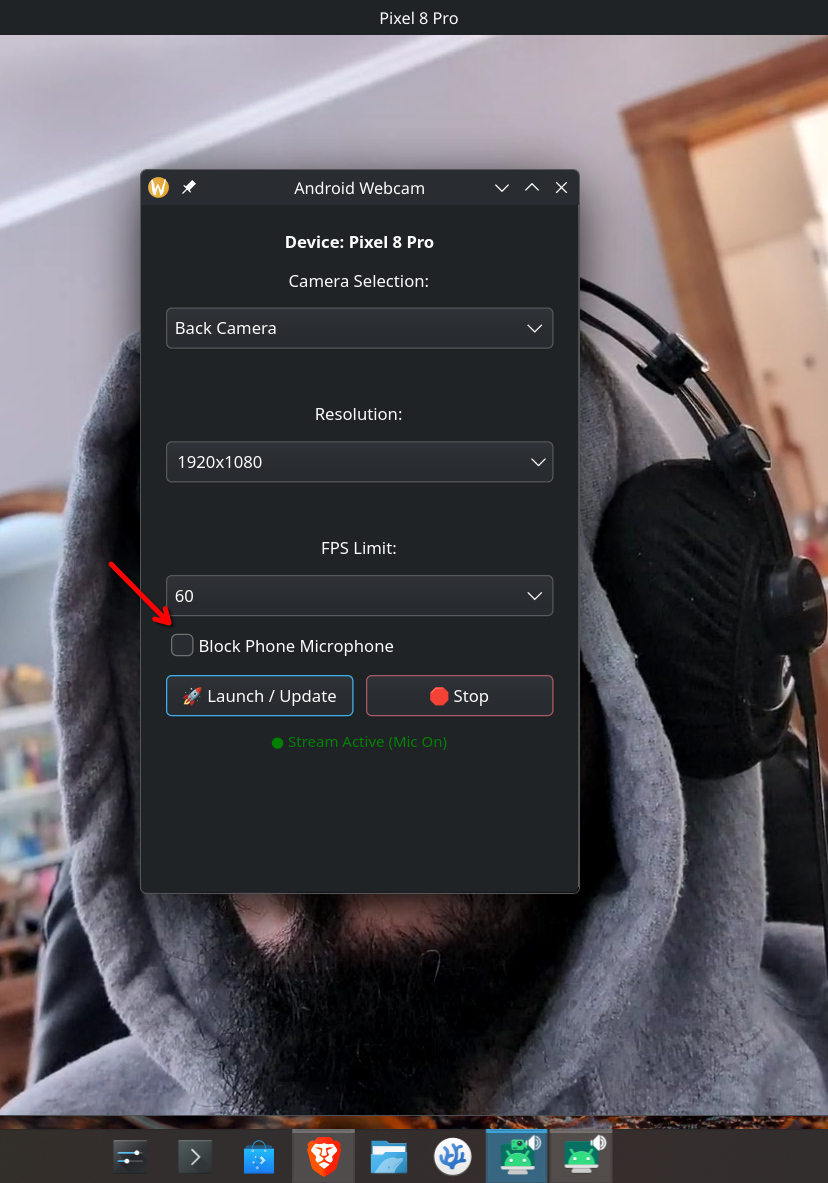
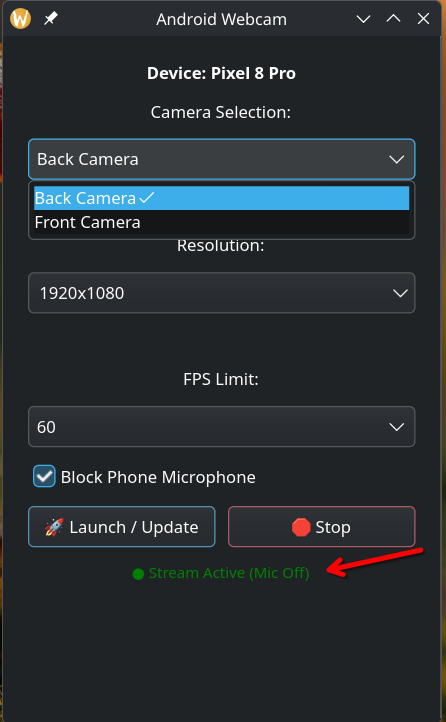
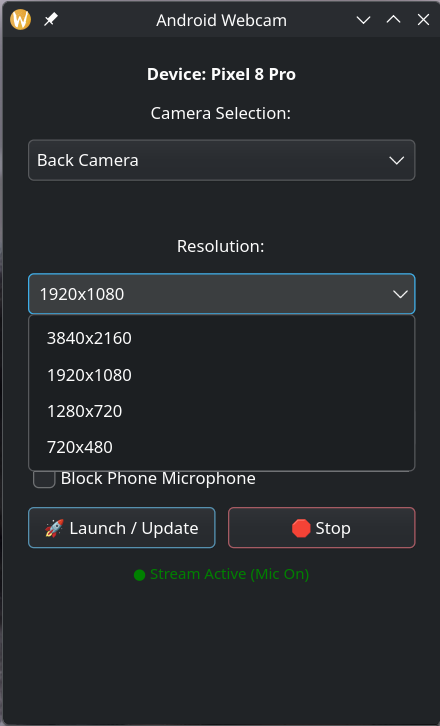
| 1. Launch & Settings | 2. Mute Microphone | 3. Change resolution |
|---|---|---|
 |
 |
 |
- USB or Wi-Fi: plug in a cable, pair over Wi-Fi with a QR code (Android 11+), type the phone's IP, or start on USB and click 📶 Switch to Wi-Fi to unplug.
- Several phones: pick which connected device to stream from.
- Settings apply on their own: change camera (front/back), resolution, FPS or the mic while streaming and the stream restarts with them. Your choices are remembered for next time.
- 🌙 Background mode: feed the virtual camera without opening the scrcpy preview window.
- Crash recovery: if the phone can't keep up, the stream relaunches at 1080p, then 720p. A busy or blocked camera, or a missing audio output, is reported instead of retried blindly.
- Safe with open meetings: while another app (a browser, OBS, Zoom) has the camera open, the settings that would cut its video are locked, with a note saying which app holds it.
- Microphone: use the phone's mic, or block it with one click.
- Languages: English, Português (Brasil) and Español, picked from your system language.
The only thing the AppImage can't bring along is the v4l2loopback kernel module.
Debian / Ubuntu / Mint:
sudo apt update
sudo apt install v4l2loopback-dkms
sudo apt install linux-headers-generic   # Ubuntu / Mint
sudo apt install linux-headers-amd64     # Debian
The headers meta-package makes DKMS rebuild the module after every kernel update (without it the camera disappears after the next update).
Arch Linux:
sudo pacman -S v4l2loopback-dkms linux-headersYou also need a desktop with GTK 4 (any current GNOME, KDE Plasma, Cinnamon, etc. has it) and
pkexec (polkit), which every mainstream desktop ships.
- Enable Developer Options (Settings › About phone › tap "Build number" 7 times).
- Enable USB debugging, or Wireless debugging to connect over Wi-Fi.
-
Download and run:
chmod +x android-webcam-appimage-x86_64.AppImage
./android-webcam-appimage-x86_64.AppImage
-
Enter your password if asked: the first launch after each boot loads
v4l2loopback(see Permissions). -
Connect your phone over USB, or over Wi-Fi from the waiting screen (📷 Pair with QR Code or Connect with the phone's IP), and tap Allow on the phone.
-
Launch: pick the camera, resolution and FPS, then click 🚀 Launch (with the preview window) or 🌙 Background (without it).
-
In your meeting app: select the camera named "Android_Webcam_v4l2".
An AppImage can't install files on your system, so whenever it needs root it asks for your
password through pkexec:
- At startup, only if
v4l2loopbackisn't loaded yet, to create/dev/video9. - Inside the app, to reload the module and reset
/dev/video9: when the device is missing, when it stops accepting video, and, on v4l2loopback older than 0.13 (e.g. Ubuntu 24.04), when you switch to a different resolution, since those versions can't change it otherwise.
To skip the startup prompt, load the module at boot:
echo "v4l2loopback" | sudo tee /etc/modules-load.d/v4l2loopback.conf
echo "options v4l2loopback video_nr=9 card_label=Android_Webcam_v4l2 exclusive_caps=1" | sudo tee /etc/modprobe.d/v4l2loopback.conf
The native packages do this for you and also reset the camera without a password.
build.sh downloads the latest scrcpy, scrcpy-server, adb and appimagetool, builds the
Rust app and packages everything.
-
Clone the repository:
git clone https://github.com/Broly1/android-webcam-appimage.git cd android-webcam-appimage -
Install the build dependencies (Rust from rustup.rs):
sudo apt install build-essential pkg-config libgtk-4-dev curl wget file   # Debian / Ubuntu
sudo pacman -S base-devel gtk4 curl wget                                  # Arch
-
Run the build script:
./build.sh
If the tools were downloaded before, it asks whether to download them again.
The result, android-webcam-appimage-x86_64.AppImage, runs on distributions at least as new as
the one it was built on, so release builds are made on Ubuntu 24.04. Without installing
anything, Docker can do that:
docker run --rm -it -e APPIMAGE_EXTRACT_AND_RUN=1 -v "$PWD":/work -w /work ubuntu:24.04 bash -c '
  apt-get update && apt-get install -y build-essential pkg-config libgtk-4-dev curl wget file ca-certificates psmisc &&
  curl -fsSL https://sh.rustup.rs | sh -s -- -y --profile minimal && . "$HOME/.cargo/env" &&
./build.sh; chown -R '"$(id -u):$(id -g)"' /work'Run the AppImage with ANDROID_WEBCAM_DEBUG=1 to print scrcpy's output and what the app decides
(launch, stop, restarts, crash recovery) to the terminal:
ANDROID_WEBCAM_DEBUG=1 ./android-webcam-appimage-x86_64.AppImageAndroid Webcam is licensed under the GNU General Public License v3.0 or later.
Bundled tools keep their own licenses:
The virtual camera is provided by v4l2loopback (GPL-2.0), installed separately.
This repository started as a fork of DonJone's Scrcpy-AppImage (Apache 2.0); none of its files remain.