Point an AI director at your live app. Get a cinematic 60-second launch video.
Real product footage — performed, shot, and edited automatically. No mockups, no timeline, no manual cuts.


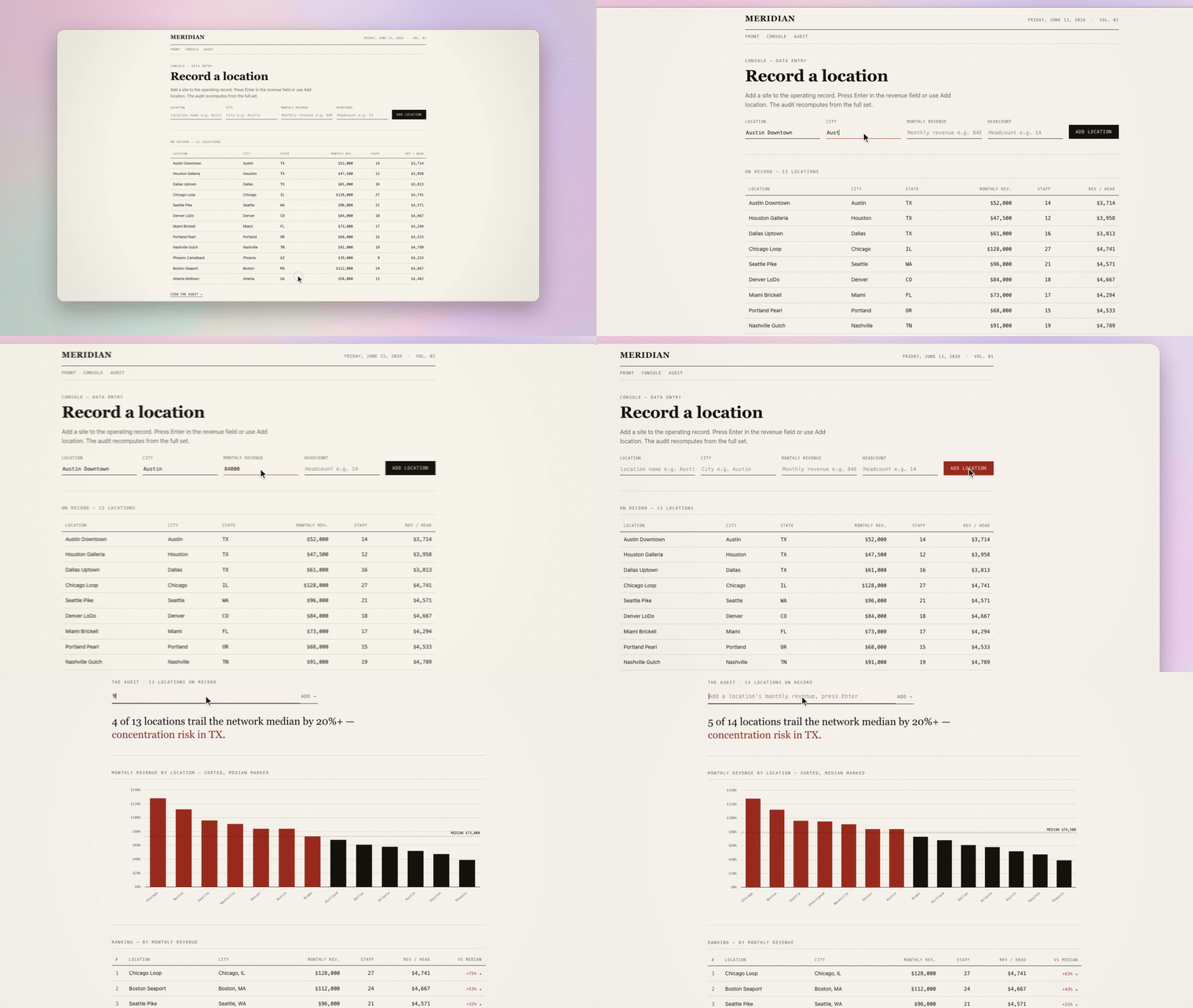
Generated by supercut from a live web app — zero manual editing. The cursor, the camera, the cuts: all automatic.
You built something great. Now you need a launch video — and all you've got is a screen recording, iMovie, and a deadline.
supercut is an AI director for launch videos. Screen recorders hand you a canvas and a timeline and leave the direction to you — supercut decides what to film by itself. Point it at your running app: it reads your source, crawls the live UI, picks the 2–4 moments that actually sell the product, drives a real browser to perform them on camera, then renders the result cinematically — spring zoom-to-cursor, motion blur, music, a wallpaper stage, and a clean 1080p60 export.
Not a screen recording. Not a fake UI mockup. Your real product, shot like a launch film — automatically.
- Real footage only. It drives your actual app in a real browser. Nothing is faked or re-created.
- It understands the product. It reads your routes/source and crawls the DOM, so it films the money moments — type a query → frame the result — instead of parking on the landing page.
- It frames the payoff. The camera holds on the result an action produces (the graph, the dashboard, the detail panel), not the button you clicked.
- Works on any app. Same pipeline for a light editorial dashboard or a dark single-page tool — copy and colors adapt per app.
- No API key required to run it.
record+renderwork fully offline; only the AI director (generate) calls an LLM. - An open contract. The recorder writes a documented event log; any recorder can feed the renderer.
 your app URL ──▶ ① analyze   read the source + crawl the app → pick the money moments (LLM)
                  ② script    write the filming recipe (LLM, schema-validated, no hallucinated selectors)
                  ③ record    a deterministic browser performs it, captured frame-by-frame
                  ④ qc        deterministic + optional vision checks, bounded re-takes
                  ⑤ render    cinematic compositing ──▶ final.mp4 (≤60s, 1080p60)
Each stage hands off a plain-JSON artifact, so you can stop at any point, hand-edit, and resume.
# your app running locally? one command:
npx @co-messi/supercut generate --url http://localhost:3000
generate needs an LLM key in a .env (see provider setup),
plus Chromium and ffmpeg: npx playwright install chromium, an ffmpeg on your PATH,
and npx @co-messi/supercut doctor checks both.
Any command accepts
--helpto print its own usage (e.g.npx @co-messi/supercut generate --help). Examples further down write the command as plainsupercut …: run it asnpx @co-messi/supercut …, ornode dist/cli/index.js …from a source checkout.
git clone https://github.com/Co-Messi/supercut
cd supercut
npm install
npm run build

node dist/cli/index.js generate --url http://127.0.0.1:3000
No key? The non-AI path works standalone against the bundled demo app:
# 1. serve the bundled demo app on port 4173 (or: npx serve -l 4173 examples/demo-app)
python3 -m http.server 4173 --directory examples/demo-app &

# 2. film it with the example recipe, then render
node dist/cli/index.js record --recipe examples/demo.recipe.json --out out/take
node dist/cli/index.js render --take out/take --out out/final.mp4

node dist/cli/index.js doctor # check Chromium + ffmpeg are installedAlready living in Claude Code, Codex, opencode, Cursor, or Cline? Don't run the
steps by hand — paste the block below in as your task, fill in the two <...>
placeholders, and let the agent clone, build, install Chromium/ffmpeg, and film your app:
Set up and run supercut (https://github.com/Co-Messi/supercut) to make a launch
video of my app. Steps:

1. git clone https://github.com/Co-Messi/supercut && cd supercut
2. npm install && npm run build
3. npx playwright install chromium
4. Ensure ffmpeg is on PATH (install it if missing), then run:
   node dist/cli/index.js doctor
5. Ask me which LLM provider to use, then create a .env:
   - DeepSeek:    SUPERCUT_PROVIDER=deepseek    + DEEPSEEK_API_KEY=...
   - OpenRouter:  SUPERCUT_PROVIDER=openrouter  + OPENROUTER_API_KEY=...
6. Film it (my app is running locally — fill these in):
   node dist/cli/index.js generate --url <MY_APP_URL> --repo <MY_APP_SOURCE_DIR> --yes
7. When it finishes, open out/final.mp4 and show me the result.

No API key handy? Skip the .env and use the no-LLM path instead:
   python3 -m http.server 4173 --directory examples/demo-app &
   node dist/cli/index.js record --recipe examples/demo.recipe.json --out out/take
   node dist/cli/index.js render --take out/take --out out/final.mp4
Same block works in any agent — they all take a pasted task. --repo is optional but
makes the director read your routes so it films real panels, not just the landing page.
Help the director understand a deeper, multi-page app by pointing it at the source:
node dist/cli/index.js generate --url http://127.0.0.1:3000 --repo ./Filming your own local dev app is the primary use case, so generate allows
localhost / RFC1918 / link-local by default — no flag needed. If you point it at an
untrusted or public URL, add --block-private-network to engage the SSRF guard
(rejects localhost, RFC1918, link-local, and cloud-metadata addresses, and validates
each redirect hop):
node dist/cli/index.js generate --url https://untrusted.example --block-private-network(--allow-private-network is a deprecated no-op kept for back-compat.) With the guard on,
every in-flight browser request is checked against the policy before it leaves the
browser. That covers navigations from clicked links and submits, fetch/XHR, images,
scripts, and WebSocket connections, and it covers every redirect hop of each request.
To see redirect hops at all, supercut makes the guarded requests itself (from Node),
checks each Location before following it, and hands the browser the final response.
A click that ends on a blocked or private page fails the scene instead of filming an
error page. Service workers are blocked while the guard is on.
The guard has costs and limits:
- A redirected page is reached through a one-line stub page that replaces itself with
the redirect target, so the page ends up at the right URL and the target is still
fetched only once. A
307/308chain that ends in aPOSTcannot be replayed that way and renders at the URL that was requested. - Responses are buffered, not streamed. A response that never completes (a long-poll or server-sent-events endpoint) fails after 30 seconds.
- WebSocket gating relies on Playwright's
routeWebSocket. On a Playwright older than 1.48, supercut prints a warning and WebSocket connections are not policy-checked. - Blocked ranges include CGNAT (
100.64.0.0/10),198.18.0.0/15, multicast, and IPv6 link-local, unique-local, NAT64 and 6to4 forms of private addresses. A proxy or VPN in "fake-IP" DNS mode (e.g. Clash) answers every lookup from198.18.0.0/15, so the guard blocks every hostname there. The real destination is hidden inside the tunnel. Turn fake-IP off, or film from a machine without it. - The guard is best-effort against active DNS rebinding. It checks each hostname with a DNS lookup, and the connection makes its own lookup a moment later. A hostname built to answer "public" to the first and "private" to the second can slip between them. Enforcing at the connection would need a filtering proxy, which supercut does not ship. For a genuinely hostile target, run supercut on a machine or network namespace that cannot reach anything private.
⚠️ supercut drives and may MUTATE the target app — it performs real clicks and typing on whatever you point it at. Destructive controls (Delete, Remove, Pay, …) are excluded from filming by default, but that filter is best-effort and English-only: it matches visible labels and cannot catch icon-only buttons or other wording. Film against a disposable/staging environment, never production data or URLs/recipes you do not trust. Pass--allow-destructiveto opt back in.
generateprints the recipe's full action list — every selector and every typed string — before filming starts. At a terminal it then asks before the first click;--yesskips the question. With no terminal to ask on (CI, a coding agent, piped stdin),generaterefuses to start unless you pass--yes(or--dry-run).--dry-runstops right there instead: reviewrecipe.json, then film it withsupercut record.
Copy .env.example to .env (or pass --env-file <file>):
cp .env.example .envDeepSeek is text-only here, so supercut disables screenshots and vision QC for it by default:
SUPERCUT_PROVIDER=deepseek
DEEPSEEK_API_KEY=...
SUPERCUT_MODEL=deepseek-v4-pro
OpenRouter / custom OpenAI-compatible providers can use vision-capable models:
SUPERCUT_PROVIDER=openrouter
OPENROUTER_API_KEY=...
SUPERCUT_MODEL=anthropic/claude-sonnet-4.6
SUPERCUT_VISION=true
For SUPERCUT_PROVIDER=custom, set SUPERCUT_API_KEY, SUPERCUT_LLM_BASE_URL and SUPERCUT_MODEL.
A provider-scoped key never leaves its provider: with deepseek or openrouter (set or
auto-detected), a SUPERCUT_LLM_BASE_URL on any other host is refused, and every base URL
must be https: (plain http: only for a loopback model server).
If multiple provider keys are present, set SUPERCUT_PROVIDER explicitly — ambiguous
config fails loudly rather than guessing.
Every generate run has a hard LLM spend ceiling: 300k tokens by default, tunable with
--max-tokens <n> or SUPERCUT_MAX_TOKENS (0/off disables). The run aborts with a
per-stage spend breakdown if a misbehaving model would blow past it.
Every render stages the app window on a background. The default is the bundled
cobalt wallpaper — deep blue-violet waves with strong contrast behind a light
app window. Pick another with --bg (on render and generate):
supercut render --take out/take --bg sunrise            # bundled wallpaper
supercut render --take out/take --bg midnight           # procedural palette
supercut render --take out/take --bg path/to/wall.png   # your own image
Bundled wallpapers (in assets/backgrounds/):
| wallpaper | look |
|---|---|
cobalt (default) |
deep blue-violet silk waves |
glacier |
cool blue-violet |
sunrise |
warm gradient |
daydream |
pastel clouds |
magenta |
magenta glow |
coral |
pastel coral bloom |
lavender |
soft blue-lavender |
Procedural palettes (generated at render time, no asset): aurora, midnight,
dusk, paper.
render is silent by default; on generate the AI director picks the bundled track
matching your app's look. --music (on render and generate) muxes a looped,
loudness-normalized track with fade-in/out under the video — never re-encoding the
video and never changing its length:
supercut render   --take out/take --music midnight
supercut generate --url http://localhost:3000 --music pulse
supercut render   --take out/take --music path/to/your-track.mp3   # your own file
Bundled tracks (in assets/music/ — original instrumentals made for supercut;
provenance in assets/music/CREDITS.md):
| track | vibe |
|---|---|
pulse |
minimal tech-house |
daybreak |
bright melodic house |
midnight |
dark synthwave/techno |
momentum |
driving minimal techno |
--music off forces a silent cut; on render, omitting the flag does too. --music
always outranks the director's pick on generate.
generate sends crawled page text, element labels/selectors, and optional repo notes
(--repo) to your configured LLM provider. In vision mode it also uploads full,
unredacted screenshots of your app. Text gets best-effort secret redaction (keys,
tokens, emails, private keys) — but redaction cannot cover images, so don't film apps
showing real customer data or secrets with vision on. It also writes frames, recipes,
and director reports to out/; review those before sharing. record + render are a
fully no-LLM workflow.
The public boundary is plain JSON, so any recorder can feed the renderer:
recipe.json ──▶ record ──▶ take directory
                         ├─ events.json        (the event-log contract)
                         ├─ frames-index.json
                         └─ frames/*.png

take directory ──▶ render ──▶ final.mp4
Schemas reject unsupported URL schemes, malformed events, non-monotonic timelines, oversized logs, and impossible camera boxes.
Event timestamps share the frame t_source clock, declared by t_source_unified: true
in events.json (the built-in recorder always writes it). Identical runs produce
structurally/geometrically identical events.json with timestamps agreeing within ~150ms
(not byte-identical). Two render-time gates protect the output:
- Skew: on a unified-clock take, events leading the footage by >250ms fail the render
(
SUPERCUT_ALLOW_SKEW=1forces). Logs without the marker are treated as legacy recorders whose clocks were never unified, and only warn. - Capture health: a take whose frame count falls far below its duration × fps is
refused — that footage renders as stills with a camera gliding over them. Average
source fps is printed on every
record/generate/renderrun. To render a genuinely sparse take (e.g. from an old change-driven recorder) setSUPERCUT_ALLOW_SPARSE=1.
- Real product footage beats mockups.
- The event log is a public contract.
- The non-AI
record/renderpaths stay useful without an API key. - Defaults fail loudly on unsafe or ambiguous config.
npm run typecheck
npm run test:fast
npm run test:e2e          # needs Chromium + ffmpeg
npm audit --audit-level=moderate
Keep PRs focused and add tests for behavior changes.