Image to 3D on your Mac. Drop a photo, generate a mesh, paint texture; entirely on Apple Silicon with MLX. No cloud queue. Your images and models stay on your Mac.
Apple Silicon · On-device · Native Swift · Metal
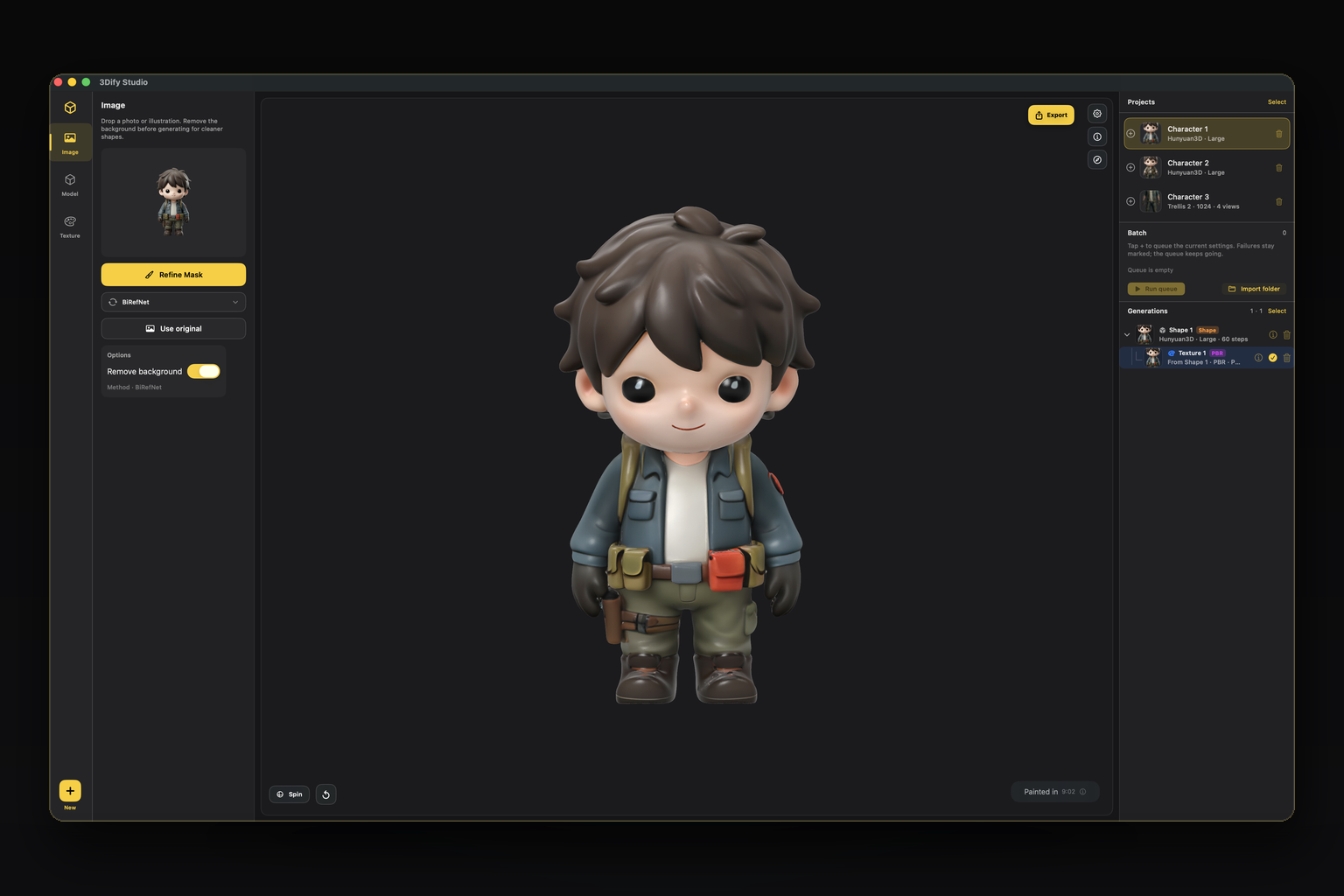
Builds are not signed or notarized by Apple, so macOS Gatekeeper will block a fresh download until quarantine is cleared.
Easiest (DMG):
- Open the DMG and double-click Install & Open (copies to Applications, clears quarantine, launches).
- Fallback: drag 3Dify Studio into Applications, then open it from there.
Zip: unzip, then double-click Install & Open in the same folder.
Manual fallback:
xattr -dr com.apple.quarantine /Applications/3Dify\ Studio.appThen open 3Dify Studio from Applications.
- Import & clean: Drop a photo, remove the background with Vision or BiRefNet, then refine the mask with brush and lasso (including every multi-view extra).
- Generate shape: Pick Hunyuan3D, Trellis 2, or Pixal3D. Add turnaround views for Trellis (and experimental Pixal). Queue batch runs with snapshotted settings.
- Texture & export: Bake native UVs or paint Color / PBR. Export GLB, OBJ, STL, or PLY for Blender, engines, AR, or print.
- Multi-view conditioning: Turnaround extras for Trellis (experimental Pixal). Background removal and mask refine on every view.
- Batch queue with snapshots: Queue the same project multiple times with different settings. Failures stay marked; the queue keeps going overnight.
- Three shape engines: Hunyuan3D, Trellis 2, and Pixal3D. Install only what you need.
- Mask craft: Vision, BiRefNet, BiRefNet HR, Lucida, plus brush and lasso.
- Private by design: No cloud API for generation. Photos and meshes stay on your Mac. Anonymous product analytics only.
- Projects & history: Multi-select delete, generation trees, live run indicators, version history.
Download from Hugging Face inside Manage Models, or import a local weights folder.
| Pipeline | Role | Notes |
|---|---|---|
| Hunyuan3D 2.0 | Shape + Paint | SDF shape; Color and PBR paint for any studio mesh |
| Trellis 2 | Shape · Multi-view | Structured latents, native UV bake, turnaround conditioning |
| Pixal3D | Shape · Fast path | Feed-forward generation, optional MoGe FOV, experimental multi-view |
- Apple Silicon Mac (M1 and later)
- macOS 14 or later
- Enough free disk for model weights (varies by pipeline)
Grab the latest macOS build from the Releases page. Prefer the DMG, then double-click Install & Open.
- No credits / no account wall for generation
- Unlimited local runs on your silicon
- Export: GLB · OBJ · STL · PLY
Optional support: Support the project.
Is generation offline?
Yes for inference. Download model weights from Hugging Face first (some gated repos need a read token). After that, generation runs on your Mac with no cloud queue.
Does anything upload my photos?
No. Photos and meshes are not sent to Fendercorp servers. Generation stays on-device.
Why does macOS say the app is damaged / can’t be opened?
The build is not Apple-signed. Double-click Install & Open on the DMG (or in the unzipped folder), or clear quarantine manually:
xattr -dr com.apple.quarantine /Applications/3Dify\ Studio.appWhat is multi-view for?
Extra turnaround photos help Trellis reconstruct the back and sides more faithfully. Pixal multi-view is experimental.
Can I leave a batch running overnight?
Yes. Failed or blocked items are marked; the queue continues with the next run.
By using 3Dify Studio you agree to the in-app Terms of Use. Third-party model weights are subject to their own licenses (Hunyuan, Trellis, Pixal, etc.).
© 2026 Fendercorp. Native Swift · MLX · Metal.