

🤗 These dotfiles help me to set up and maintain my macOS or Linux installations. They intend to automate the installation and update process of, well, everything. Feel free to explore, copy and re-use the code to your liking.
💥 Warning: Please fork and review the code first, before giving these dotfiles a try. In theory, they can be installed on an existing system as well, but a fresh installation is recommended. Use at your own risk.
macOS notes: Make sure to install the Xcode Command Line Tools by running
xcode-select --install first, then log into iCloud and the Apple App Store.
The installer asks for your admin password once up front — Rosetta, Homebrew
casks, FileVault and the /etc/hosts symlink all need it later on.
Linux notes: Linux is headless — no GUI applications, no casks — but it
does provision its own command line. linux/packages is the counterpart to the
Brewfile: a declared list of system packages, installed with apt when
missing. Tools with no distribution package worth using (fnm, uv,
starship) are installed into $HOME instead, alongside oh-my-zsh, TPM,
vim-plug and herdr.
Sudo is asked for only when a package is actually missing, which is the first run and nothing after it. Where sudo is unavailable — a container, or a box you do not administer — nothing fails: the run reports what is missing and carries on.
[WARN] Still missing: neovim git-delta
[ .. ]   sudo apt install neovim git-delta
dotfiles -u also upgrades installed packages, mirroring what brew upgrade
and softwareupdate already do on the mac. That block sits on its own in
linux/update and is easy to remove if you would rather own upgrades
yourself; it is skipped silently when there is no cached sudo.
Only apt is implemented. Other package managers get the report and the
matching install line, not an automatic install.
Applications, fonts, iTerm2, the Dock and the iCloud-synced config are macOS
concerns and skip themselves with a message. If you have no iCloud Drive,
machine-local secrets go in ~/.localrc as usual.
The following command will install the dotfiles into ~/.dotfiles and runs the
installer automatically 🤖:
/bin/bash -c "$(curl -fsSL https://raw.githubusercontent.com/finalangel/dotfiles/master/bootstrap)"
🤔 Yeah that's it, really, I think...
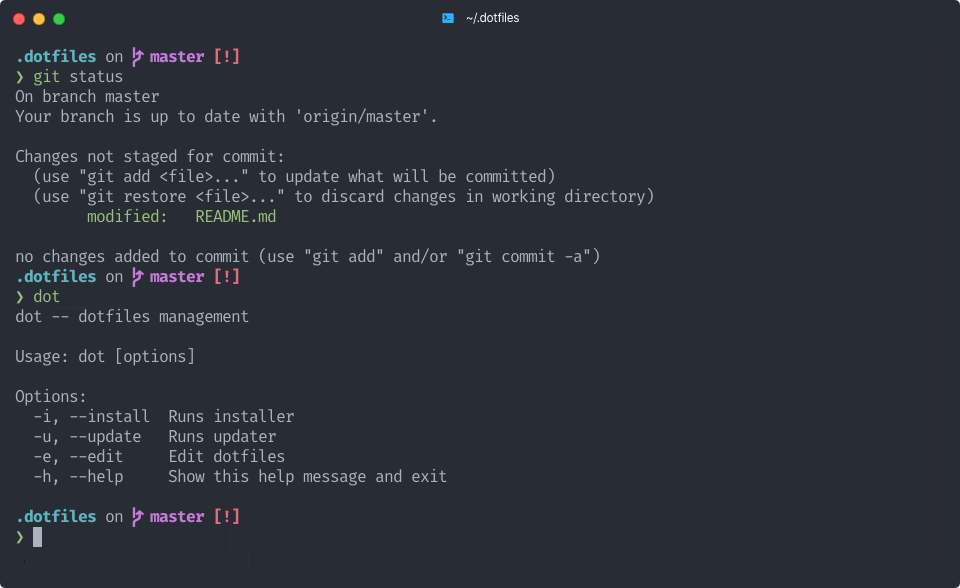
👉 Once installed, use the following command to manage the dotfiles:
$ dotfiles --help
Usage: dotfiles [options]

Options:
  -e, --edit     Edit dotfiles
  -g, --go       Go to dotfiles directory
  -h, --help     Show help
  -i, --install  Runs installer
  -u, --update   Runs updater
dotfiles -u is the one that matters day to day: it pulls this repository,
then runs every topic's update script — Homebrew, npm globals, uv tools,
tmux plugins, fonts, the Dock layout and macOS software updates.
Except for bin/, scripts/ and utils/, every top-level folder is a
self-contained topic providing an install and update script. You can
easily disable individual topics by commenting the lines in scripts/. On top
of that:
- every
aliases.zsh,paths.zshandfunctions.zshfile in a topic is automatically loaded - every
.symlinkfile in a topic will be mapped to~/.[filename] - everything in the
bin/folder gets automatically added to your$PATH
macos/ and linux/ are the two platform topics, and exactly one of them
is ever active: utils/os detects the system, scripts/install dispatches to
the matching topic, and the shell loaders skip the other one's aliases.zsh
and functions.zsh. That is what keeps pbcopy and defaults out of a Linux
shell, and resolvectl out of a mac. Topics that only make sense on one side
(Homebrew, iTerm2, fonts, the iCloud sync) guard themselves and report a skip
rather than being left out of the list.
The macOS package list lives in homebrew/Brewfile, the Linux one in
linux/packages. The following package flavours are installed on macOS:
- FiraCode with nice custom font management
- Git with GPG signing enabled, plus delta as the diff pager
- herdr installed into
~/.local/bin - Homebrew with cask and mas
- Neovim
- Node with fnm manager
- Oh My Zsh
- Python with uv and pyenv
- Starship 🚀
- tmux with TPM and an agent sidebar
- Zed and iTerm2 with their settings
A few things are kept in sync across machines rather than installed:
- Claude config (
~/.claude,~/.agents) lives in iCloud and is symlinked into place, so settings, memory, skills and hooks follow both machines - Private files (secrets,
.pypirc, tmuxinator projects) are linked out of iCloud too, which keeps them out of this public repository - The Dock is declared in
macos/Dockfileand reapplied on every update;macos/dock-dumpregenerates it from the current Dock - Dark mode re-themes a running tmux server automatically through a
dark-notifylaunch agent
🐛 Feel free to send me pull requests if something is misconfigured or could be enhanced upon. These are very personal, but if they work for others as well, the more, the merrier.
scripts/lint syntax-checks every bash, zsh, ruby and python file in the
repository and runs on each push through GitHub Actions — the badge at the top
reflects it. Run it locally before opening a pull request:
./scripts/lint
I generally still want to improve on:
- Adding real tests beyond linting would be nice :)
❤️ Many thanks to the dotfiles community and the excellent work from dotphiles, holman, mathiasbynens, pchampio and webpro. This work wouldn't be possible without them.