

A local-first productivity hub for staying consistent — without the app-switching fatigue.


Features · Architecture · Preview · Get started · Installation · Status · License
Snowball replaces the daily juggle of a task manager, habit tracker, focus timer, calendar, and notes app with a single system — one source of truth for your routine on Windows, macOS, Linux, Android, and the web. Everything is stored locally first and synced to the cloud in the background, so the app stays fast and keeps working offline.


- Planning & execution: priorities, due dates, and scheduled times for your day.
- Progress tracking: completion counts and effort allocation per task.
- Tagging: custom, color-coded tags for effortless categorization.

- Consistency first: a dedicated tracker for daily habits.
- Visual momentum: an activity heatmap that tracks your consistency over months.

- Focus timer: a built-in timer to cut out distractions and enter a flow state.
- Session tracking: completed sessions are logged to the study heatmap and history view.

- Month view: single-day, multi-day, and recurring events (daily, weekly, monthly, yearly — with optional end dates).
- Google Calendar: connect from inside the app, pick which upcoming events to import (reviewing and retagging each one), or import the whole batch with shared settings. Recurring Google series keep their rules.
- Alerts that stay in-app: get notified when a new event appears on your Google Calendar, and see a summary of upcoming events that aren't in Snowball yet.

- Quick notes: a low-friction scratchpad for reminders, ideas, and temporary logs.
- Zero overhead: fast access to information without maintaining a full wiki.

- Spotify & YouTube: bring study/work soundtracks and tutorials straight into your focus environment.
- Only what you use: the Spotify card appears once you've connected an account and disappears when you disconnect; YouTube has its own independent toggle, so one can live without the other.

- Dashboard cards: show or hide any of the nine dashboard cards (timer, stats, calendar, tasks, heatmap, Spotify, YouTube, notes, habits) from Settings → Dashboard Cards. Changes apply immediately and sync across signed-in devices.
- Tags that follow your theme: alongside per-tag colors, a "Follow theme" mode derives every tag color from the active accent so the palette shifts with your theme. Custom per-tag colors are paused, not deleted, and come back when you turn it off.

Snowball is built on a local-first philosophy: immediate responsiveness and offline availability come before constant network connectivity. For a deeper dive, see ARCHITECTURE.md.
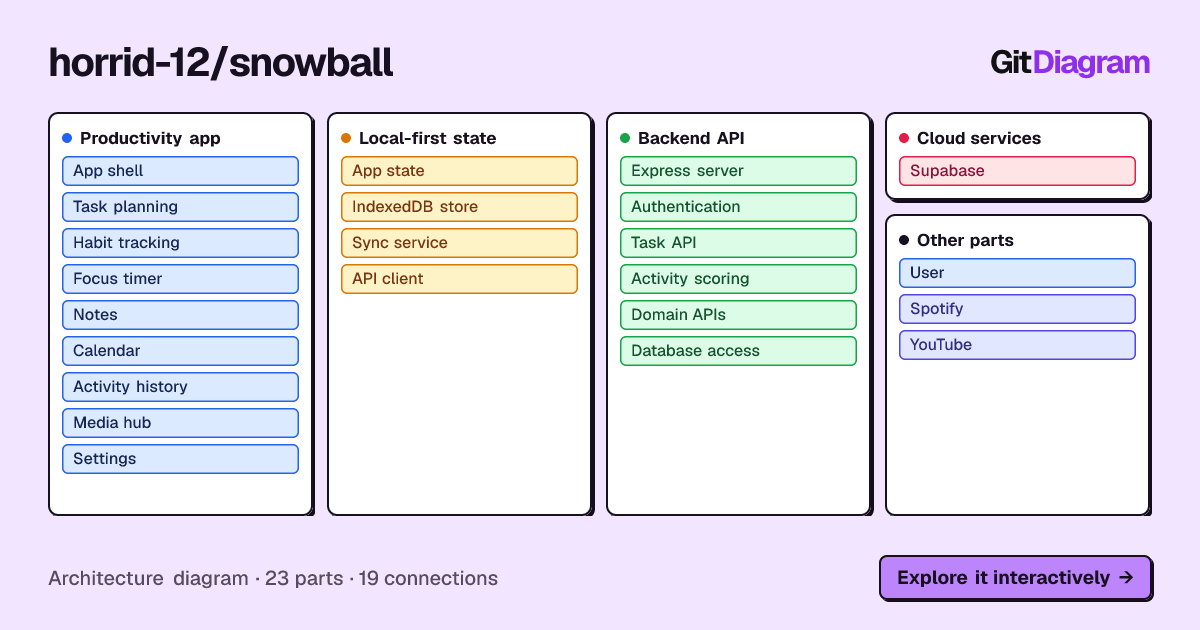

- Immediate UI (optimistic updates): every mutation is applied to local state and IndexedDB (via Dexie.js) instantly.
- Eventually consistent: changes are pushed to the cloud (Supabase) in the background.
- The outbox pattern: if a network request fails, the mutation is stored in a local
outboxqueue and replayed automatically when connectivity is restored.
| Layer | Stack |
|---|---|
| Frontend |      |
| Local storage |  |
| Backend |    |
| Database & auth |   |
| Desktop & mobile |   |
| Hosting |  |

A tour of the current interface — click any image to open it at full size.
Plan and review

Full task board — priorities, dates, tags, and effort tracking

Minimal task board

History and productivity score
Track and focus
| Habits | Daily summary | Focus timer |
|---|---|---|
 |
 |
 |
Organize and connect
| Calendar | Friends | Quick notes |
|---|---|---|
 |
 |
 |

Run the app from source. Prerequisites: Node.js 22+ and git.
git clone https://github.com/Horrid-12/Snowball.git
cd Snowball
npm run install:all
cp backend/.env.example backend/.env
npm run dev
Windows PowerShell users
git clone https://github.com/Horrid-12/Snowball.git
cd Snowball
npm run install:all
Copy-Item backend\.env.example backend\.env
npm run dev
Before the backend can start, fill in backend/.env. Start from backend/.env.example, which documents each supported variable:
| Variable | Required | Purpose |
|---|---|---|
JWT_SECRET |
yes | Signs auth tokens — any long random string is fine in development |
SUPABASE_URL |
yes | Your Supabase project URL |
SUPABASE_SERVICE_ROLE_KEY |
yes | Server-side service role key — never expose it to clients |
SUPABASE_ANON_KEY |
yes | Anon key used for RLS-scoped, user-token queries |
FRONTEND_URL |
no | Frontend origin for CORS and OAuth redirects (local defaults work in development) |
GOOGLE_CLIENT_ID / GOOGLE_CLIENT_SECRET |
no | Google Calendar connect and import |
SPOTIFY_CLIENT_ID / SPOTIFY_CLIENT_SECRET / SPOTIFY_REDIRECT_URI |
no | Spotify tab in the Media Hub |
YOUTUBE_API_KEY |
no | YouTube playlist import (search works without it) |
VITE_DISCORD_CLIENT_ID is a frontend build-time setting, not a backend one: it enables Discord Rich Presence in the desktop build and is not a sign-in credential. Set it in frontend/.env if you want to override the default already baked into frontend/src/config.js.
The app then runs at:
- Frontend: http://127.0.0.1:5173
- Backend: http://localhost:3000

Download a prebuilt app from Releases:
| Platform | Download Artifact | Installation / Running |
|---|---|---|
| Windows | Snowball_*_x64-setup.exe |
Run the installer and launch Snowball from the Start Menu. |
| macOS (Apple Silicon) | Snowball_*_aarch64.dmg |
Open the .dmg, drag Snowball.app into Applications. (See Gatekeeper note below.) |
| macOS (Intel) | Snowball_*_x64.dmg |
Open the .dmg, drag Snowball.app into Applications. (See Gatekeeper note below.) |
| Linux (Ubuntu/Debian) | Snowball_*_amd64.deb |
Run sudo apt install ./Snowball_*_amd64.deb (or double-click to install). |
| Linux (Universal) | Snowball_*_amd64.AppImage |
Run chmod +x Snowball_*.AppImage, then ./Snowball_*.AppImage. |
| Android | Snowball_*.apk |
Sideload and install the APK on your device. |
Note
macOS first launch (Gatekeeper): Because Snowball is community open-source and not signed with an Apple Developer ID certificate ($99/yr), macOS will flag the app on first launch. To run it:
- Right-click (or Control-click)
Snowball.appin/Applicationsand select Open. - Click Open in the confirmation dialog.
- Alternative: Go to System Settings → Privacy & Security, scroll down to Security, and click Open Anyway (or run
xattr -cr /Applications/Snowball.appin Terminal).

Current stage: active development. Features are added and refined frequently. Contributions and feedback are welcome — see Issues for current bugs and feature requests.

Contributions, bug reports, and feature requests are all welcome:
- Fork the repository and create a feature branch.
- Make your changes — see Get Started to run the app locally.
- Open a pull request describing what changed and why.
Report bugs and propose features in Issues. For security matters, follow SECURITY.md.
Distributed under the MIT License. See LICENSE for details.