An end-to-end Full-Stack IoT Library Management System powered by an ESP32 RFID Scanner, Node.js/Express Backend, PostgreSQL Database, and a real-time React Web Dashboard.
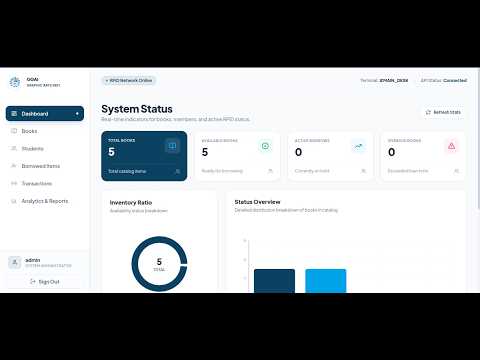
👉 Click here to watch the full project video demo on YouTube


Imagine a modern school or university library where students don't need to manually fill out paper logs or wait in long lines to borrow or return books.
With this system:
- Every student receives a smart RFID Card (like a keycard).
- Every book in the library has an RFID Tag.
- When a student taps their card or a book tag on the ESP32 Scanner, the system instantly identifies them, updates the library database, and displays real-time updates on the web dashboard!
The project is split into three main components: Hardware (IoT), Backend (Server & Database), and Frontend (User Interface).
+------------------+         HTTP (WiFi)        +------------------+
|  ESP32 Hardware  | -------------------------> | Node.js Backend  |
| (RFID Reader+LCD)| <------------------------- | (Express/Prisma) |
+------------------+         JSON Resp          +--------+---------+
                                                         |
                                                Socket.IO| (Real-time)
                                                         v
                                                +------------------+
                                                | React Web App    |
                                                | (Live Dashboard) |
                                                +------------------+
The hardware unit acts as the physical scanner placed at the library checkout counter.
- ESP32 NodeMCU: Microcontroller with built-in Wi-Fi and Bluetooth to handle network requests.
- RC522 RFID Reader: Reads 13.56 MHz RFID tags and cards using SPI communication.
- 16x2 LCD Display (with I2C Module): Displays real-time status messages (e.g., "Card Scanned", "Book Issued", "Access Denied").
- Buzzer & LEDs (Red/Green): Gives instant visual and audio feedback (sound beep & light signal when scanning).
- Arduino C++: Code flashed onto the ESP32 using the Arduino IDE with
WiFi.h,HTTPClient.h,MFRC522, andLiquidCrystal_I2C.
The backend handles the business logic, security, database storage, and real-time events.
- Node.js: JavaScript runtime engine.
- Express.js (v5): Web application framework for routing HTTP requests.
- PostgreSQL: Relational database storing students, books, transaction histories, and admin accounts.
- Prisma ORM: Modern database toolkit used to write type-safe queries and manage database migrations.
- Socket.IO (v4): Enables bidirectional real-time communication to immediately push scan events from backend to web dashboard.
- JWT (JSON Web Tokens): Secures admin API endpoints.
- Bcrypt.js: Hashes admin passwords for security.
- Cloudinary & Multer: Handles book cover and student profile image uploads.
The web application allows library staff to manage books, view live transactions, and analyze library statistics.
- React (v19): Frontend library for building fast, component-based user interfaces.
- Vite: Super-fast build tool and development server.
- Tailwind CSS (v4): Utility-first CSS framework for modern styling and responsive layout.
- Socket.IO Client: Listens for live scanner events broadcasted by the server.
- Lucide React: Icon set for UI components.
- Framer Motion: Smooth micro-animations for page transitions and card views.
- Recharts: Data visualization library for rendering interactive charts and library reports.
- Axios: HTTP client for requesting data from the backend APIs.
[Student/Book Tag] ---> (1. Tap RFID) ---> [ESP32 Scanner]
                                                |
                                    (2. Send HTTP POST /rfid/scan)
                                                v
[React Web App] <--- (4. WebSockets) --- [Express Backend Server]
(UI Updates Live)                               |
                                    (3. Query/Update DB via Prisma)
                                                v
                                        [PostgreSQL Database]
- Tap RFID Tag: A student or library manager swipes an RFID tag/card near the RC522 scanner.
- Read & Transmit: ESP32 extracts the unique RFID ID (
rfidUid) and sends a POST request over Wi-Fi tohttps://<your-domain>/api/rfid/scan. - Database Processing:
- The backend checks if the tag belongs to a Student or a Book.
- If a student card is tapped, the backend marks the active student.
- If a book tag is tapped, the backend checks out or returns the book depending on current status.
- Real-time Notification (WebSockets): The backend emits a
socket.emit('scan-event'). The React Dashboard instantly displays the result without needing a page refresh! - Physical Feedback: ESP32 receives the server response, beeps the buzzer (double-beep for success, long beep for error), lights up the Green/Red LED, and prints the result on the LCD screen.
All backend endpoints are prefixed with /api. Here is how they work:
GET /health- What it does: Checks if the server is running and healthy.
- Response:
{ "status": "ok" }
| Method | Endpoint | Description | Easy Explanation |
|---|---|---|---|
POST |
/api/auth/register |
Register new Admin | Create a new librarian account with username & password |
POST |
/api/auth/login |
Login Admin | Authenticates admin and returns a JWT security token |
GET |
/api/auth/me |
Get Profile | Fetches details of the currently logged-in admin |
| Method | Endpoint | Description | Easy Explanation |
|---|---|---|---|
GET |
/api/students |
Get all students | Returns list of all registered students & their RFID UIDs |
POST |
/api/students |
Add new student | Registers a new student and assigns an RFID tag |
GET |
/api/students/:id |
Get student details | Fetches single student record with transaction history |
PUT |
/api/students/:id |
Update student | Edits student name, ID, or RFID card assignment |
DELETE |
/api/students/:id |
Soft delete student | Deactivates student record |
| Method | Endpoint | Description | Easy Explanation |
|---|---|---|---|
GET |
/api/books |
Get all books | Retrieves full catalog of library books & availability |
POST |
/api/books |
Add new book | Adds a new book entry attached with an RFID tag |
GET |
/api/books/:id |
Get book details | Displays book info, availability state, and history |
PUT |
/api/books/:id |
Update book | Updates title, author, ISBN, image, or RFID tag |
DELETE |
/api/books/:id |
Soft delete book | Removes book from active catalog |
| Method | Endpoint | Description | Easy Explanation |
|---|---|---|---|
POST |
/api/rfid/scan |
RFID Scan Endpoint | Main Hardware API! Called by ESP32 when an RFID card is tapped |
POST |
/api/borrow-book |
Borrow Book | Manually issue a book to a student from web interface |
POST |
/api/return-book |
Return Book | Process book return & calculate any overdue fines |
GET |
/api/dashboard |
Dashboard Overview | Summarizes total books, issued books, active students, etc. |
GET |
/api/transactions |
Transaction History | Lists all past borrow and return activities |
GET |
/api/transactions/overdue |
Overdue Books | Displays books that haven't been returned on time |
DELETE |
/api/transactions/:id |
Remove Transaction | Deletes transaction record |
| Method | Endpoint | Description | Easy Explanation |
|---|---|---|---|
GET |
/api/reports/summary |
Library Analytics | Generates statistics for charts (most borrowed books, active users) |
GET |
/api/reports/logs |
System Activity Logs | Detailed log history of scan events and library activity |
Make sure you have installed:
- Node.js (v18+)
- PostgreSQL Database
- Arduino IDE (for ESP32 programming)
git clone https://github.com/your-username/smart-rfid-library.git
cd smart-rfid-library-
Open a terminal and enter the backend directory:
cd library-back-end -
Install dependencies:
npm install
-
Create a
.envfile inlibrary-back-end/:PORT=3000 DATABASE_URL="postgresql://username:password@localhost:5432/library_db?schema=public" JWT_SECRET="your_secret_jwt_key" CLOUDINARY_CLOUD_NAME="your_cloud_name" CLOUDINARY_API_KEY="your_api_key" CLOUDINARY_API_SECRET="your_api_secret"
-
Run Prisma database migrations & seed database:
npx prisma migrate dev --name init
npm run seed
-
Start backend development server:
npm run dev
Server will run at:
http://localhost:3000
-
Open a new terminal window and navigate to the frontend directory:
cd front-end -
Install dependencies:
npm install
-
Create a
.envfile infront-end/:VITE_API_URL="http://localhost:3000/api" VITE_SOCKET_URL="http://localhost:3000"
-
Run the frontend development server:
npm run dev
Frontend will open at:
http://localhost:5173
- Open Arduino IDE.
- Install necessary libraries from Tools > Manage Libraries:
MFRC522by githubmfrc522LiquidCrystal_I2Cby Frank de BrabanderArduinoJsonby Benoit Blanchon
- Open
esp32-rfid-scanner/esp32-rfid-scanner.ino. - Update Wi-Fi credentials & server backend URL:
const char* ssid = "YOUR_WIFI_NAME";
const char* password = "YOUR_WIFI_PASSWORD";
const char* serverUrl = "http://<YOUR_LAPTOP_IP>:3000/api/rfid/scan";
- Connect ESP32 via USB, select Board ESP32 Dev Module, and click Upload.
| Component | Pin on Component | ESP32 Pin |
|---|---|---|
| RFID RC522 | SDA (SS) | GPIO 5 |
| RFID RC522 | SCK | GPIO 18 |
| RFID RC522 | MOSI | GPIO 23 |
| RFID RC522 | MISO | GPIO 19 |
| RFID RC522 | RST | GPIO 4 |
| RFID RC522 | 3.3V & GND | 3.3V & GND |
| LCD 16x2 I2C | SDA | GPIO 21 |
| LCD 16x2 I2C | SCL | GPIO 22 |
| LCD 16x2 I2C | VCC & GND | 5V & GND |
| Green LED | Anode (+) | GPIO 12 |
| Red LED | Anode (+) | GPIO 13 |
| Buzzer | Signal (+) | GPIO 2 |
- ✅ Automated RFID Checkout: Tap card to borrow or return books instantly.
- ⚡ Real-time Synchronization: Socket.IO notifies the web app as soon as a card is scanned.
- 📱 Full Mobile & Multi-Device Responsiveness: Seamless off-canvas navigation drawer, adaptive modals, scrollable tables, and touch-friendly controls across smartphones, tablets, laptops, and ultra-wide screens.
- 📊 Smart Dashboard: Displays live counts, borrow trends, overdue alerts, and system health.
- 🔐 Secure Access: JWT-based authentication for administrative actions.
- 🖥️ Hardware Status Feedback: Visual (LEDs/LCD) & Audio (Buzzer) response directly on hardware.
This project is open-source and available under the ISC License.