🔁 Self-hosted reverse proxy tunnel for securely exposing HTTP and TCP services.


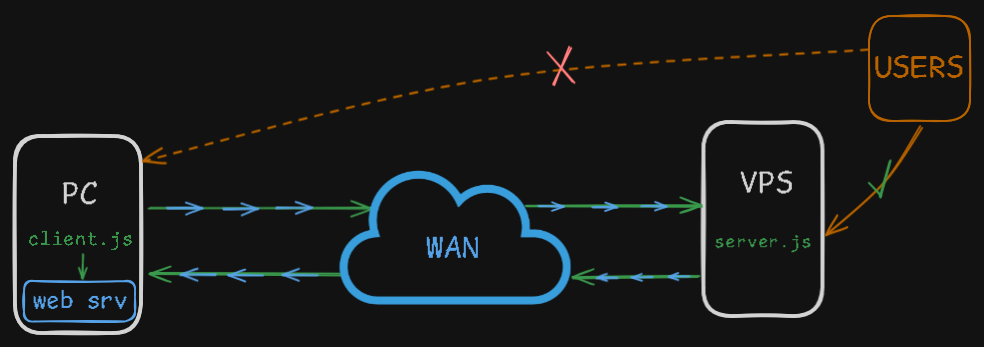
- Expose HTTP, HTTPS and raw TCP services such as SSH or RDP
- Outbound WebSocket tunnel with no inbound port required on the target machine
- ChaCha20-Poly1305 encryption for raw TCP tunnel payloads
- Token-authenticated tunnel connections
- Dashboard authentication with optional TOTP 2FA
- Rate limiting and temporary blocking against abusive requests
- Single public port shared by HTTP and raw TCP traffic
- Dashboard-generated
client.jswith automatic WS/WSS endpoint configuration - Real-time tunnel status and connected client information
- Fully self-hosted and open source
Clone the repository and install dependencies:
git clone https://github.com/Nullmess/Waitgate.git
cd Waitgate
npm install
Start Waitgate:
npm startOpen the dashboard:
http://localhost:8000/dashboard
The default username is admin. A random dashboard password, tunnel token and encryption key are generated on first launch and stored in .env.
From the dashboard, download client.js, then configure the local service to expose:
const LOCAL_HOST = '127.0.0.1'
const LOCAL_PORT = 443
Run the tunnel client on the target machine:
node client.jsWaitgate automatically reconnects the client when the WebSocket tunnel is interrupted.
Waitgate creates and maintains its local .env configuration automatically.
Main variables:
TUNNEL_CHACHA_KEY   ChaCha20-Poly1305 key used for raw TCP tunnel payloads
TUNNEL_TOKEN        Bearer token used to authenticate the tunnel client
DASH_USER           Dashboard username
DASH_PASS           Dashboard password
LOGIN_SECRET        Key used to protect dashboard login data
TOTP_ENABLED        Enables or disables dashboard TOTP authentication
TOTP_SECRET         TOTP secret when 2FA is enabled
WHITELIST_IPS       IP addresses excluded from rate limiting
PORT                Public listening port, defaults to 8000
Waitgate secures raw TCP tunnels with ChaCha20-Poly1305 encryption, token authentication and optional TOTP 2FA, while HTTPS/WSS is recommended for HTTP traffic.
Waitgate is intended for legitimate and authorized use only; users are responsible for ensuring that their use of the software complies with applicable laws, policies and permissions.
Give a ⭐️ if Waitgate helped you!
Copyright © 2026 Nullmess.
This project is licensed under the MIT License.