




- Shock on Death
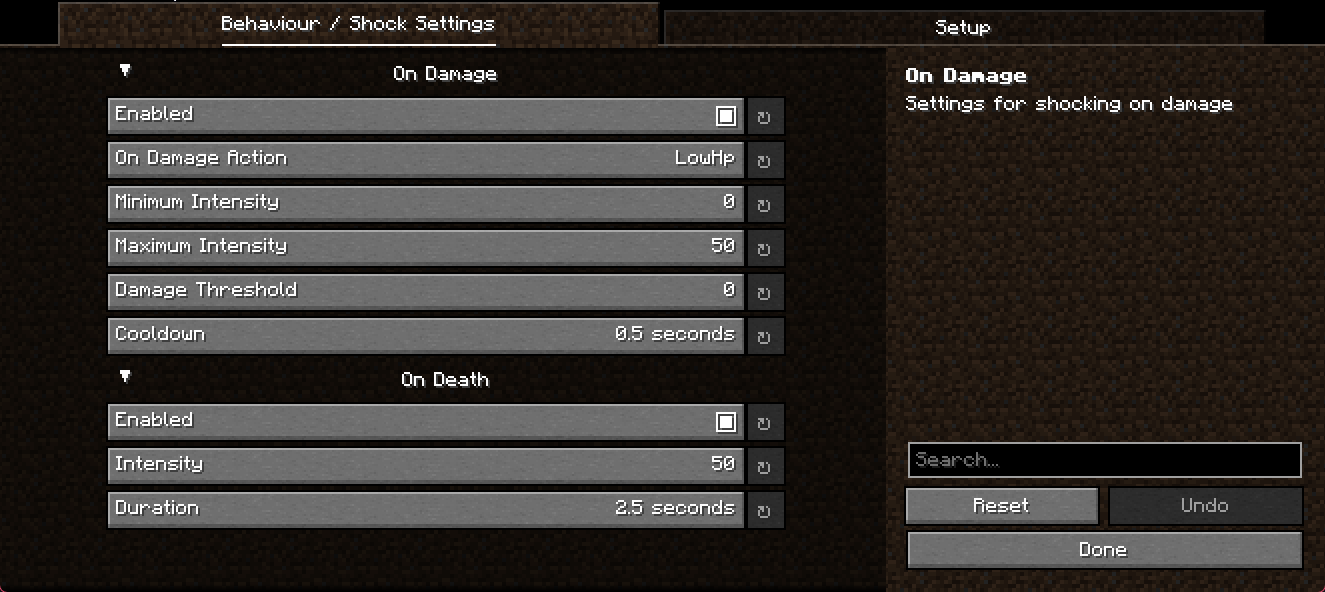
- Shock on Damage
- Multiple on damage modes
- Filter which kinds of damage may shock you, by category or by exact damage type
- Threshold of damage
- Cooldown between damage shocks
- Adjustible intensity and duration
Config GUI by YetAnotherConfigLib
Enter your API URL and token under Setup, and the Shockers group fills itself with every shocker that token can control - your own and the ones shared with you - as a checkbox each. Tick the ones ShockCraft should use; no IDs to copy over by hand.
The list is fetched the first time the settings screen is opened with a given token, and Reload shockers from OpenShock fetches it again (saving the screen first, so a token you just typed is the one it logs in with). If the backend cannot be reached, the reason is shown above the button and Shocker IDs (manual) still takes IDs typed in by hand.
The behaviour settings are per instance, in config/ShockCraft.json5, so they travel with a
modpack or an exported instance like any other mod config.
Your API URL, API token and shocker IDs are not. They belong to your OpenShock account rather than to one instance, so they are stored per user instead:
| Windows | %APPDATA%\OpenShock\ShockCraft\account.json5 |
| macOS | ~/Library/Application Support/OpenShock/ShockCraft/account.json5 |
| Linux | $XDG_CONFIG_HOME/OpenShock/ShockCraft/account.json5 (usually ~/.config) |
This keeps your token out of the files you share when you send someone an instance or attach a log to a bug report, and means you only enter it once no matter how many instances or launchers you run. It is still stored in plain text - it is not encrypted, and anyone with access to your user account can read it. Existing setups are migrated automatically the first time you launch, and the token is removed from the old instance config.
You can support the openshock dev team here: Sponsor OpenShock
The mod is built from a single source tree for every supported Minecraft version and both mod loaders, using Stonecutter for the version matrix and Stonecraft (which wraps Architectury Loom) for the loader wiring.
| Minecraft | 1.20.4, 1.21, 1.21.1, 1.21.4, 1.21.5, 1.21.11, 26.1, 26.2 |
| Loaders | Fabric, NeoForge |
| Targets | 16 (every version × every loader) |
| Java | 17 for 1.20.x, 21 for 1.21.x, 25 for 26.x (Gradle downloads any it is missing) |
./gradlew chiseledBuildAndCollect   # build every target; jars land in build/libs/
./gradlew build                     # build only the currently active target
The active target is the one your IDE and runClient use. Switch it with:
./gradlew "Set active project to 1.21.1-neoforge"Stonecutter rewrites the files under src/ in place when you switch, commenting out the branches
that do not apply to the new target. That is expected — do not revert it.
./gradlew :26.2-fabric:runClient
./gradlew :1.21.1-neoforge:runClient
In IntelliJ, the same targets are under runClient for each subproject in the Gradle tool window,
and Architectury Loom adds a Minecraft Client (:<version>-<loader>) configuration per target
during sync, which launches the game directly and is the easier one to attach a debugger to.
Dev runs log in as developer. To play as yourself, set dev_username in gradle.properties or
~/.gradle/gradle.properties:
dev_username=YourNameFOV, GUI scale and the narrator are pinned for every target in the clientOptions block in
build.gradle.kts, and written to run/<version>-<loader>/options.txt before each launch. They
are reapplied every run, so change them there rather than in the game's own settings screen.
You do not need to switch the active target to run a different one - every target is a real Gradle subproject and can be launched directly. Switching only changes which one your IDE indexes and edits.
Each target runs in its own directory, run/<version>-<loader>/, because Minecraft 1.21.1 and 26.2
cannot share a world or an options file and the two loaders cannot share a mods folder.
Pushing a version tag runs .github/workflows/release.yml, which builds all targets, creates a
GitHub release with the jars attached, and publishes every one of them to Modrinth and CurseForge.
git tag 1.4.0 && git push origin 1.4.0The tag is the source of truth for the version (tag 1.4.0 publishes 1.4.0), so mod.version in
gradle.properties does not need bumping first. The changelog on Modrinth and CurseForge is a link
back to the GitHub release, so the notes only ever live in one place.
The tag also decides the release type, consistently across all three destinations:
| Tag contains | Modrinth / CurseForge | GitHub release |
|---|---|---|
alpha |
Alpha | pre-release |
beta, next, rc |
Beta | pre-release |
| anything else | Stable | normal |
rc needs an explicit mapping because Stonecraft's own inference recognises only alpha, beta
and next; left to it, an rc tag would reach both platforms marked stable.
Configure these under Settings -> Secrets and variables -> Actions:
| Secret | |
|---|---|
MODRINTH_TOKEN |
Modrinth PAT with the "Create versions" scope |
CURSEFORGE_TOKEN |
CurseForge API token |
| Variable | Current value |
|---|---|
MODRINTH_ID |
DwMSqx5B |
CURSEFORGE_ID |
980833 |
CURSEFORGE_SLUG |
openshock-shockcraft |
The workflow checks all five are set before building, so a missing one fails in seconds with a clear message rather than part-way through publishing.
Nothing is ever uploaded unless PUBLISH_RELEASE=true, which only the release workflow sets, so
running ./gradlew chiseledPublishMods locally is always a dry run. Use it to preview exactly what
would be sent:
./gradlew chiseledPublishModssettings.gradle.kts— the list of targets. Adding a Minecraft version is one line here plus a matchingversions/dependencies/<version>.propertiesfile.versions/dependencies/<version>.properties— every dependency version for that Minecraft version, shared by its Fabric and NeoForge targets. This is the only file to touch when bumping Fabric API, NeoForge, YACL, Mod Menu or Kotlin for Forge.build.gradle.kts— applied to every target.src/main/kotlin/.../platform/— the only loader- and version-specific code:Entrypoint.kt— the Fabric and NeoForge entrypoints.Platform.kt— the handful of loader APIs with no common equivalent.McCompat.kt— the few vanilla APIs that changed across the version range.
Everything outside platform/ compiles unchanged on all sixteen targets. Sources use Mojang
mappings, which both loaders share.
The version-conditional code is deliberately confined to those files. McCompat.kt covers the
vanilla renames (ResourceLocation/Identifier, the fromNamespaceAndPath factory,
displayClientMessage/sendOverlayMessage, Minecraft.screen moving onto Gui), and the
NeoForge half of Entrypoint.kt covers the 1.21 API break (TickEvent.ClientTickEvent became
ClientTickEvent.Post, ConfigScreenHandler.ConfigScreenFactory became IConfigScreenFactory,
and @Mod gained its dist element).