
An embedded Linux platform for building, deploying, updating and managing connected products —
a native app runtime, signed apps, the Orbit OS Store, atomic OTA updates and one hardware API for Go, Python and Java.


The whole platform in 11 minutes: the device and its layers, the HAL and the API, Orbit Studio, the Store, updates and real products built on Orbit OS.
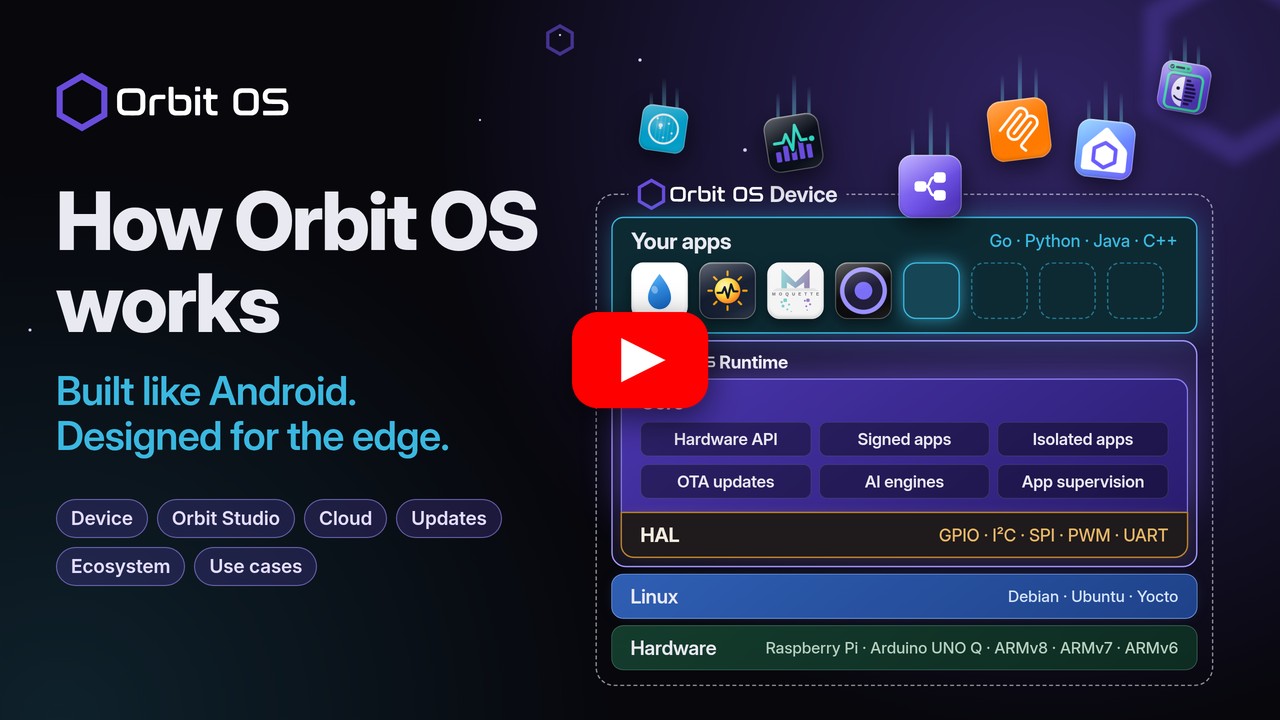
Every embedded Linux product rebuilds the same platform layer: hardware access, app lifecycle, remote deployment, OTA updates, security. Orbit OS ships it ready-made, so you write only the application.
- Installs on top of your existing Linux — no reflashing. The native Orbit OS Runtime supervises every app — no Docker.
- Real-time development on real hardware — run your code from your laptop against the device's GPIO, I²C, UART, camera and AI APIs, then ship it as a signed
.orb. - One API for all hardware, the same in Go, Python and Java, locally or remotely (IPC on the device, a secure mTLS connection from outside).
- Orbit OS Store, OTA and fleet — install apps in one click, update apps and the runtime over the air with rollback.
- Edge AI built in — TFLite and ONNX runtimes on the device.
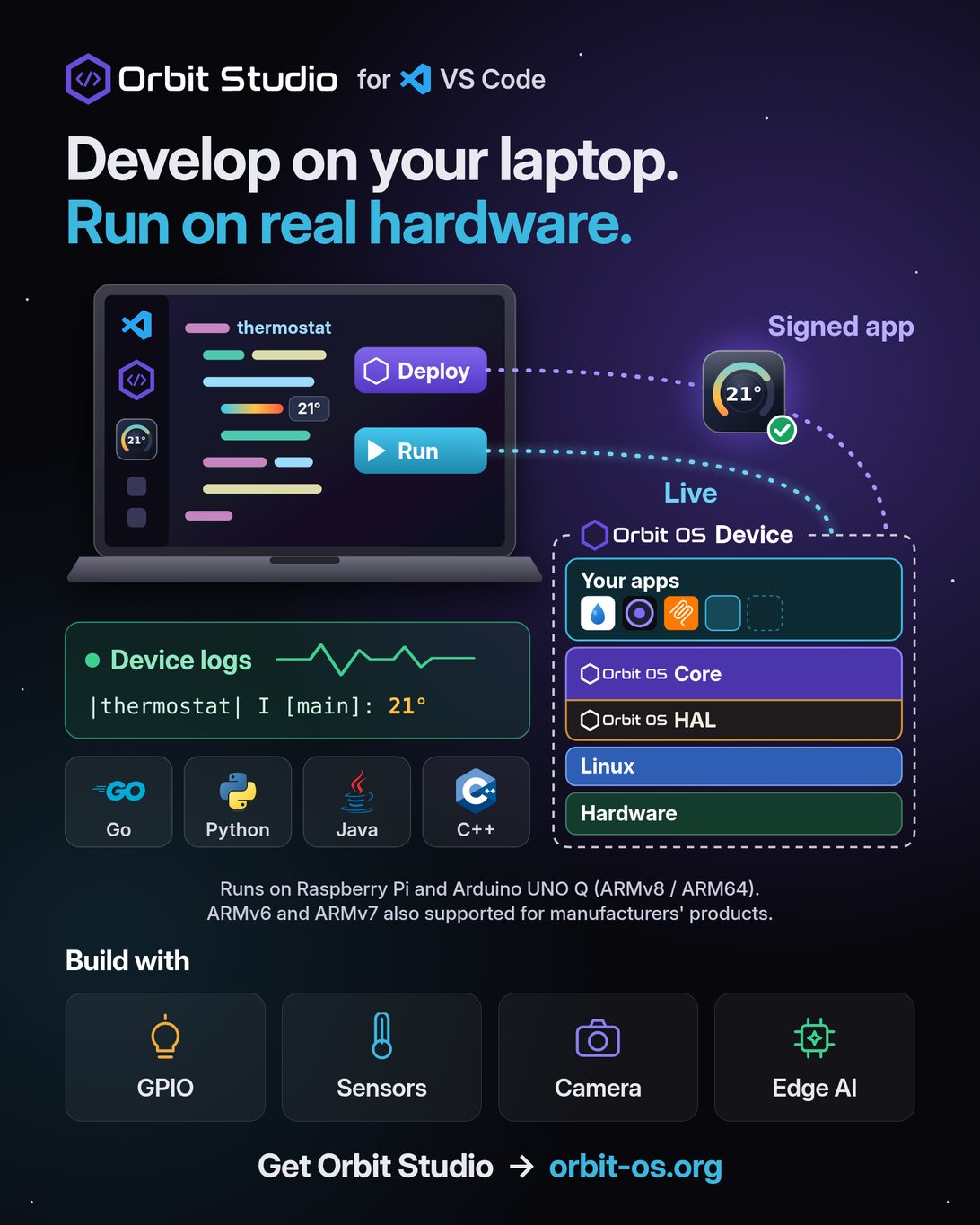
Your apps run natively on the Orbit OS Runtime, with no Docker: the Core runs each signed app in its own sandbox and gives it one API, and the HAL connects that API to each board's hardware.
Apps ship as signed .orb packages, the equivalent of an APK on Android. Install them locally on the device or from the Orbit OS Store. Learn more.
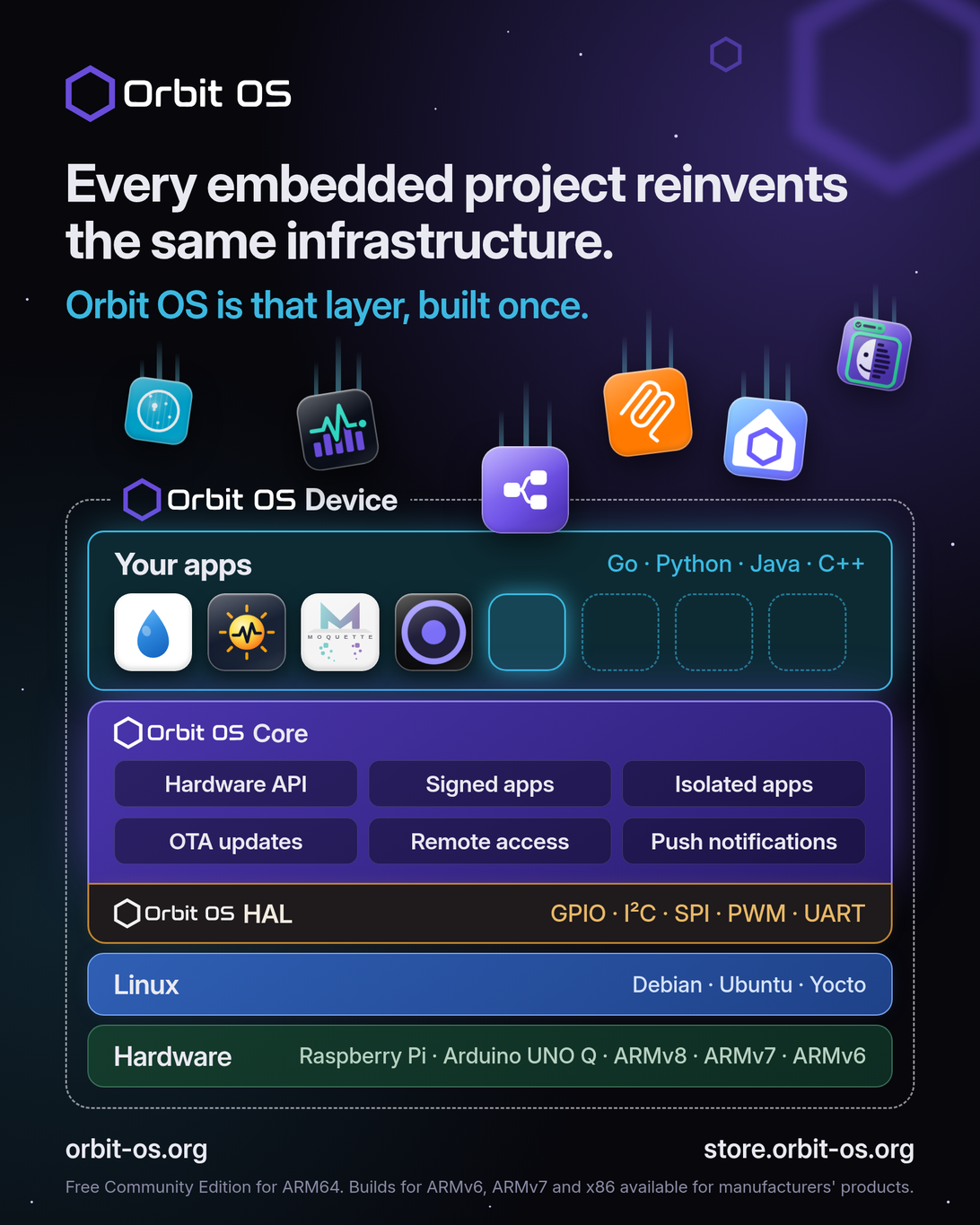
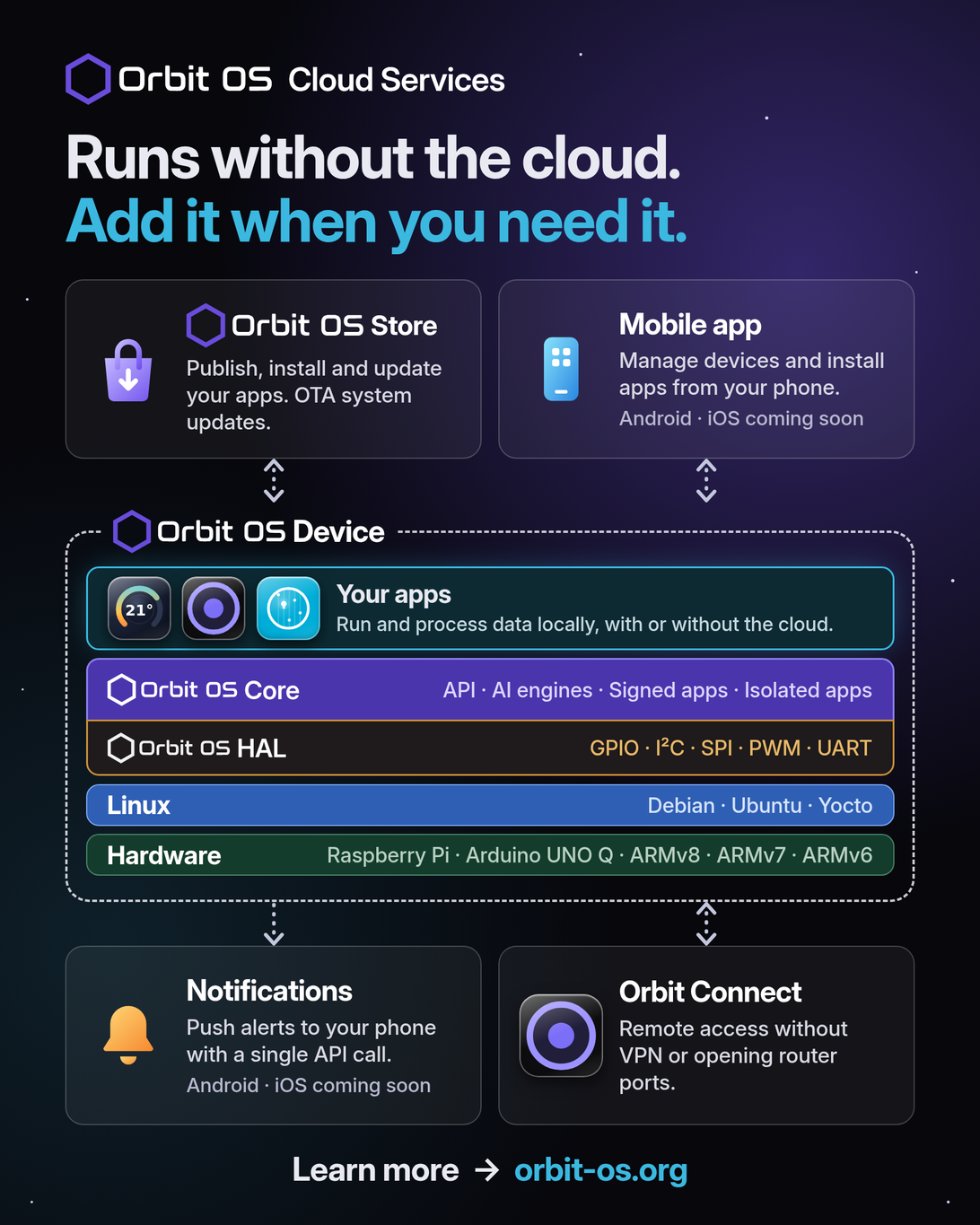
Optional online services: a device runs its apps without them. Add the Orbit OS Store, the mobile app, push notifications or Orbit Connect when you need them.
To install apps from the Orbit OS Store, create an Orbit OS Store account and link your device to it in Settings. Learn more.
| 1 · Install | 2 · Develop | 3 · Ship |
|---|---|---|
| Run the installer on a Raspberry Pi, Arduino UNO Q or other ARM64 board — guide | Create a project in Orbit Studio (VS Code) and run it live against the device | Build a signed .orb, deploy it, or publish it on the Orbit OS Store |
 VS Code
Orbit Studio is the official VS Code extension for Orbit OS, free on the VS Code Marketplace.
- Run — your code runs on your computer and talks live to the real device, in Developer Mode.
- Deploy — builds your app, signs it as an
.orband installs it on the device. - Device logs — stream your app's output to the editor, live.
No flashing between changes, no SSH, no Docker.
// UDS on the device, TCP + mTLS from your laptop (Developer Mode) — same API
c, err := client.NewClientAuto("192.168.1.100")
if err != nil {
	log.Fatal(err)
}
defer c.Close()

led := &client.GpioPin{Name: "GPIO17", Number: 17, ChipNumber: 0}
c.GpioManager.SetDirection(led, client.GPIO_DIR_OUT)
c.GpioManager.SetLevel(led, client.GPIO_LEVEL_HIGH)
Python
from client import Client
from client.gpio_manager import GpioPin, GpioDirection, GpioLevel

device = Client.connect("192.168.1.100")
led = GpioPin(name="GPIO17", number=17, chip_number=0)
device.gpio_manager.set_direction(led, GpioDirection.OUT)
device.gpio_manager.set_level(led, GpioLevel.HIGH)
Java
try (Client client = Client.connect("192.168.1.100", "my-app")) {
    var led = new GpioManager.GpioPin("GPIO17", 17, 0);
    client.gpioManager().setDirection(led, GpioManager.Direction.OUT);
    client.gpioManager().setLevel(led, GpioManager.Level.HIGH);
}
Full reference: SDK & API reference (API 26) · PDF manuals
SDKs — one hardware API, three languages (Apache-2.0)
| Language | Repository | Requires |
|---|---|---|
| Go | orbit-os-sdk-go | Go 1.25+ |
| Python | orbit-os-sdk-python | Python 3.10+ |
| Java | orbit-os-sdk-java | Java 17+ |
| C++ | Coming soon — planned for Q4 2026 | — |
Documentation — downloadable manuals
| Repository | What it has |
|---|---|
| orbit-os-docs | SDK API Reference as a printable PDF, one per API version, covering Go, Java and Python |
Apps — open-source apps you can install from the Orbit OS Store or build yourself
| App | Repository | What it does | Language | License |
|---|---|---|---|---|
 MCP Server |
orbit-os-app-mcp-server | Let AI agents (Cursor, Claude Code…) control GPIO, I²C, UART, Wi-Fi and Bluetooth on a real device | Go | Apache-2.0 |
 Edge AI – Smart Image Detection |
orbit-os-app-smart-image-detection | On-device object detection (YOLOv8, TFLite) on your own images — an example of the Orbit OS AI API | Go | AGPL-3.0 |
 Edge AI – Face Recognition |
orbit-os-app-face-recognition | Face detection and recognition from a camera, on the device: enroll a person in seconds and see names live in the browser | Go | Apache-2.0 |
 IOFlow |
orbit-os-app-ioflow | Test GPIO, PWM, UART, I²C and SPI from your browser: set pins, scan an I²C bus and read or write registers, watch a serial port live | Go | Apache-2.0 |
 Mochi MQTT Broker |
orbit-os-app-mochi | Mochi MQTT broker with a web admin UI: listeners, MQTT users, topic filters and live messages | Go | Apache-2.0 |
 Moquette MQTT Broker |
orbit-os-app-moquette | Moquette MQTT broker with a web admin UI: start/stop, live clients, configuration and MQTT users | Java | Apache-2.0 |
 Orbit Flow |
orbit-os-app-orbit-flow | Build automation by wiring blocks in your browser, the Node-RED way: Modbus, OPC UA, S7, MQTT, GPIO, PWM and a dashboard for your phone | Go | AGPL-3.0 |
 Pulse |
orbit-os-app-pulse | Device monitor with history: CPU, memory, temperature, disk, network and per-app use as charts in the browser, from the last hour to a year | Python | Apache-2.0 |
 RPI 4-Channel Relay |
orbit-os-app-rpi-4ch-relay-keyestudio | 4-channel relay controller with web UI, Modbus TCP and MQTT / Home Assistant | Go | Apache-2.0 |
 Serial Console |
orbit-os-app-serial-console | A serial terminal in your browser: reach a device's UART over the network, with a real terminal emulator | Go | Apache-2.0 |
Apps and products made by other teams that run on Orbit OS.
| Project | What it is | Links |
|---|---|---|
 Sprinqua |
Smart irrigation controller for Raspberry Pi relay boards: watering programs, weather-based Smart Watering and Home Assistant over MQTT. Open source (GPL-3.0). | Website · GitHub · Orbit OS Store |
 SolaStat |
Solar monitoring for your home and business. Coming soon. | Website |
Built something on Orbit OS? Tell us at info@orbit-os.org or in the forum and we'll add it here.
| Area | Services |
|---|---|
| Hardware I/O | GPIO, I²C, SPI, UART, PWM, Camera |
| Connectivity | Wi-Fi, Ethernet, Cellular, Bluetooth (BLE), VPN |
| AI | TFLite and ONNX model loading and inference |
| System | OTA updates, package manager (.orb), events, power, metrics, firewall |
| Apps & users | AppHub (web UIs behind one login), push notifications to the Orbit OS mobile app |
The Community Edition (free for DIY projects) runs on ARM64: the boards below and other ARM64 embedded Linux boards. All the boards below can be used in certified products; ARMv7 and ARMv6 builds are only for certified products and are not a public download. See the Hardware Certification Program.
| Manufacturer | Board | Architecture | Community Edition | Certified products |
|---|---|---|---|---|
 Raspberry Pi | Raspberry Pi 5 | ARM64 (ARMv8) |  | |
| Raspberry Pi 4 | ARM64 (ARMv8) | | | |
| Raspberry Pi 3 | ARM64 (ARMv8) | | | |
| Raspberry Pi Zero 2 W | ARM64 (ARMv8) | | | |
| Raspberry Pi Zero W | ARMv6 |  | | |
| Raspberry Pi Zero | ARMv6 | | | |
| Raspberry Pi 1 A+ / B+ | ARMv6 | | | |
 Arduino | Arduino UNO Q | ARM64 (ARMv8) | | |
 Luckfox | Luckfox Lyra PLC | ARMv7 | | |
Website · Getting started · Downloads · Docs (PDF) · Orbit OS Store · Forum · YouTube · info@orbit-os.org
The Orbit OS Community Edition is free for DIY projects. The SDKs are open source under Apache-2.0; the apps listed above are open source under the license shown for each one.