




A durable runtime for AI agents, people, and automated work.
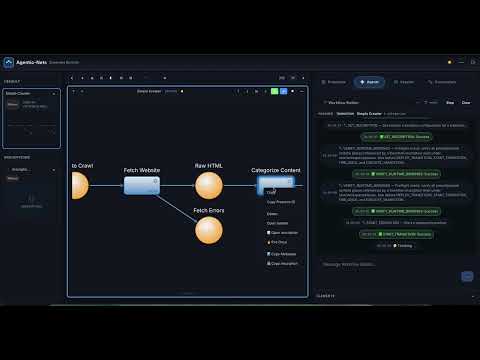
Watch the product preview: personas, nets, and the live Studio in motion, before you read a single line about Petri nets.
Agentic-Nets runs personas, teams, and automated processes that keep existing after the chat window closes:
- A specialist that remembers. A health coach that knows every week of your training, a domain expert that carries your product's real context, a support persona that can still explain the decision it made last month.
- A team with real handoffs. Product manager, architect, developer, reviewer, release guardian: each one a persona with its own tools, context, and authority, passing work through explicit states instead of one long prompt.
- Work that continues while you sleep. Put a lane on a cron or an interval and it keeps firing: collect sources overnight, digest a backlog every morning, probe an endpoint every five minutes and speak up only when it breaks.
- Deterministic steps beside AI steps. Seven transition kinds, so a shell command, an HTTP call, or a plain data transform lives in the same process as the reasoning, and the parts that never needed a model stop paying for one.
- Boundaries and approvals you can point at. Capability flags, tool allowlists, credential scopes, and approval gates decide what a persona may do before it does it, not after.
- A history that answers questions later. Every token, fire, tool call, and emission is event-sourced, so "what did this process actually do over the last three days, and where did it get stuck" is a query rather than a guess.
- Whole systems you can reuse. Publish a persona, a team, a context system, a tool, or a complete application to NetHub and install it into another workspace, dependencies bundled and credentials scrubbed.
You do not have to draw a net to get one. Connect the MCP client you already use, Claude Code, Codex, Claude Desktop, or Cursor, and say what you want in plain language:
"Create a health coach that checks in with me every Monday."
"Start a safe product team for this repository."
"Give me a research analyst that reads these three sources overnight."
The client builds the places, transitions, schedules, and personas through MCP, tells you what it armed, and the system is running when it finishes answering. Watching it is just as direct: the bundled Studio shows the live net, its tokens, its event story, and every handoff as it happens. Changing it is another sentence, and the change is versioned and inspectable like everything else.
Every committed change is an event, not a log line. The data engine records each tree mutation with its causal ids, and the master keeps a story journal of fires, outcomes, and errors on disk, one file per model per day. Three layers, each with a stated durability, and every tool tells you which one it is reading.
That turns the question most systems cannot answer into an ordinary query:
- "What did this transition do over the last three days, and where did it get
stuck?"
transition_historyjoins the master's stories with the structural mutations by exact fire id, andfocus:"failures"returns the last correlated failure together with the engine's own binding diagnosis. - "Who created this token, who changed it, who consumed it?"
token_lineagewalks it back through the retained event blocks. - "What is happening right now?"
events_waitlong-polls the live event line with honest cursors, so a restart appears as a reset rather than a silent gap.
Retention is a setting rather than a side effect: the data engine keeps
structural history per model (historyRetentionDays), and the story journal
keeps narratives for its own configured window.
The point of keeping history is what you do with it. An agent can read it back and improve the system that produced it. The domain-neutral Model Steward reviews a whole model, its bottlenecks, failures, rework, wait time, and spend, then proposes changes that are approval-gated and versioned like any other change. Crystallization goes further: reasoning that has proven itself collapses into deterministic transitions, so a process gets cheaper, faster, and more predictable the longer it runs. A net that has been working for a month should not look like the one you started with.
One caveat the docs repeat rather than hide: retention windows are finite, and
absence of evidence in a layer is not proof that something never ran.
See docs/observability.
Map, HTTP, LLM, and agent lanes run on the master. A command lane is the one that leaves the building: it is dispatched to an executor, a small service that polls for work over an outbound connection only. Nothing has to reach in, so an executor can sit behind a firewall or NAT, on a build machine, on your laptop, or in another cloud, and still be part of the same net.
- Pick the machine per lane.
action.executorIdnames one executor;"*"offers the work to every executor that polls and the first token reservation wins. Each executor carries its own model allowlist. - Scoped credentials. Executors authenticate with a dedicated OAuth2 client whose JWT scope permits the polling protocol and nothing else.
- Typed results. Exit code, stdout, stderr, and duration come back as a token, so a failing build routes down an error path instead of disappearing into a log file.
- Anything your shell can do becomes a step: run the test suite, tag a release, call a CLI, or drive an installed Claude Code or Codex session headless as one lane inside a larger process.
This is what makes a net more than an orchestrator of API calls. The same graph
that reasons about a change can build it, test it, and ship it, with every step
recorded in the history above.
See docs/commands.
Everything a net reaches outside itself lives in one durable tool catalog. The same catalog can describe very different things because each entry separates the contract (what may be called) from the binding (how it runs):
| Kind | What it is | Runs on |
|---|---|---|
| HTTP service | A base URL plus its OpenAPI description, registered once. Agents wrap the operations into ordinary http transitions. |
Master |
| Script | An executable artifact (node, sh, bash, python3) stored once and invoked by reference. At fire time the master checks the stored blob still matches its pinned sha256, and the executor verifies it again before running. |
Executor |
| Docker tool | A digest-pinned container image. The master never builds one: it validates, pins the digest, catalogs it, and later runs only images the local allowlist permits. | Container |
| Tool net | An entire net published as one callable unit, composing the other three into a reusable capability. | Wherever its lanes run |
Two properties make this more than a plugin list. Lookup is local-first: a
model's own catalog shadows the shared global one, so one workspace can ship its
own variant of a shared script without disturbing anybody else. And capability
flags decide which kinds a persona can even see: h for HTTP, s for
scripts, d for containers, t for tool nets, each granted separately, so
"may register a script" never quietly means "may spawn containers".
The ladder is the part worth stealing. Start with a shell one-liner in a command
lane. Promote it to a registered script once it earns a name. Wrap a container
when it needs its own runtime. Publish a tool net when the whole pattern becomes
reusable, and other nets call it by name. The Forge agent can build that last
step from a plain-language intent, inside the running system.
See docs/tool-catalog.
The same nets, personas, and packages run in every deployment. Pick the one that fits today and move later without rebuilding anything.
| Deployment | What it is | Best for |
|---|---|---|
| Desktop Lite | One installer for macOS, Windows, or Linux. No Docker daemon, no Java or Node install, no API key, no server LLM. | Getting started, and daily local work. |
| Docker stack | The compose stack from Docker Hub with Studio, a server LLM provider of your choice, and optional monitoring. | Shared machines and production-like setups. |
| Server and cluster | Multi-master partitioning by model, remote executors that only poll outbound, gateway-scoped OAuth2 clients, Grafana, Prometheus, Tempo, and Loki. | Teams, remote execution, and operations. |
Desktop Lite is the easy one, and for an unusual reason: you never configure an LLM provider at all. The bundled server LLM stays switched off, and the model inside your connected MCP client does the reasoning through external fires. The subscription you already pay for is the only provider involved. There is no API key to paste, no Ollama process to feed, and no cloud account to create. Install the package, connect the client from the tray, ask for what you want. Token binding, scheduling, emission, accounting, and the event trail stay with the local runtime, so the work is still governed and still replayable. If you want a persona to keep going while no client is connected, it can drive an installed Claude Code or Codex CLI instead.
- Download the latest release: one package per platform.
- Open it. The tray launcher starts and health-checks the whole stack on your machine.
- Connect your client: tray → Connect Claude Code / Connect Codex / Copy MCP URL + Token, one paste, then ask for the persona or team you want.
Checksums, platform notes, and the full workflow: Desktop Lite.
Agentic-Nets turns a process into a live, inspectable Petri net. Typed JSON tokens hold the current state; transitions run deterministic code, LLMs, personas, commands, or HTTP calls; and every mutation becomes part of an event-sourced history.
The platform solves the part that a prompt or chat transcript does not: how work keeps running, who may change what, where handoffs go, what happened after the model answered, and how the whole process can be reused. A developer agent, review team, health coach, research pipeline, or operations process all use the same primitives: explicit state, controlled transitions, durable context, permissions, evidence, and approvals.
Humans can operate that state through Studio or an installable Net Application. Agents use the same state and actions through MCP, the CLI, or runtime tools. The interface changes; the governed net underneath does not.
| Question | Answer |
|---|---|
| What is it? | A stateful orchestration platform and Petri-net runtime for governed personas, workflows, tools, memory, remote execution, and evidence. |
| Why does it exist? | To make autonomous processes inspectable, permission-scoped, historically analyzable, continuously improvable, and reusable instead of hidden inside chat state. |
| What is a Net Application? | A versioned NetHub package containing an executable session plus an optional compiled UI. Install it into a model and Studio discovers it without being rebuilt. |
| Can I use my own model? | Yes. Run server-side with Claude, OpenAI, or Ollama; host lanes from the CLI/MCP process; or let the connected MCP model execute selected AI transitions through external fires. |
| What is public in this repo? | Licensed public source for the Net Application SDK, MCP server, desktop launcher, gateway, executor, vault, CLI, chat bot, blobstore, tool containers, deployment, and monitoring. |
| What is closed source? | The node, master, and Studio GUI runtime images used by the full stack. They ship from Docker Hub under the Proprietary EULA. |
| Latest release | Always on the GitHub Releases page. Beta: suitable for evaluation, local experiments, and early adopters comfortable with a fast-moving stack. |
Model (isolated workspace)
└── Session (one installed or created runtime)
    └── Net (the executable graph)
        ├── Places + tokens (typed state)
        └── Transitions (work and routing)

Net Application = session runtime + manifest + optional compiled UI
| Term | Meaning |
|---|---|
| Model | An isolated workspace containing sessions, shared resources, policy, and history. |
| Session | A running or installable unit containing one or more nets. |
| Net | The explicit graph that decides when work may run and where its results go. |
| Place / token | A place is a typed state boundary; a token is one JSON value stored there. |
| Transition | A deterministic or AI-powered step that binds inputs, performs work, and emits outputs. |
| Persona | An agent role living inside a net, with durable context, declared tools, and bounded authority. |
| NetHub | The registry for reusable nets, sessions, applications, models, teams, context systems, tools, catalogs, and blobs. |
| Net Application | A human-facing view and action contract over an ordinary session runtime; the net remains the source of truth. |
Design -> Run -> Observe -> Review -> Propose change -> Approve -> Version
       -> Verify -> Compare -> Crystallize
| Stage | What Agentic-Nets provides |
|---|---|
| Design | Named personas and teams, typed places, seven transition types, durable context, policies, links, tools, and authority boundaries. |
| Run | Deterministic workflows plus AI judgment from a server LLM, a connected MCP model, an unattended Claude Code/Codex session, or ordinary commands and APIs. |
| Observe | An immutable event trail, token state, transition timing, tool evidence, structured status, and a readable Protocol narrative. |
| Review | Model-wide inspection through the domain-neutral Model Steward, with bottlenecks, failures, rework, cost, wait time, and risk made visible. |
| Improve | Approval-gated, versioned changes to personas, prompts, context, nets, tools, and policies, followed by evidence-based comparison. |
| Reuse | NetHub packages for personas, teams, nets, context systems, tools, catalogs, models, and complete operating patterns. |
This makes Agentic-Nets useful well beyond software delivery. The reusable substrate is the same for research, operations, support, education, finance, health coaching, logistics, or another domain: explicit state, controlled transitions, evidence, permissions, and a feedback loop.
Domain-general does not mean domain-omniscient. A useful autonomous process still needs domain context, success criteria, trustworthy data and integrations, bounded tools and authority, human or policy approvals, and validation matched to its risk. Agentic-Nets provides the governed runtime and historical evidence; it does not silently self-rewrite or remove responsibility from the operator.
- External execution / bring your own model. Mark an
llmoragenttransition as external, or apply that policy to a net, session, or model. Master leaves it alone; an MCP client leases the exact prepared prompt, supplies the answer with its own model, and hands it back to the normal emit-and-consume pipeline. - Installable agent teams. Agent Hub currently ships seven starting templates: Safe Product Team, Model Steward, Dev Crew, Research Analyst, Health Coach, Context Curator, and Crystallizer. Model profiles can compose the right resident agents and context systems automatically.
- NetHub packages whole systems. Publish and install ten artifact kinds: nets, sessions, applications, models, agent teams, context systems, tool nets, individual tools, catalogs, and blobs. Dependencies are bundled and credentials are scrubbed. Applications combine an ordinary session runtime with an optional verified UI surface; see the developer guide and the complete Persona Kanban tutorial.
- Governance is enforced at runtime. Ten positional capability flags
(
rwxhludcts), named capability profiles, tool allowlists, resource scopes, Vault-backed credentials, a fleet-wide LLM freeze, and an automatic spend breaker bound what an agent can do. - One MCP server exposes the platform.
@agenticnets/mcpprovides a focused curated workflow surface plus an optional native catalog used by in-net agents. Desktop Lite defaults to curated; server installs retain both for compatibility.
Release status: The SDK, generic Studio host, and certified examples are currently on
mainunder Unreleased. Use matching application-capable runtime and Studio builds; thev2.47.0Desktop packages predate this finalized contract.
A Net Application is not an Angular module imported into the closed GUI. It is an independently built, versioned NetHub artifact with three parts:
- an ordinary session runtime containing nets, inscriptions, permitted initial tokens, and dependencies;
- a manifest declaring semantic store roles, schema-checked actions, permissions, agent instructions, and UI metadata;
- an optional self-contained browser module that registers one custom element.
flowchart LR
    source["Angular UI + session runtime + manifest"] --> package["Versioned application package"]
    package --> hub["NetHub"]
    hub -->|"install into a model"| instance["Application instance"]
    instance --> runtime["Session, nets, and event-sourced tokens"]
    instance --> descriptor["Installed UI descriptor"]
    descriptor --> studio["Studio's generic application host"]
    human["Human"] --> studio
    studio --> actions["Declared roles and actions"]
    agent["Persona or MCP agent"] --> actions
    actions --> runtime
Publishing adds the reusable definition to NetHub. Installing it verifies the package and UI hashes, imports the runtime into the selected model, and records the installed descriptor. Studio discovers that descriptor, loads the verified module, creates its custom element, and injects a constrained runtime bridge. There is no private route change, source-code import, npm build, or Studio image rebuild per application.
The UI is only a projection and controller. The event-sourced net is the source of truth, so a human in Studio, an MCP-connected agent, and a resident Persona agent can see and operate the same work through the same declared contract.
The complete open-source example is Persona Kanban. One installation gives humans a five-column board while connected and resident agents can discover, create, claim, comment on, review, and complete the same tasks. Its canonical card state and append-only activity facts live in ordinary net places—there is no Kanban-specific backend or database.
Start with:
cd agentic-net-apps
npm install
npm run build
npm run pack:kanban
npm run test:kanban-package- Net Application SDK workspace
- Developer guide: architecture, contract, packaging, deployment, and security
- Persona Kanban: complete source-to-Desktop tutorial
- Application certification levels and real-stack gates
Executable UI currently uses a same-origin trusted-element model. Treat it as a trusted beta: install only reviewed packages from trusted publishers. Public marketplace execution still requires publisher signatures and stronger UI isolation; the certification specification tracks that boundary explicitly.
One complete worked example is the Safe Product Team: Product
Manager, Architect, Developer, Reviewer, Release Guardian, and Chronicle over a
deterministic backlog/review backbone. Repository policy is explicit, release
effects are approval-gated, every stage writes structured status, and meaningful
milestones appear in Protocol. Invoke the MCP prompt start-safe-product-team.
It is an example, not a domain boundary: the domain-neutral
Model Steward reviews any model's nets, running processes, event evidence,
risks, bottlenecks, and optimization opportunities without modifying them.
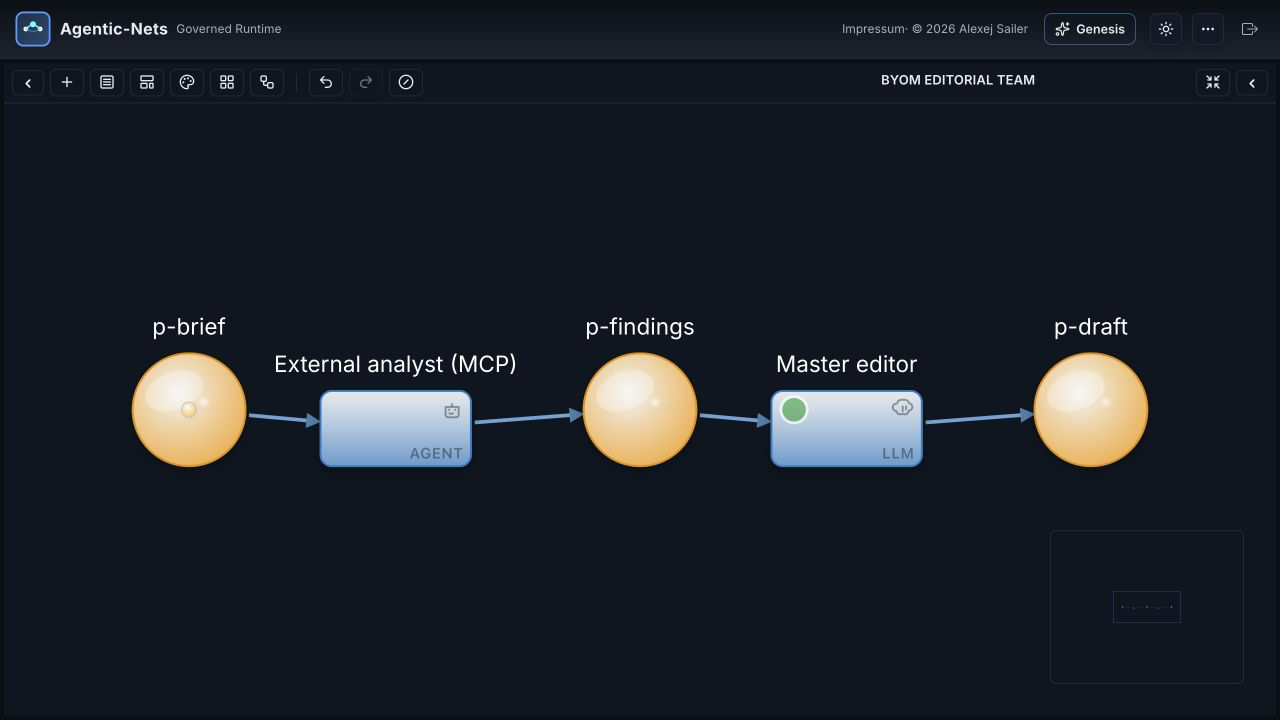
One net, two execution locations: an external MCP agent hands structured findings to a master-run LLM lane.
If prompt-based agents feel powerful but structurally weak, this is the missing layer:
- Agents live in nets. Context is structured state, not a fragile chat session.
- Nets talk to nets. Teams, tools, approvals, memory, and pipelines become explicit handoffs.
- Everything stays inspectable. Tokens, tool calls, events, and emissions remain queryable and replayable.
- The same model scales up. Build one guarded developer agent or a whole product runtime with the same primitives.
| Goal | Link |
|---|---|
| Fastest local creator/operator setup (no Docker) | Desktop Lite |
| Run the production-like Docker stack | Install in 5 minutes |
| Build an installable UI over a net | Net Applications and the SDK workspace |
| Follow a full application example | Persona Kanban tutorial |
| Bring your own model through MCP | Connect over MCP |
| Ask what a net did last week, and improve it from that | Observability you can act on |
| Run builds, tests, and CLIs on your own machines | Command transitions and executors |
| Give agents tools: APIs, scripts, containers, tool nets | Tools |
| Follow the release velocity | CHANGELOG.md and release tags |
| See live systems already running on Agentic-Nets | See it running in production |
Watch the live safe-teams net |
Public read-only live demo |
| Understand the core model | What makes this different and ARCHITECTURE.md |
| Read the whitepaper — the harness control system, complete domain automation | docs/whitepaper/the-harness-control-system.html (view rendered) |
| Drive a stack from Claude Code | Drive it from Claude Code |
| Connect any MCP client | MCP server |
| Contribute to the public repo | CONTRIBUTING.md and issues |
| Ask questions or discuss use cases | GitHub Discussions or forum.agentic-nets.com |
| Report a security issue | SECURITY.md |
Licensing note. Agentic-Nets is a hybrid stack. Public components in this repository are licensed under BSL 1.1 and convert to Apache 2.0 on 2030-02-22. The orchestration core ships as closed-source Docker Hub images and desktop release assets under the Proprietary EULA. See licensing before production use.
This starts the lightweight local stack from Docker Hub. Use the longer install section if you want monitoring, local public-service builds, Ollama cloud-model login details, or troubleshooting notes.
git clone https://github.com/alexejsailer/agentic-nets.git
cd agentic-nets/deployment

cp .env.template .env
# Optional for master-run llm/agent lanes: choose one server provider.
# LLM_PROVIDER=claude + ANTHROPIC_API_KEY=...
# LLM_PROVIDER=openai + OPENAI_API_KEY=...
# LLM_PROVIDER=ollama for the bundled Ollama container
#
# You can instead leave AI lanes stopped/external and let a connected MCP
# model execute them. See "Connect over MCP" below.

docker compose -f docker-compose.hub-only.no-monitoring.yml up -d

cat data/gateway/jwt/admin-secret
open http://localhost:4200This is the fastest local persona/team creator: install one package, connect
Codex, Claude Code, or another MCP client, and choose a small starter pattern,
invoke start-safe-product-team for the product-delivery example, or ask for
one developer, domain expert, reviewer, or another specialist. Agentic-Nets gives those
personas durable context, task/result places, deterministic tools, schedules,
review hand-offs, readable Protocol reporting, and an event-sourced audit trail. The bundled server LLM is disabled by
default; interactive reasoning comes from the connected client. A persona can
also run unattended through an installed Claude Code/Codex CLI. No Docker
daemon, Java or Node installation, API key, or Ollama process is required.
Desktop Lite is loopback-only and is not the recommended production deployment. Use the Docker/server deployment for remote access, clustering, monitoring, or production lifecycle controls.
Download the latest release. Every release page carries one package per platform:
| Platform | Package on the release page |
|---|---|
| macOS, Apple Silicon | AgenticNetOS-<version>-macos-arm64.dmg |
| Windows, x64 | AgenticNetOS-<version>-windows-x64.msi |
| Debian/Ubuntu | AgenticNetOS-<version>-linux-<arch>.deb (amd64 / arm64) |
| Fedora/RHEL | AgenticNetOS-<version>-linux-<arch>.rpm (amd64 / arm64) |
Verify your download against the release's SHA256SUMS.txt and its Ed25519
signature SHA256SUMS.txt.sig (both attached to every release).
Installation notes:
- macOS:
AgenticNetOS-<version>-macos-<arch>.dmg— open, accept the license, drag to Applications. Current builds are unsigned, so macOS refuses the first open: right-click the app → "Open", or allow it under System Settings → Privacy & Security → "Open Anyway". - Debian/Ubuntu:
sudo apt install ./AgenticNetOS-<version>-linux-<arch>.deb, then run/opt/agenticnetos/bin/AgenticNetOS. On a server without a desktop it runs headless (no tray, same services). - Fedora/RHEL: the matching
.rpm. - Windows: run
AgenticNetOS-<version>-windows-x64.msi. Current builds are unsigned, so SmartScreen may warn on first run ("More info" then "Run anyway"). Upgrades install over the old version in place; the msiexec-level upgrade path (previous release installed, data preserved, app serving afterwards) is tested in CI before every release.
Build the installer yourself: clone this repository and run
agentic-net-desktop/scripts/build.sh (macOS/Linux) or
agentic-net-desktop\scripts\build-windows.ps1. The primary requirements are a
JDK 21+ and Node.js 22; see the
Desktop Lite guide
for the small platform packaging prerequisites. Closed node/master/GUI binaries
come from matching checksum-verified release assets, with Docker Hub images
only as a fallback.
Then: use "Connect Codex (copy config)" or "Connect Claude Code (copy
command)" in the tray and ask the client to read
agenticnets://docs/starter-patterns, then choose the smallest matching example.
Use agenticnets://docs/safe-product-team for the worked product-delivery team
or agenticnets://docs/personas for a custom specialist/domain.
With no server provider, master skips provider-backed AI lanes rather than
failing them, and the connected model can serve them. For unattended personas,
use an agent transition with llmMode:"bash" and binary:"claude"|"codex";
for one-shot headless work use a command lane with the prompt on stdin. Master
still owns token binding, emission, accounting, and the event trail. Data lives
in ~/.agenticos/ and survives updates. The bundled command executor is eligible
for every model and activates that model on demand after its first command lane,
so newly created domains need no executor configuration. Full
workflow and limitations: Desktop Lite.
Updating: quit the app, install the new package over the old one (macOS:
drag-replace in Applications; Debian/Ubuntu: sudo apt install ./<new>.deb),
relaunch. All data and settings live in ~/.agenticos/ and survive updates —
the app itself is stateless. The tray notifies you when a new release is out.
Everything binds to localhost by default. The bundled node, master and gui binaries are covered by the Proprietary EULA; the rest of the bundle is built from this repository under BSL 1.1.
Not slideware — these are live systems, each one Agentic-Nets running a real harness end to end:
- forum.agentic-nets.com — a real product forum. A feature request posted here is picked up by a virtual team net, triaged, built, tested, deployed, and reported back on the thread — automatically, with every lifecycle milestone posted as it happens.
- gitanalytics.agentic-nets.com — the actual product that team is building: a live git-commit-analytics service whose new endpoints are shipped by agents, not people.
- The
safe-teamsnet — the virtual agile team that connects the two: PM, Architect, Developer, QA, DevOps, and RTE agents coordinating through a single net — intake → design → code (a realcommandtransition runs the coding CLI on an executor) → QA gate → deploy → status. One harness turns a forum post into a shipped, verified feature. - agentic-nets.com — full documentation, the concept chapters, and the product tour.
You can open the live Studio in monitor mode and watch the safe-teams net
working without admin access:
-
Paste this public read-only demo token into the login form:
07a9af1d663f899f79f08ca56050a977d41472e34cc0dd0f74abe046446f78f9 -
Keep Read-only access (no writes) enabled and log in.
The monitor view is scoped to the safe-teams model. It lets guests inspect
the live net, token counts, event story, console, agenda, and current handoffs.
Read-only sessions cannot edit nets, fire transitions, deploy changes, or use
write-capable assistant personas.
You can still ask questions from the monitor. The chat is pinned to the Domain Expert (read-only) persona, which can explain what is happening in the visible system. The normal Universal Assistant, Workflow Builder, Persona, and other write-capable personas are reserved for authenticated Studio use.
- Virtual developers with explicit permissions, memory, and execution boundaries.
- Virtual agile teams where planner, builder, reviewer, tester, and releaser agents coordinate through nets.
- Smart development tools that behave like reusable nets instead of throwaway prompts.
- Development pipelines that generate code, run checks, gate releases, and keep a durable audit trail.
- Product-level systems where backlog, QA, docs, incidents, and operations communicate as structured nets.
- Industry-specific operating models in software, finance, support, operations, research, healthcare, logistics, or any other domain that can be expressed as communicating nets.
- Builders who want agents to operate inside explicit state machines instead of loose prompt loops.
- Teams that need remote execution, approvals, secrets, and audit trails around autonomous work.
- Product engineers turning one-off agent workflows into reusable internal systems.
- Researchers and tool builders exploring Petri nets as a runtime model for agent coordination.
- You only need a one-off chat wrapper or a single scripted LLM call.
- You require every runtime component to be permissively licensed today.
- You need certified production software for regulated environments without doing your own validation.
One net can contain one or many agents. Many nets can also work together as a larger runtime: one can guard, one can gather, one can synthesize, one can execute, and all of them can exchange structured state through explicit flows instead of hidden prompt handoffs.

This simple crawler net shows the model in practice: places hold the state,
http fetches, an agent transition categorizes content, a command
transition runs remote work through an executor, and map plus pass
transitions route results through the graph.

Agentic-Nets uses seven transition types: pass, map, http, llm,
agent, command, and link.
agenttransitions are the core runtime primitive. They can mimic almost any agent behavior or mode, but inside a governed net with explicit inputs, outputs, permissions, and memory boundaries.agenttransitions can also adapt the net itself. If an agent has sufficient rights, it can read tokens in the net, create additional places and transitions, and extend the structure on demand instead of staying confined to a fixed graph.commandtransitions connect the net to remote execution. They define which executor can run a command remotely and bring the result back into the net as structured state.- Deterministic and non-deterministic transitions coexist. Fixed logic can stay fixed, while open-ended reasoning stays open-ended, in the same runtime and on the same graph.
- This is what makes the model powerful across domains. A net can combine several cooperating agents with deterministic control flow, verification, remote execution, and cross-net communication.
A production agent harness is all the scaffolding around the model: the tools it can call, the control flow between steps, the memory it keeps, where it runs, who is allowed to do what, and how you see what happened afterwards. Most teams hand-write that harness in code and re-write it for every new agent. Agentic-Nets gives you every one of those pieces as a first-class primitive you build by describing it — and each piece is inspectable, reusable, and governed by default.
| A harness needs… | …you get it as (no code) |
|---|---|
| Tools | Reusable tool nets, digest-pinned Docker tools, HTTP services, executable scripts, and http / command transitions |
| Control flow | Nets wired from seven transition types — deterministic (pass / map / http) and AI (llm / agent) lanes on the same graph, with conditional routing and capacity gates |
| Agents | agent transitions, built-in assistant personas, and versioned Agent Hub teams installed as complete sessions |
| Memory & state | Places + tokens, typed context systems, and bounded context capsules queryable with ArcQL |
| Execution | Distributed executors that poll egress-only (firewall-friendly, deployable anywhere) and run scoped work in Docker |
| Governance | rwxhludcts capability roles, named profiles, tool allowlists, resource scopes, spend controls, and Vault secrets injected only at action time |
| Observability | Event-sourced history — replay the log, watch the live event-line, and ask what existed at any decision point |
| Reuse & export | Export inscriptions / PNML or use NetHub to move nets, sessions, applications, models, agents, contexts, tools, catalogs, and blobs |
| Self-extension | Builder / Forge agents that create new places, transitions, and whole tool-nets inside the running system — the harness grows itself |
You are not tied to one model vendor or one interface.
In the Studio (the GUI). Watch every net, token, tool call, and event as it happens, and set the whole thing up by clicking — create models, sessions, nets, places, transitions, and inscriptions, deploy them, and adapt anything live. The Studio ships several built-in assistant agents — a Universal Assistant front door, a Workflow Builder that lays down and deploys whole nets from plain language, a Persona specialist-builder, plus operator and domain-expert roles — so you get the same "just describe it" power as an external coding agent, right inside the product. The Forge meta-agent builds new reusable tool-nets on demand.
From Claude Code (remote). The agenticos-control plugin (dedicated
net-designer and net-operator agents, a control skill, and slash commands) plus
Claude Code's Remote Control let you drive the entire system — build nets,
run pipelines, even cut a release — from anywhere, including your phone,
purely by chatting. See Drive it from Claude Code.
Bring your own model. Point the server at Claude, OpenAI, or a local Ollama model; host selected lanes in the CLI/MCP process; or mark AI lanes as external so the connected MCP model itself performs the reasoning. A single net can mix master-run and externally executed transitions while retaining the same state, emission, audit, and permission pipeline.
- Invisible state. Every intermediate value is a token in a typed place, queryable with ArcQL while the net runs.
- Vanishing memory. Memory is structured state. Agents read and write lessons through places and
EMIT_MEMORY. - Weak observability. State is event-sourced. Replay the log, inspect reductions, and ask what existed at decision time.
- No permission model. The
rwxhludctsrole ceiling, capability profiles, allowlists, and scopes gate tools at dispatch, not only in the prompt. - Secrets in the wrong place. Vault keeps credentials outside tokens and events, scoped per transition and injected only at action time.
- Unsafe execution boundary. Remote executors poll over egress-only links; command work runs in scoped Docker tool containers.
- Hard to explain why. Tool calls, results, emissions, and event trails keep provenance attached to the actual work.
- Poor reusability. NetHub packages ten artifact kinds, their referenced dependencies, and an explicit token policy for installation elsewhere.
- No reflexive model. Builder agents can create nets, places, arcs, transitions, and inscriptions inside the same runtime.
Most coding agents disappear after they ship code. The prompt is gone, the checks are ad hoc, and the verification logic is not part of the product.
Agentic-Nets lets an agent do more than implement a feature. It can also create the surrounding operating structure: unit tests, integration tests, and even a dedicated verification net that stays in the system and can be reused against future changes. That turns one-off AI output into durable runtime structure and addresses some of the biggest weaknesses of coding agents: weak handoffs, fragile memory, and missing long-term verification.
Full docs and install chapter: agentic-nets.com (see also the Install chapter in-repo).
BETA — USE AT YOUR OWN RISK. In active development; may contain bugs, incomplete features, and breaking changes. No warranty. See LICENSE.md and PROPRIETARY-EULA.md.
Agentic-Nets ships as a hybrid stack: licensed public clients, SDKs, integration services, deployment code, and desktop packaging live in this repository; the state engine, orchestrator, and Studio binaries are distributed through Docker Hub and inside Desktop Lite releases. Read this before deploying.
| Layer | What | License | Who can use it |
|---|---|---|---|
| Public components (source in this repo) | agentic-net-apps, agentic-net-desktop, agentic-net-mcp, gateway, executor, vault, CLI, chat, blobstore, tool containers, deployment, and monitoring |
BSL 1.1 | Free for development, testing, personal, educational, and evaluation use. Commercial production use requires a commercial license. Converts to Apache 2.0 on 2030-02-22. |
| Closed-source core binaries (Docker Hub images and bundled Desktop Lite payloads) | agentic-net-node, agentic-net-master, agentic-net-gui |
Proprietary EULA | Free for personal, educational, evaluation, and non-commercial use. Commercial use requires contacting alexejsailer@gmail.com. |
Both licenses include a strong NO WARRANTY / BETA disclaimer. Nothing here is certified for regulated environments out of the box — you are responsible for your own risk assessment. If you are unsure whether your intended use counts as commercial production, ask before deploying.
Prompts with tools get you started. Production agent systems need more than that: durable state, bounded permissions, visible handoffs, scoped execution, secret management, and a way to replay what happened after the chat has gone away.
Most agent frameworks solve the "how do I call an LLM" problem and leave the operating model to application code. Agentic-Nets makes that operating model explicit: agents read tokens from places, write tokens to places, call only the tools their role permits, and leave an event trail behind.
You need Docker Desktop or Docker Engine with Compose v2. A server-side LLM backend is required only for AI lanes that master executes: choose Claude, OpenAI, or Ollama. External lanes can instead use the model in a connected MCP client, with no server API key. You do not need Java, Node.js, or Maven unless you want to build services from source.
Apple Silicon Macs can run the current Docker Hub images through Docker
Desktop's linux/amd64 emulation. Docker may print platform-mismatch warnings
on first start; that is expected unless multi-arch images have been published
for your release.
# 1. Clone the public repo
git clone https://github.com/alexejsailer/agentic-nets.git
cd agentic-nets/deployment

# 2. Create your env file
cp .env.template .env

# 3. Optional: configure ONE provider for master-run llm/agent lanes:
#    Claude: LLM_PROVIDER=claude + ANTHROPIC_API_KEY=sk-ant-...
#    Ollama: LLM_PROVIDER=ollama (bundled container — no host install required).
#            Default model: deepseek-v4-pro:cloud (routes through ollama.com,
#            requires a one-time login — see step 5). To run fully offline instead,
#            set OLLAMA_MODEL (and the HIGH/MEDIUM/LOW tiers) to a local tag
#            like llama3.2 before starting the stack.
#    OpenAI: LLM_PROVIDER=openai + OPENAI_API_KEY=sk-...

# 4A. Start the full stack with monitoring
docker compose -f docker-compose.hub-only.yml up -d

# 4B. Or start the lighter stack without Grafana/Prometheus/Tempo
# docker compose -f docker-compose.hub-only.no-monitoring.yml up -d

# If startup says port 5001 is already allocated, edit .env and set:
# AGENTICNETOS_REGISTRY_PORT=5002
# Then rerun the same docker compose command.

# 5. If you chose Ollama, authenticate or pull the model into the bundled container:
#    (a) Default cloud model — one-time interactive login (see note below):
docker exec -it agenticnetos-ollama ollama signin
#    (b) OR, if you switched to a local model (e.g. llama3.2), pull it instead:
# docker exec agenticnetos-ollama ollama pull llama3.2

# 6. Optional: seed approved Docker tool images into the local registry.
#    Agents use these for crawler/RSS/search/Reddit/API helper containers.
docker compose -f docker-compose.hub-only.yml --profile tools run --rm agenticos-tool-seeder

# 7. Grab the admin secret the Studio login page asks for.
#    The gateway auto-generates it on first startup and bind-mounts it onto
#    the host — read it from the host (NOT from inside the container):
cat data/gateway/jwt/admin-secret

# 8. Open the Studio GUI and paste the secret into the login page
open http://localhost:4200
Where does the admin secret come from?
agentic-net-gatewaywrites a random admin secret todeployment/data/gateway/jwt/admin-secreton its first start. Read that file on the host and paste the value into the Studio login page (tick Read-only access if you want a read-only JWT — same secret, the gateway mints a scoped token). CLI, chat, and executor mount the same file read-only and auto-acquire their JWTs, so you don't need to configure them. If you prefer a pinned value, setAGENTICOS_ADMIN_SECRET=<long-random-string>in.envbeforedocker compose up -d— that string then becomes the login secret.
Where does the Ollama login token come from?
ollama signinis a one-time pairing: it prints a URL + device code to the container logs, you open that URL in a browser, sign in to your ollama.com account, and approve the device. No token file to manage — credentials are stored inside the container at/root/.ollama/and survive restarts (theollama-datavolume). If you prefer non-interactive auth, generate an API key at ollama.com/settings/keys and pass it:docker exec agenticnetos-ollama ollama signin <your-api-key>. Cloud-suffixed models (:cloud,:671b-cloud, etc.) route through ollama.com and can be rate-limited during long sessions — swap to a local tag if you hit429errors.
You don't write any code for the first run. Open the Universal Assistant in the Studio and ask "Help me build my first net." For write operations, switch to or invoke the Workflow Builder persona. It can create places, transitions, arcs, inscriptions, and deploy the result in the active model/session.
Prefer to use the model already connected to your MCP client? Start the stack,
connect @agenticnets/mcp, and use set_external on one transition or at net,
session, or model scope. list_external_fires shows which lanes are ready;
prepare_external_fire and complete_external_fire execute the work through
the connected model while master retains token binding, emissions, accounting,
and the audit trail.
| File | What it starts | Use it when |
|---|---|---|
deployment/docker-compose.hub-only.yml |
Complete local stack from Docker Hub, including monitoring | You want the production-like local setup |
deployment/docker-compose.hub-only.no-monitoring.yml |
Complete runtime stack from Docker Hub, no monitoring | You want a lighter laptop setup |
deployment/docker-compose.yml |
Closed-source core images from Docker Hub + public services built locally | You are developing this repo |
The .env.template is fully commented. The most important variables are:
| Variable | Purpose |
|---|---|
AGENTICNETOS_VERSION |
Docker Hub image tag. Release CI pins this. |
AGENTICNETOS_BIND_ADDRESS |
Defaults to 127.0.0.1 so published ports stay local. |
LLM_PROVIDER |
ollama, claude, openai, claude-code, or codex. |
ANTHROPIC_API_KEY, OPENAI_API_KEY |
Required only for those hosted providers. |
OLLAMA_BASE_URL, OLLAMA_MODEL |
Required for local Ollama. |
OPENBAO_DEV_ROOT_TOKEN |
Local Vault token. Change before exposing the stack. |
AGENTICNETOS_NODE_DATA_DIR |
Host directory for Node events and snapshots. |
MASTER_OTEL_TRACES_EXPORTER |
Master traces are off by default (none) so its chatty poll loop can't flood Tempo. Set to otlp for end-to-end master→node tracing. Node always traces; master metrics always reach Prometheus. |
Detailed install, env, verification, and troubleshooting: deployment/README.md.
The monitoring stack (started by docker-compose.hub-only.yml, or the standalone
monitoring/docker-compose.yml; omitted by the no-monitoring compose) gives you three
signals, all viewable in Grafana at http://localhost:3000 (admin/admin):
| Signal | Backend | How it gets there |
|---|---|---|
| Metrics | Prometheus (:9090) |
Each service exposes /actuator/prometheus; Prometheus scrapes it. Always on. |
| Traces | Tempo (:3200) |
Services export OTLP to the OpenTelemetry Collector (:4318), which forwards to Tempo. |
| Logs | Loki (:3100) |
Grafana Alloy tails every container's stdout and pushes to Loki. |
Every service logs to stdout — so docker logs <container> (and Docker Desktop's log
view) shows the live application log — and to a rolling file under
deployment/data/logs/<service>/. All Java services share one logback configuration:
- Pattern:
yyyy-MM-dd HH:mm:ss.SSS [thread] LEVEL logger [trace_id,span_id] - msg(thetrace_idlinks a log line to its Tempo trace when tracing is on). - Rollover: 50 MB per file, 7 daily archives, 500 MB total cap, gzip-compressed — bounded
by default. Tune per service with the standard Spring properties
logging.logback.rollingpolicy.max-file-size/.max-history/.total-size-cap. - File path:
${LOG_PATH:-/tmp}/<service>.log; compose setsLOG_PATH=/app/logsand bind-mounts it to the host.
The Node/TS services (CLI, chat, MCP) print the same timestamped LEVEL format; diagnostics
go to stderr (the CLI keeps stdout clean for command output, and the MCP server reserves
stdout for the protocol), so Docker captures them without disturbing the wire format.
Centralized query. With the monitoring stack up, Grafana Alloy discovers every
container via the Docker socket (mounted read-only — no application change) and ships stdout to
Loki. In Grafana → Explore, pick the Loki datasource and query by label, e.g.
{container="agenticnetos-master"} or {service="gateway"}. Loki is hard-capped out of the
box (72 h retention, 5 MB/s ingest — see monitoring/config/loki.yaml) so it can't fill the
disk. Loki listens on :3100; set LOKI_PORT to remap.
Traces answer "what did this request touch, and where did the time go" across the executor → gateway → master → node hops. The flow is:
service (OTLP) ──▶ otel-collector :4318 ──▶ Tempo :3200 ──▶ Grafana (TraceQL / trace view)
Query traces in Grafana → Explore → Tempo datasource (TraceQL, or search by service/
duration). Because a log line carries its trace_id, you can pivot straight from a Loki log to
the matching Tempo trace.
Two deliberate defaults keep tracing from overwhelming a laptop or the staging box:
- Master tracing is OFF by default. The master polls every transition every 2 s, which is by
far the chattiest span source. Set
MASTER_OTEL_TRACES_EXPORTER=otlpto turn on end-to-end master→node tracing. The node always traces, and master metrics always reach Prometheus regardless. - Tempo is capped (
monitoring/config/tempo.yaml): 24 h block retention and a 5 MB/s ingestion rate limit (10 MB burst, 5 MB max per trace). These caps exist because an uncapped Tempo once spiraled to multi-core CPU and hundreds of GB on staging — raise them deliberately, not by accident.
The agenticos-control Claude Code plugin turns any Claude Code
session into a full control surface for a running stack: inspect nets, read and edit places and tokens, call
the designtime and runtime REST APIs, fire and diagnose transitions, author nets, drive the Universal
Assistant / Persona / Forge personas, and export net diagrams. It is CLI-first (it uses the agenticos
CLI when it is installed) with a curl fallback, and works both locally (direct to the services) and
remotely (through the gateway's OAuth2, so you can drive the whole thing from anywhere, even your phone).
Install it. From any Claude Code session:
/plugin marketplace add alexejsailer/agentic-nets
/plugin install agenticos-control@agentic-nets
(Working from a local clone instead? /plugin marketplace add ./agentic-nets.)
Point it at your stack. The plugin auto-detects gateway mode when a secret is present, otherwise direct
mode. For the local Docker stack (whose gateway is published on 127.0.0.1:8083), reuse the same admin
secret the Studio login uses:
export AGENTICOS_GATEWAY_URL=http://localhost:8083
export AGENTICOS_GATEWAY_SECRET_FILE=deployment/data/gateway/jwt/admin-secret
For a same-network setup where master and node are reachable directly, set
AGENTICOS_MASTER=http://localhost:8082 and AGENTICOS_NODE=http://localhost:8080 and leave the secret
unset. Secrets are read only from an env var or a file, the JWT stays in-process, and nothing is ever printed
or written to disk.
Use it. The plugin ships a skill, two agents (agenticos-net-designer, agenticos-net-operator), and
slash commands:
| Command | What it does |
|---|---|
/agenticos-doctor |
Preflight the connection (resolved mode/auth/targets + reachability, no secrets) |
/agenticos-inspect <modelId> [sessionId] [netId] |
Snapshot transitions and states, a session's nets, a net's places and live token counts |
/agenticos-fire <modelId> <transitionId> |
Fire a transition once (handles the stop/fire/start dance) |
/agenticos-persona <universal|persona|...> <modelId> "<prompt>" |
Drive a persona and stream its reply |
/agenticos-forge <modelId> "<intent>" |
Build a reusable tool-net from a plain-language intent |
/agenticos-export <modelId> <sessionId> <netId> |
Export a net to JSON or PNML (then render a diagram) |
Or just describe what you want: the skill routes structural work to the designer agent and diagnosis to the operator agent. Full details, the REST/API reference, and the environment-variable table are in the plugin's own README.
The agentic-net-mcp server exposes a running stack to any
MCP client (Claude Code, Claude Desktop, Cursor, or your own agent framework)
over the Model Context Protocol. The client
gets persistent working memory, a complete net workbench, Agent Hub and NetHub
operations, and governed execution tools through one protocol.
- 164 tools in the default read-write surface. Start with 54 curated lowercase tools for common workflows, or drop to 110 native uppercase tools generated from the same catalog used by agent transitions inside the runtime.
- Memory that runs.
memory_write/memory_recalluse event-sourced places, and scheduled server-side transitions can distill raw captures into durable notes after the client disconnects. - Build and operate full systems. Create models with standard, research, knowledge, or development profiles; install Agent Hub teams and context systems; publish or install NetHub packages; build nets; inspect live state; and diagnose transitions without shell access to the host.
- Two client-side execution paths.
host_transitionruns an unattended local provider loop. External fires instead let the connected model itself reason:list_external_fires,set_external,prepare_external_fire,complete_external_fire, andabandon_external_firepreserve master's normal binding, emission, accounting, permission, and idempotency rules. - Controls that survive prompt injection. A model allowlist, readonly mode, capability profiles, per-fire tool grants and resource scopes, model pause, fleet-wide LLM freeze, and spend reporting are enforced by the runtime and gateway rather than merely described in a system prompt.
claude mcp add agenticnets \
  -e AGENTICOS_GATEWAY_URL=http://localhost:8083 \
  -e AGENTICOS_GATEWAY_SECRET_FILE="$PWD/data/gateway/jwt/admin-secret" \
  -e AGENTICOS_MODELS=my-memory \
  -- npx @agenticnets/mcp
Run that command from deployment/ after starting the stack. Then tell your
assistant to "set up my working memory", "install the development profile",
or "make the AI transitions in this session external." The full tool list,
configuration, templates, hooks, and security model are in the server's own
README.
The active CHANGELOG.md tracks the current calendar
quarter. Older quarters are archived under
changelogs/ (index).
Agentic-Nets is a fast-moving beta. Between July 3 and July 25, 2026, the public repository recorded 23 version tags across 16 release days. Tags are not all equal in size, so the changelog, tests, and live demo are the useful evidence behind the cadence:
| Release | Platform milestone |
|---|---|
v2.33.0 |
Installable Agent Hub teams |
v2.34.0 |
Context systems, typed relations, and semantic navigation |
v2.35.0 |
Shared capability profiles and bounded context capsules across master and client hosts |
v2.36.0 |
External fires, fleet-wide LLM freeze, and spend-breaker controls |
| Quarter | Highlights |
|---|---|
| 2026 Q3 (current) | CHANGELOG.md |
| 2026 Q2 | Gateway/vault maturation, tool-net library + Forge, capability flags, glm-5.2:cloud default — archive |
| 2026 Q1 | First releases (v1.6.0 → v1.19.0), repo split, v1.2.0 launch — archive |
| 2025 Q4 | Pre-release: distributed execution, agent transitions, outbound-only architecture, designtime API — archive |
| 2025 Q3 | Pre-release: project foundations, multi-model architecture, NL→PNML, GUI editor — archive |
| Prompt-with-tools frameworks | Agentic-Nets | |
|---|---|---|
| What can this agent see? | Whatever you paste into context | Only the tokens in its inbound places |
| What can this agent do? | Whatever tools you register | Only tools allowed by its rwxhludcts role ceiling, capability profile, allowlist, and resource scopes |
| Where do its outputs go? | Back to you, mixed with reasoning | Typed tokens in declared outbound places |
| What did it actually do? | Chat transcript | Token trail with full provenance |
| How does it get cheaper? | It doesn't | Crystallization — agent steps collapse into deterministic transitions |
| Where does the model run? | Usually wherever the framework is hosted | On master, in a local transition host, or in the connected MCP client, selectable down to one AI lane |
The graph gives hallucination less room to become uncontrolled action: inputs, permissions, and outputs are explicit.
    CLIENTS AND WORKERS  (all authenticate via gateway-minted JWT)
  +--------------+  +--------------+  +--------------+  +---------------+
  | agentic-net  |  | agentic-net  |  | agentic-net  |  | agentic-net   |
  | gui (4200)   |  | cli          |  | chat         |  | executor      |
  | Closed core  |  | Public src   |  | (Telegram)   |  |  (8084)       |
  |              |  | + MCP        |  | Public src   |  | Public src    |
  +------+-------+  +------+-------+  +------+-------+  +------+--------+
         |                 |                 |                 |
         | JWT             | JWT             | JWT             | JWT *
         |                 |                 |                 |
         +-----------------+--------+--------+-----------------+
                                    |
                                    | (all client traffic funnels
                                    |  through the gateway;
                                    |  tokens minted from the
                                    |  admin secret auto-generated
                                    |  on first startup at
                                    |  data/gateway/jwt/admin-secret
                                    |  and mounted read-only by
                                    |  cli, chat, executor)
                                    v
                         +-------------------+
                         | agentic-net-      |   Public source (BSL 1.1)
                         | gateway (8083)    |   OAuth2 + JWT router
                         +---+------------+--+
                             |            |
                +------------v+         +-v---------------+
                | agentic-net |         | agentic-net     |   Closed source (Hub / desktop)
                | master      |<------->| node            |   orchestration + state engine
                |  (8082)     |         |  (8080)         |
                +--+--------+-+         +-----------------+
                   |        |
                   |        |   BACKEND SERVICES
                   |        |   (master-internal,
                   |        |    not client-exposed)
                   |        |
          +--------v--+  +--v-----------+
          | agentic-  |  | sa-blobstore |   Public source (BSL 1.1)
          | net-vault |  |  (8090)      |   backend data tier
          |  (8085)   |  | large tokens |
          | secrets   |  | + knowledge  |
          +-----------+  +--------------+

  * Executor supports dual-mode polling: JWT via gateway (shown above, works
    across firewalls) OR direct to master on the same compose network.
Every agent runs under the positional capability role rwxhludcts. The
role is the coarse ceiling; a named capability profile, an explicit tool
allowlist, and resource scopes can narrow it for a particular fire.
| Flag | Capability | Examples |
|---|---|---|
r |
Read | Inspect nets, places, tokens, models, contexts, and package metadata |
w |
Write | Create tokens and structure; author, register, or promote tool nets |
x |
Execute | Deploy, start, stop, fire, and run transitions |
h |
HTTP | Call and register external HTTP services |
l |
Logs | Query events, facets, and fire trails |
u |
Inhabit | Await tokens and use fire-and-wait interaction patterns |
d |
Docker | Discover, validate, run, stop, and inspect container tools |
c |
Coordinate | Invoke personas, delegate tasks, and collect results |
t |
Tool nets | Discover, inspect, and invoke reusable capability nets |
s |
Scripts | Register executable script artifacts in the tool catalog |
A role-less agent defaults to lean read/write access, not full power. The runtime refuses calls outside the effective grant.
Executor agents use egress-only polling — firewall-friendly, deployable anywhere:
| Mode | When | Executor polls | Auth |
|---|---|---|---|
| Direct | Same network as master | http://agentic-net-master:8082 |
None (internal) |
| Gateway | Remote / different network | http://<gateway-host>:8083 |
JWT (auto-acquired) |
| Service | Purpose | Port |
|---|---|---|
| agentic-net-gateway | OAuth2 API gateway with JWT auth, rate limits, read-only scopes | 8083 |
| agentic-net-executor | Distributed command execution agent, polls master direct or via gateway | 8084 |
| agentic-net-vault | Secrets management (OpenBao wrapper) for agent-transition credentials | 8085 |
| agentic-net-cli | Command-line agent with multi-provider LLM routing and tool-catalog sync | — |
| agentic-net-chat | Telegram-facing agent with streaming tool-call batches and /verbose toggle |
— |
| agentic-net-mcp | MCP server: working memory, net workbench, Agent Hub/NetHub, and external execution | stdio / 8091 |
| agentic-net-apps | Public Angular SDK, development host, Hello Net and Persona Kanban examples, tests, and packager for installable NetHub applications | — |
| agentic-net-desktop | Public Desktop Lite launcher, supervisor, local-vault implementation, and installer build scripts | — |
| sa-blobstore | Distributed blob storage for large tokens, artifacts, and knowledge content | 8090 |
| agentic-net-tools/ | Tool containers agents start on demand (crawler, echo, reddit, rss, search, secured-api) | dynamic |
Docker tools are published as alexejsailer/agenticos-tool-*:<version> and mirrored into the bundled local registry (localhost:5001) by agenticos-tool-seeder. Master only runs images matching the local allowlist, normally localhost:5001/agenticos-*.
| Image | Purpose | Port |
|---|---|---|
alexejsailer/agenticnetos-node |
Event-sourced state engine, tree-structured persistence, ArcQL queries | 8080 |
alexejsailer/agenticnetos-master |
Orchestration, LLM integration, transition engine, agent runtime | 8082 |
alexejsailer/agenticnetos-gui |
Angular visual editor with drag-drop Petri-net design | 4200 |
These images are governed by the Proprietary EULA.
Full architecture deep dive: see ARCHITECTURE.md. Long-form whitepaper — The Harness Control System: Complete Domain Automation on Agentic-Nets (concepts, control loop, use cases, live evidence): docs/whitepaper/the-harness-control-system.html — a self-contained HTML document; download and open in any browser, or view it rendered.
agentic-nets/
├── LICENSE.md                    # BSL 1.1 for public code in this repo
├── PROPRIETARY-EULA.md           # EULA for Docker Hub images
├── README.md                     # (this file)
├── ARCHITECTURE.md               # Deep dive: transitions, ArcQL, coordination
├── CHANGELOG.md                  # Human-curated release notes
├── CONTRIBUTING.md               # How to contribute
│
├── docs/
│   ├── applications/             # Net Application guide, tutorials, and certification contract
│   ├── foundations/              # Figures from the 2012 KIT diploma thesis (see FOUNDATIONS.md)
│   └── whitepaper/               # The Harness Control System — self-contained HTML whitepaper
│
├── agentic-net-apps/             # Angular SDK, development host, examples, and packager
├── agentic-net-desktop/          # Desktop Lite launcher and installer packaging
├── agentic-net-gateway/          # OAuth2 API gateway (Spring Boot)
├── agentic-net-executor/         # Command executor (Spring Boot)
├── agentic-net-vault/            # Secrets wrapper for OpenBao (Spring Boot)
├── agentic-net-cli/              # CLI agent (TypeScript/Node)
├── agentic-net-chat/             # Telegram-facing agent (TypeScript/Node)
├── agentic-net-mcp/              # MCP server and external-fire client surface
├── sa-blobstore/                 # Distributed blob storage (Spring Boot)
├── agentic-net-tools/            # Tool containers (Docker)
│
├── deployment/
│   ├── README.md                 # Local Docker Compose install guide
│   ├── docker-compose.yml        # Hybrid: Hub images + local builds
│   ├── docker-compose.hub-only.yml  # All services from Docker Hub + monitoring
│   ├── docker-compose.hub-only.no-monitoring.yml  # Runtime stack without monitoring
│   ├── .env.template             # Environment config template
│   ├── dockerfiles/              # Build files for public services
│   └── scripts/
│       ├── build-and-push.sh     # Build & push public service images
│       └── seed-tool-registry.sh # Mirror/build Docker tools into local registry
│
└── monitoring/
    ├── config/                   # OTel, Prometheus, Tempo, Loki, Alloy configs
    └── grafana-provisioning/     # Dashboards and datasources (Prometheus, Tempo, Loki)
Dual-license model:
- Public code in this repo — BSL 1.1. Free for development, testing, personal, educational, and evaluation use. Commercial production use requires a commercial license. Converts to Apache 2.0 on 2030-02-22.
- Closed-source Docker Hub images (
agenticnetos-node,agenticnetos-master,agenticnetos-gui) — Proprietary EULA. Free for personal, educational, evaluation, non-commercial use. Commercial use requires contact at alexejsailer@gmail.com.
ALL SOFTWARE IS PROVIDED AS-IS WITH ABSOLUTELY NO WARRANTY.
- Commercial licensing: alexejsailer@gmail.com
- Website & blog: https://alexejsailer.com
- Hosted docs: https://agentic-nets.com
- Video walkthroughs (YouTube): Agentic-Nets playlist
- Issues: https://github.com/alexejsailer/agentic-nets/issues
- Contributing: see CONTRIBUTING.md
Agentic-Nets is currently designed and maintained by Alexej Sailer as a one-person product effort, amplified by AI pair programming and an automated release pipeline. The product is therefore also a live test of its own premise: agents can increase delivery speed when their state, permissions, execution, and verification are made explicit. See CHANGELOG.md for the human-curated evidence.
Copyright (c) 2025-2026 Alexej Sailer. All rights reserved.