


Verify CertifiedData.io certificates from the command line. Audit-friendly, zero crypto dependencies.
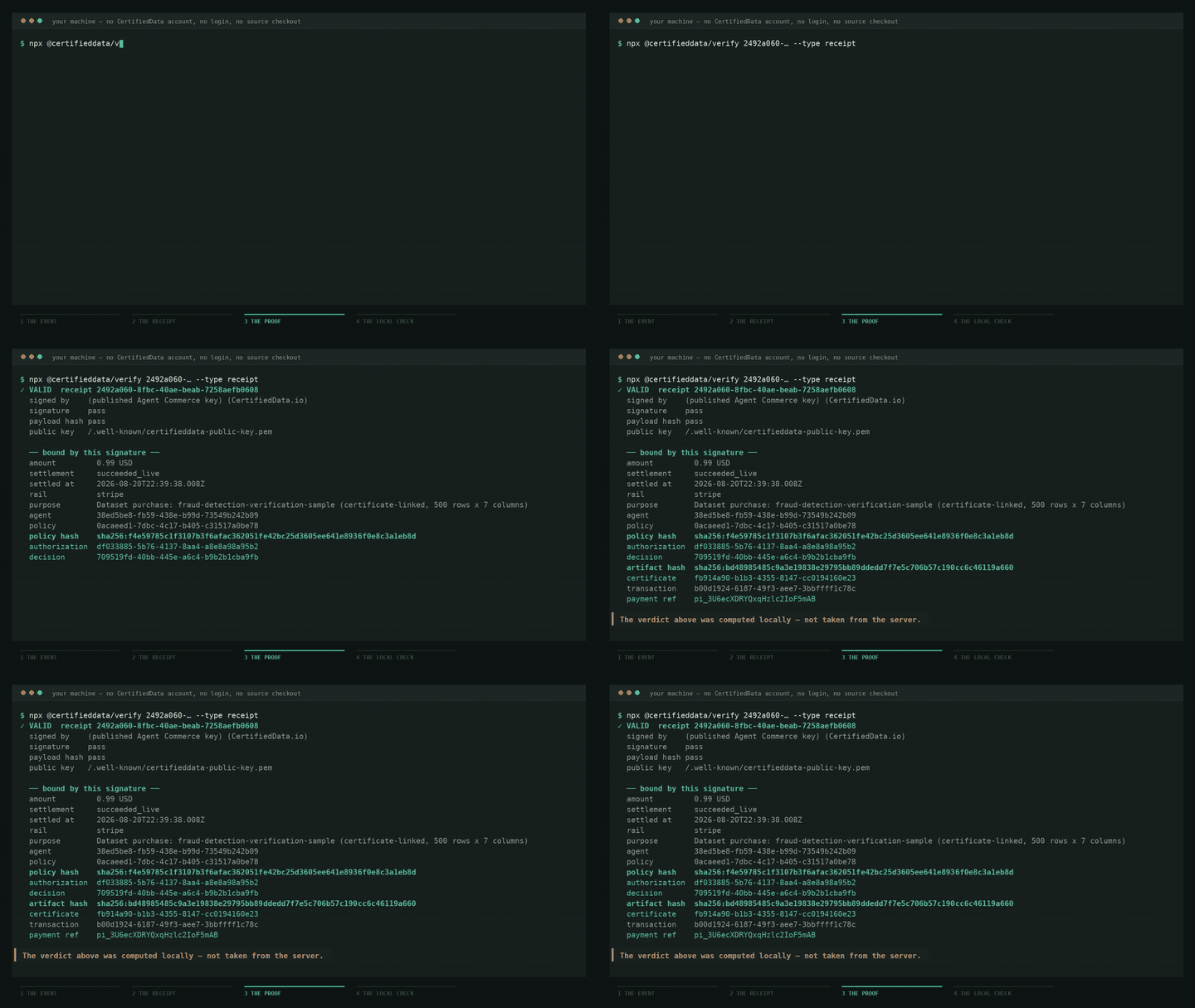
No install, no account, nothing of ours on your machine:
npx --package @certifieddata/verify cd-verify d6da041f-a70c-4945-93b7-dff1e42a00d0 --type certificate
# → ✓ VALID  certification_id d6da041f-a70c-4945-93b7-dff1e42a00d0
#     signed by  ed25519-prod-2025-02  (Certified Data LLC)

npx --package @certifieddata/verify cd-verify 2492a060-8fbc-40ae-beab-7258aefb0608 --type receipt
# → ✓ VALID  receipt 2492a060-8fbc-40ae-beab-7258aefb0608
#     settlement   succeeded_live
Both ids are real production artifacts, and both verdicts are computed locally against the issuer's published key — not read back from our API. If our servers disagreed with the maths, this tool would side with the maths.
The receipt above carries signed bindings for the policy snapshot that
authorized the spend, the authorization and decision records, the live Stripe
settlement, the artifact hash and the certificate issued for it. The recording
uses the short npx @certifieddata/verify … form; the longer form above is the
one that also works on Windows, where verify is a cmd.exe built-in.
What that signature establishes is narrow and worth stating exactly: that CertifiedData issued the record, that its bytes have not changed since, and which policy, authorization, decision, artifact and settlement were bound together at the moment of signing. It does not establish that the policy was a good one, that any control was effective, or that anyone is compliant with any regulation.
npm install -g @certifieddata/verify
cd-verify <certificate-id> --dataset path/to/data.csv
On Windows use
cd-verify, notverify.verifyis a built-in cmd.exe command and shadows the bin, which fails silently with exit 1. Thecd-verifyandcertifieddata-verifyaliases work everywhere.
- The signature. An Ed25519 signature over the RFC 8785 JCS canonicalization of the certificate payload. We re-canonicalize, re-verify, and refuse to claim a cert is valid unless the signature checks out.
- The signer. The certificate's signing key must appear in the issuer's published signing-keys document and must not be revoked. That URL is pinned in this package; we deliberately do not follow the
public_key_urlinside a certificate, because a document that has not been verified yet must not choose the keys it is verified against. - The dataset (optional). When
--dataset <path>is supplied, we stream-hash the file and refuse to claim a match unless its SHA-256 is bit-identical to the digest in the certificate.
Both issued schemas are supported, and the CLI picks the right one from the document itself — you never pass a flag for it.
cert.v1 |
cert.v2 (current) |
|
|---|---|---|
| Signature location | cert.signature, inside the document |
detached, beside the payload |
| Canonicalized bytes | certificate minus signature |
the whole payload |
| Signer named at | cert.key_id |
payload.issuer.signing_key_id |
| Artifact digest | cert.dataset_hash (sha256:…) |
payload.artifact_hash (bare hex) |
A cert.v2 document is an envelope. Note that the outer schema_version names
the envelope, not the certificate, and that signature is an object rather
than a bare string:
{
  "schema_version": "certifieddata.manifest.v1",
  "payload":   { "schema_version": "cert.v2", "certificate_id": "d6da041f-…", "…": "…" },
  "signature": { "alg": "Ed25519", "key_id": "ed25519-prod-2025-02", "value": "base64…" }
}
Because the v2 signature is detached, the payload is canonicalized exactly as
issued — nothing is removed before verification. A bare base64 signature
string is also accepted.
Resolving a bare certificate id fetches
https://api.certifieddata.io/api/certificates/<id>/signed-payload.
Use that one. …/api/certificates/<id> (without the suffix) returns a
certifieddata.cert.v1-shaped display projection of the same certificate.
It carries the real signature bytes, but the signature covers the v2 payload
rather than the projection, so verifying that document reports INVALID —
which reads as tampering when nothing has been tampered with.
Note on
hashes.certificate_payload_sha256. Some v2 payloads carry a self-referential digest field. It is not part of the trust decision and this verifier ignores it: the Ed25519 signature over the canonicalized payload is what establishes integrity. The published value is not reproducible from the stored document under JCS, plainJSON.stringify, sorted-key stringify, or pretty-printed JSON — most likely it was computed over insertion-ordered JSON, which Postgresjsonbdoes not preserve. Do not treat a mismatch in that field as a verification failure.
The whole verification routine lives in src/verify.ts — under 100 lines, no clever indirection, no third-party crypto. We use node:crypto directly:
const ok = crypto.verify('ed25519', canonicalBytes, publicKey, signatureBytes);If you can read TypeScript, you can audit our verifier in five minutes.
| Code | Verdict | Meaning |
|---|---|---|
| 0 | VALID |
Signature verified and key is trusted (and dataset matches if --dataset was passed) |
| 1 | INVALID / DATASET_MISMATCH |
Signature does not verify, or recomputed dataset hash differs |
| 2 | UNKNOWN_KEY |
key_id is not in the trusted keys document, or has been revoked |
| 3 | MALFORMED |
Certificate JSON is missing required fields, has bad base64, etc. |
| 4 | NETWORK |
Could not reach the API or .well-known endpoint and no fresh cache is available |
| 64 | USAGE |
Bad command-line flags |
{
  "verdict": "VALID | INVALID | UNKNOWN_KEY | DATASET_MISMATCH | MALFORMED",
  "certification_id": "ce_...",
  "key_id": "ck_...",
  "issuer": "CertifiedData.io",
  "algorithm": "CTGAN",
  "signed_at": "2026-03-18T20:31:45Z",
  "dataset_hash_expected": "sha256:...",
  "dataset_hash_actual": "sha256:... | null",
  "checks": {
    "signature": "pass | fail | skipped",
    "key_trust": "pass | fail | skipped",
    "dataset_match": "pass | fail | skipped"
  },
  "reason": "human-readable explanation"
}- name: Verify training-data certificate
run: |
npm install -g @certifieddata/verify
certifieddata-verify "${{ env.TRAINING_CERT_ID }}" --dataset data/training.csv --json \
| tee verify-result.json
- uses: actions/upload-artifact@v4
with: { name: cert-verification, path: verify-result.json }The non-zero exit codes fail the job automatically — a CI run will not pass if your training data has drifted from the cert.
# Pre-stage a copy of the issuer's keys document, then verify with no network.
curl -O https://certifieddata.io/.well-known/signing-keys.json
certifieddata-verify ./received-cert.json --keys ./signing-keys.json --offline
--offline refuses to make any network call. Combined with --keys, it produces a fully reproducible audit you can replay months later.
Receipts are a different artifact from certificates, with a different trust root
(/.well-known/certifieddata-public-key.pem rather than the keys document).
npx --package @certifieddata/verify cd-verify 2492a060-8fbc-40ae-beab-7258aefb0608 --type receiptThat id is a real production receipt for a live 99-cent settlement, so the command above works as written rather than needing a placeholder substituted.
The canonicalization, the exact bytes that are signed, and the test vectors are
specified normatively in RECEIPT-VERIFICATION.md.
It is RFC 8785 (JCS) — not json-stable-stringify; the two produce different
bytes for the same document. fixtures/valid-receipt.json is a real production
receipt and src/receipt-vectors.test.ts pins its digest, so an outside
implementation can check itself against a known-good value.
The server's signatureValid boolean is never used to decide the verdict. It is
CertifiedData's opinion about CertifiedData's own signature.
CertifiedData.io currently issues cert.v2 documents (cert.v1 is still
supported here and still verifies). Both bind together:
- An artifact hash —
sha256(file_bytes)for binary data (CSV, Parquet, ZIP) orsha256(JCS(payload))for structured data. - Provenance — the issuing engine, a record count, the issuance timestamp, and an opaque certificate id.
- A signer — a
signing_key_id, with the public key fetched from the issuer's pinned.well-knownsigning-keys document.
In cert.v1 the signature is computed over the JCS canonicalization of the
certificate with the signature field omitted. In cert.v2 the signature is
detached and travels beside the payload, so the whole payload is
canonicalized with nothing stripped. Either way, nothing signs the field that
holds its own signature.
We use Ed25519 because it is fast, deterministic, has small keys (32 bytes) and small signatures (64 bytes), and is built into Node's crypto module. We never sign the field that contains the signature, and we never claim a verdict beyond what the cert actually says — for example, we will not call a CTGAN cert "differentially private" unless the metadata explicitly carries a non-null epsilon and the algorithm is DP-CTGAN.
See SECURITY.md. Please do not open a public issue for cryptographic findings — email security@certifieddata.io and we will respond within 48 hours.
@certifieddata/pii-scan— scan datasets for PII before certifying themcertifieddata/reference-impl— a 50-line EU AI Act Article 12 reference application that uses this CLI
MIT — see LICENSE.