
Get started · Source code · Compatibility · Community · Latest release
CloudBurrow is an open-source local Google Cloud emulator built on Kubernetes. It gives developers a place to exercise supported cloud APIs on their own machines and in integration tests, without deploying to Google Cloud for every code change.
Connect using official Google client libraries, inspect the local services, and follow operations from your application into their backends. Compatibility is documented at the operation level, so you can see what has been tested and where the boundaries are.
|
Run supported services beside your application. Use local endpoints while keeping familiar client libraries. |
Exercise interactions between services in an isolated environment. Run the workflow, not just an individual mock. |
Follow compatibility entries to the tests behind them. Check support for the operations your application actually calls. |
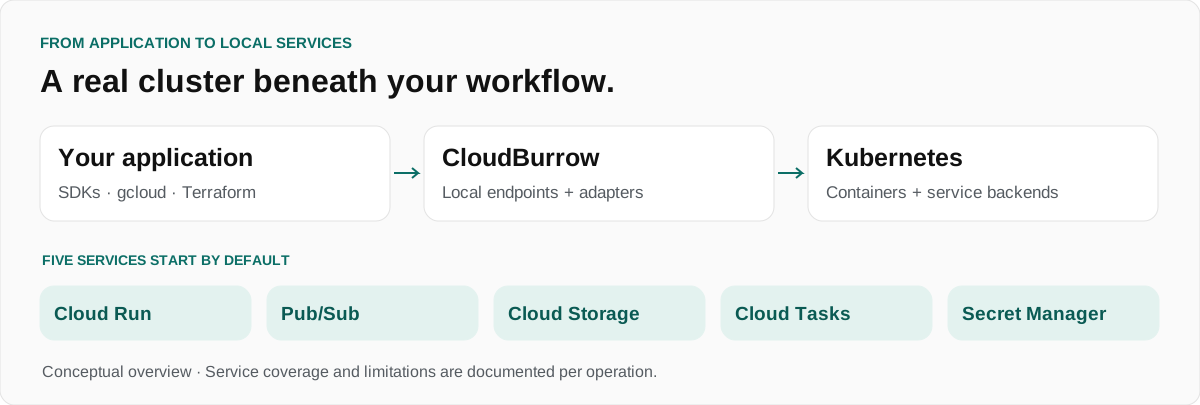
CloudBurrow creates a dedicated kind cluster. It combines Google-provided emulators, CloudBurrow implementations and service backends, with Knative Serving for Cloud Run. You can also work with the cluster using Kubernetes tooling.
| Starts by default | Local implementation |
|---|---|
| Cloud Run | Knative Serving through a Cloud Run API adapter. |
| Pub/Sub | Google’s Pub/Sub emulator. |
| Cloud Storage | CloudBurrow’s storage implementation. |
| Cloud Tasks | CloudBurrow’s queue and task implementation. |
| Secret Manager | Local secrets and versions for testing. Use test values only; it is not an authenticated secret store. |
Additional services can be enabled for database, caching, key-management and other workflows. Consult the service directory and compatibility reference for their scope and limitations.
Install Docker, kind and kubectl first. See the installation guide for platform requirements and installation options.
brew install cloudburrow/tap/cloudburrow
cloudburrow doctor
cloudburrow up
In another terminal, configure your client environment:
eval "$(cloudburrow env)"The local console is available at http://127.0.0.1:9090 by default. It reads through the same APIs used by client applications and exposes supported inspection and management actions.
Read the quickstart → · Explore the source →
CloudBurrow is a development and testing environment. Its compatibility documentation distinguishes verified operations from partial or unsupported behavior; it does not promise full Google Cloud parity.
- Check the operation: a service name alone does not establish that every method or option is supported.
- Check the evidence: verified entries identify the tests used to exercise the behavior.
- Use test data: local credentials and security-related services are not production security boundaries.
Compatibility matrix · Current implementation status · Releases

Ask setup questions in Q&A, propose workflows in Ideas, and share examples in Show and tell. Follow Announcements for maintainer updates. Reproducible bugs and actionable work belong in Issues.
Join the discussion → · Read the welcome guide →
| Repository | Purpose |
|---|---|
| cloudburrow | CLI, local services, console, documentation and compatibility tests. |
| homebrew-tap | Homebrew installation formula. |
Open source under Apache-2.0. Built by SweetTech. CloudBurrow is not affiliated with or endorsed by Google. Google Cloud and its product names are trademarks of Google LLC.
