feat(home): offer Docker command and guided local setup - #179
guanzhousongmicrosoft merged 16 commits into
Conversation


DocumentDB Local shipped in the VS Code extension's 0.10.0 release: the
extension now creates and starts the container itself, so someone already
working in VS Code no longer needs to run Docker by hand and then type a port,
username, password and TLS choice back into a connection wizard.

The home page only offered the Docker command, so that path was invisible to
the people it was built for -- the ones who arrive at the site without the
extension and leave with a terminal command.

Docker stays selected by default. It works everywhere and needs nothing beyond
Docker itself, while the VS Code path only pays off for people who already live
in that editor, so it is offered rather than assumed.

The install link comes before the deep link, and neither appears alone. A
vscode:// URL for an extension that is not installed does nothing visible at
all -- no error, no navigation -- so presenting it on its own would leave a
first-time visitor clicking a button that silently does nothing.

The heading moves from 'Run locally with Docker' to 'Run DocumentDB locally',
since it now covers both. The run-with-docker anchor is kept: nothing in the
repository links to it, but it is a public URL and it still lands on the right
card.

Co-authored-by: Copilot <223556219+Copilot@users.noreply.github.com>
Signed-off-by: Guanzhou Song <guanzhousong@microsoft.com>
Signed-off-by: Guanzhou Song <guanzhousong@microsoft.com>
Co-authored-by: Copilot <223556219+Copilot@users.noreply.github.com>
Require extension 0.10.1 or later, explain the Docker prerequisite and wizard actions, and provide the Command Palette fallback. The /local deep link shipped in microsoft/vscode-documentdb#898 and no longer needs a release blocker. Preserve the Docker default and add rendered-homepage regression coverage.

Signed-off-by: Guanzhou Song <guanzhousong@microsoft.com>
Co-authored-by: Copilot <223556219+Copilot@users.noreply.github.com>
Use Vite's automatic JSX runtime for Vitest without changing Next.js's preserve setting or adding dependencies.

Signed-off-by: Guanzhou Song <guanzhousong@microsoft.com>
Co-authored-by: Copilot <223556219+Copilot@users.noreply.github.com>
Copilot-Session: b2b0079f-68de-4316-8592-64ccfa495ee3

The setup step said "confirm if prompted" without naming what to confirm.
The extension's deep-link handler shows a modal whose confirm button is
labeled "Open setup", so name it, matching how the remaining steps already
name Continue, Start DocumentDB Local, and Open Connection.

Verified against microsoft/vscode-documentdb main (013e429f):
src/vscodeUriHandler.ts shows the confirmation, and LocalQuickStart.tsx
drives introduction -> Continue -> configure -> Start DocumentDB Local ->
Open Connection.

Co-Authored-By: Claude Opus 5 (1M context) <noreply@anthropic.com>
Claude-Session: https://claude.ai/code/session_017dU6YABKoUxKLU2AB1qeH1
A design and product review of the tabbed quick start found the VS Code
panel narrated a wizard the reader has never seen, and led with a deep
link that silently does nothing for the very person the tab is for.

Copy:
- The prerequisite now says the VS Code path still uses Docker, and that
  the extension never installs Docker or changes the user's system,
  rather than the jargon "in your VS Code environment".
- Step 01 names what gets installed instead of pinning extension version
  0.10.1, which is maintenance debt on a homepage and is noise for a new
  installer who gets the latest anyway.
- Step 02 was a four-action transcript of wizard buttons; it now says
  click, allow, and follow the wizard.
- Step 03 states the outcome, port and generated credentials, so the
  reader knows what they got.
- The fallback names the likely cause instead of treating "no VS Code",
  "no extension", and "old extension" as the same thing.
- The Docker steps drop the one that restated the command above it, add a
  first-run time expectation, and end on a concrete connect-and-query
  instead of "the setup you need".

Structure:
- Tabs are Terminal and VS Code. Labelling one "Docker" implied the other
  avoided Docker, when both start the same container.
- Install the extension is now the primary action; the deep link is
  secondary, matching the order of the steps.
- The card footer link follows the active tab and points at that path's
  full guide. Download packages is gone, since the hero already has
  Download pointing at the same page.
- Each panel links to the other path so neither is hidden behind a tab.

Presentation:
- The tablist gets a solid active state and larger hit targets, so it
  reads as a control rather than as another badge between the Quick start
  chip and the numbered step markers.
- The hero grid is items-start. It was items-center, and since the card is
  the taller column, switching tabs moved the DocumentDB headline.
- Home and End keys move between tabs, per the ARIA authoring practices.

Co-Authored-By: Claude Opus 5 (1M context) <noreply@anthropic.com>
Claude-Session: https://claude.ai/code/session_017dU6YABKoUxKLU2AB1qeH1
…-quickstart-vscode
Two reviews of the tabbed quick start, one on design and one on
correctness, found two defects that reached users.

The VS Code guide still described the manual flow. articleService
short-circuits on `vscode-quickstart` and returns an inline constant
before reading the cloned markdown, so rewriting the guide upstream in
documentdb/docs never reached the site. The card told people the
extension sets things up for them; one click on "Full VS Code guide"
told them to run Docker by hand and type the port and credentials. The
inline copy now leads with the wizard and keeps the manual flow as an
explicit alternative, preserving the loopback binding, quoted
placeholders and TLS guidance that copy already got right.

The hero command was a shell syntax error. Unquoted <YOUR_USERNAME> and
<YOUR_PASSWORD> parse as redirections, so `bash -n` and `zsh -n` both
reject it, and step 01 had just started telling people to run it. The
placeholders are quoted and the step says to replace them first.

The command also published on every interface. The Docker guide it links
to says a bare `-p 10260:10260` "publishes it on every interface, which
is rarely what you want on a laptop", the VS Code guide uses loopback,
and the extension binds hostIp 127.0.0.1. The homepage was the only
surface in the product disagreeing, and a test pinned it that way.

Copy corrections, each against extension source:
- "Both start the same DocumentDB Local container" was false. The paths
  share an image; the containers, volumes, credentials and seeding all
  differ.
- "never installs Docker or changes your system" overpromised: it creates
  a container and a persistent volume. The extension's own wording is
  "nothing else on your machine is changed".
- Port 10260 was stated as a guarantee. suggestPort scans forward when it
  is taken.
- Step 02 implied opening the link starts the container. Nothing starts
  until Continue, then Start DocumentDB Local.
- The prerequisite dropped the Linux-containers requirement, which the
  extension enforces as a hard failure, and "the same machine as VS Code"
  is wrong for WSL, dev containers and SSH remotes.
- mongosh needs TLS and auth flags, and sample data needs --init-data.

Structure and a11y:
- Both guide links render inside their own panel. The link was
  conditional on the active tab, so under output: "export" the VS Code
  guide had no link from the homepage at all.
- The cross-panel switches are labelled for screen readers and go both
  ways. The terminal one now says the extension is a GUI for the same
  container, instead of restating the tablist above it.
- The active tab no longer uses the same solid blue as the hero's primary
  button.

Tests: assertions are scoped to the card and matched attribute by
attribute rather than by JSX prop order, the version guard matches shape
instead of one literal, and the VS Code guide link is covered.
vitest.config renamed to .mts to silence the CJS/ESM warning.

Co-Authored-By: Claude Opus 5 (1M context) <noreply@anthropic.com>
Claude-Session: https://claude.ai/code/session_017dU6YABKoUxKLU2AB1qeH1
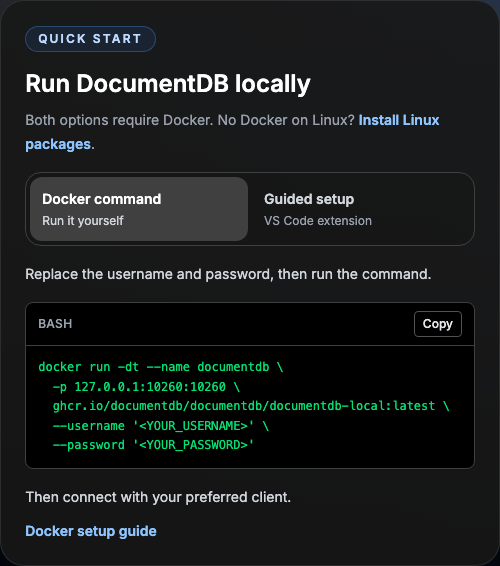
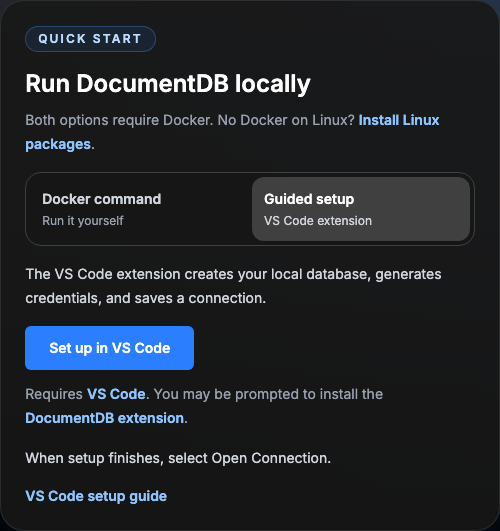
Updated screenshotsFresh captures from the production export of Desktop (1440px viewport)
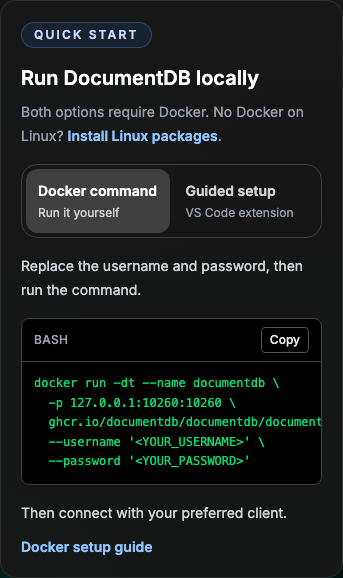
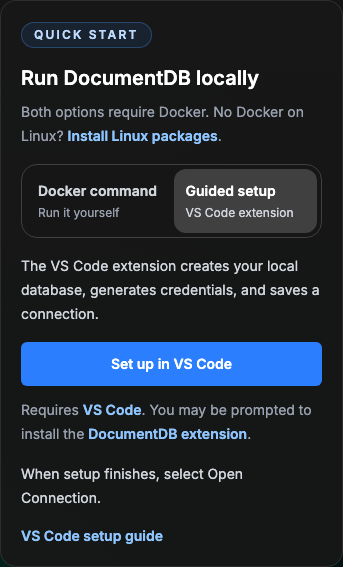
Mobile (375px viewport)
|

|
@GuanzhouSong Thanks for the thorough pass on this. One area I would like to push further: the VS Code tab. Reading the two tabs side by side, the VS Code one comes across as heavier and more intimidating than the Terminal one, and that is the opposite of what I want. The VS Code path is the one where you click and go, so it should feel like the easy option, not the one with caveats. Three concrete changes. 1. Drop the Docker prerequisite paragraph. It is true that this path needs Docker, but it is equally true of the Terminal tab, and we do not say it there. Stating it only under VS Code makes the guided path look like the one with extra requirements. The full guide covers Docker properly, including the readiness states. 2. One button, and two steps instead of three. VS Code offers to install the extension when the deep link is opened, so "Install the extension" as a separate primary action is a step the user does not have to take on their own. A single button can carry the whole flow, with the install explained in a caption underneath so nothing is hidden. That also removes the old step 01, and the old step 02 was partly restating the button directly above it. What is left is the wizard and the payoff. Two steps against Terminal's three is worth having: the guided path should look shorter at a glance. 3. Move the troubleshooting block out of the main flow. The "If nothing happens, check that the extension is installed and up to date" paragraph sits right in the happy path. The guide already lists every way to open the wizard (activity bar, Command Palette, the Proposed copy for the tab: Above the button
Button (single)
Caption under the button
Steps
Footer
|
Reading the two quick start tabs side by side, the VS Code one read as the
heavier option: a Docker prerequisite paragraph, two buttons, three steps
and a troubleshooting paragraph in the happy path. The guided path should
look like the short one.

- Drop the Docker prerequisite. Both paths need Docker and the Terminal
  tab does not say so; saying it only here made the guided path look like
  the one with extra requirements. The guide covers Docker properly.
- One button, "Set up in VS Code". VS Code offers to install a missing
  extension when a vscode:// link targets it and re-handles the link after
  install, so a separate "Install the extension" action was a step the
  visitor never has to take. The caption explains the install and links
  the Marketplace, so nothing is hidden.
- Two steps instead of three: the wizard, then the payoff. Sample data is
  seeded by default (loadSampleData in the extension's quickStartTypes.ts).
- Troubleshooting moves out of the happy path into one footer sentence
  that links to the guide's "Set up DocumentDB Local" section. The anchor
  is derived with the same kebabCase the renderer uses, so a retitled
  heading moves the link rather than breaking it.

On managed devices whose policy sets ExtensionGalleryServiceUrl, the
install-on-link fails with "No extension gallery service configured" when
the link is also what starts VS Code: the gallery account check runs
before the Microsoft auth provider is up, and the URL handler does not
retry. A second click once VS Code is running works. A status line shown
only after the button is used says so, keeping the caveat away from
people who have not clicked yet, and the guide's troubleshooting names the
error and both fixes.
Design review of the previous commit found the post-click hint fired
instantly for everyone, so the majority for whom VS Code was already
opening read "it can report an error" - the doubt in the happy path the
reviewer asked to remove, moved one click later. It also promised "VS
Code should now open" to people with no VS Code at all, for whom the
link is silent.

The hint is now one line that appears four seconds after the button is
used: "Nothing happened? Try Set up in VS Code again, or install the
extension from the Marketplace first." The deep link is repeated as the
retry control, since on managed devices the second click is the one
that works. The error itself is explained only in the guide. The live
region is mounted from the first paint so the line is announced when it
arrives.

The caption is two short sentences with the same facts, and the footer
link reads "full VS Code guide" to rhyme with the Terminal panel's
"Full Docker guide", so a successful visitor still has a neutral route
to the guide.
…steps

Code review of the previous two commits, applied:

- The homepage imported the docs content service to obtain one anchor
  string, and Markdown.tsx and articleService.ts each called kebabCase
  independently, so the "renderer and link cannot drift" claim was only
  true by coincidence. app/lib/docsAnchors.ts now owns headingAnchor and
  the setup-section constants; the renderer, the guide and the homepage
  all use it, and the homepage no longer imports a module that touches
  fs.
- The retry line arrived above the step list, shifting the steps down
  while they were being read. It now renders below the steps, next to
  the footer it belongs with, as an exported SetupRetryHint component so
  the visible state is covered by a test without a DOM library.
- Copy: VS Code offers to install the extension, it does not install it
  unasked; the flow has prompts to confirm; sample data is loaded by
  default rather than unconditionally included. The guide's gallery
  bullet keeps the symptom and both fixes and drops the unverified
  mechanism, and says "open the link again" since the guide has no
  button.
- Tests no longer pin attribute order or exact empty-element markup,
  bound the caption to its paragraph, and fail with an assertion rather
  than a TypeError if a panel boundary moves.

|
I don't think Terminal / VS Code is the right split here. It mixes an interaction surface with a product: Docker Desktop has both a GUI and an integrated terminal, while VS Code also has an integrated terminal. The actual choice this UI presents is manual container setup versus extension-guided setup. Could we label the paths by that distinction instead? For example:
I would also remove “Want a GUI?”. Docker Desktop is already a GUI, and the VS Code path’s real advantage is automated provisioning and a ready-to-use connection—not simply that it is graphical. This is also closer to how other database projects frame the workflow: MongoDB presents its VS Code extension as a tool for working with a deployment, while Microsoft's PostgreSQL extension quickstart treats a running server—local, Docker, on-premises, or cloud—as the prerequisite and then describes the editor experience. The two paths here are useful; I think they should be framed as quick/manual versus guided, rather than terminal versus editor. |

Address the workflow distinction raised in PR 179: Docker command versus extension-guided provisioning, rather than terminal versus editor. Keep one guided launch action and two steps, explain the shared Docker requirement once, and remove the timed retry hint.

Give existing instances a separate connection-guide route and make guide verification work with or without sample data. Preserve the command default, public anchor, safe command, and keyboard interaction; update the regression coverage.

Signed-off-by: Guanzhou Song <26541184+GuanzhouSong@users.noreply.github.com>
 GuanzhouSong
changed the title
GuanzhouSong
changed the title
Signed-off-by: Guanzhou Song <26541184+GuanzhouSong@users.noreply.github.com>
Signed-off-by: Guanzhou Song <guanzhousong@microsoft.com>
Signed-off-by: Guanzhou Song <guanzhousong@microsoft.com>
Signed-off-by: Guanzhou Song <guanzhousong@microsoft.com>


4 participants


Live preview
Open the public reviewer preview | Desktop and mobile screenshots
The preview shows the homepage implementation at
ad134e4. Fork-only deployment settings and screenshots stay on separate branches, outside this PR.Summary
Offer two ways to set up DocumentDB Local, following German's feedback: run Docker yourself or let the VS Code extension provision it. This is a setup choice, not Terminal versus VS Code.
The public
run-with-dockeranchor, loopback-bound command, quoted credentials, command-first default, keyboard navigation, andvscode://ms-azuretools.vscode-documentdb/localsetup URI are preserved. There is no delayed retry UI or website-side handoff detection.Guide alignment
The website serves
vscodeQuickStartGuideContentfromapp/services/articleService.ts; changing cloned markdown alone would not update this route.The guide leads with the setup wizard, keeps the manual Docker alternative, and has a stable Connect an existing instance section. It explains guided versus manual sample-data defaults and supports an empty instance. Prerequisites, alternate wizard entry points, and launch recovery remain available.
Latest update
ad134e4adds the Linux-packages alternative beside the shared Docker requirement and tests that it sits outside both setup panels. It builds on the concise homepage guidance in415dbdd; the default tab, command, and guided setup behavior are unchanged. The screenshots and public preview have been refreshed for the latest revision.Validation
main, rather than added to this PR.Browser-to-VS-Code handoff, extension installation, and Docker provisioning were not exercised end to end. These website checks do not certify those external workflows.