
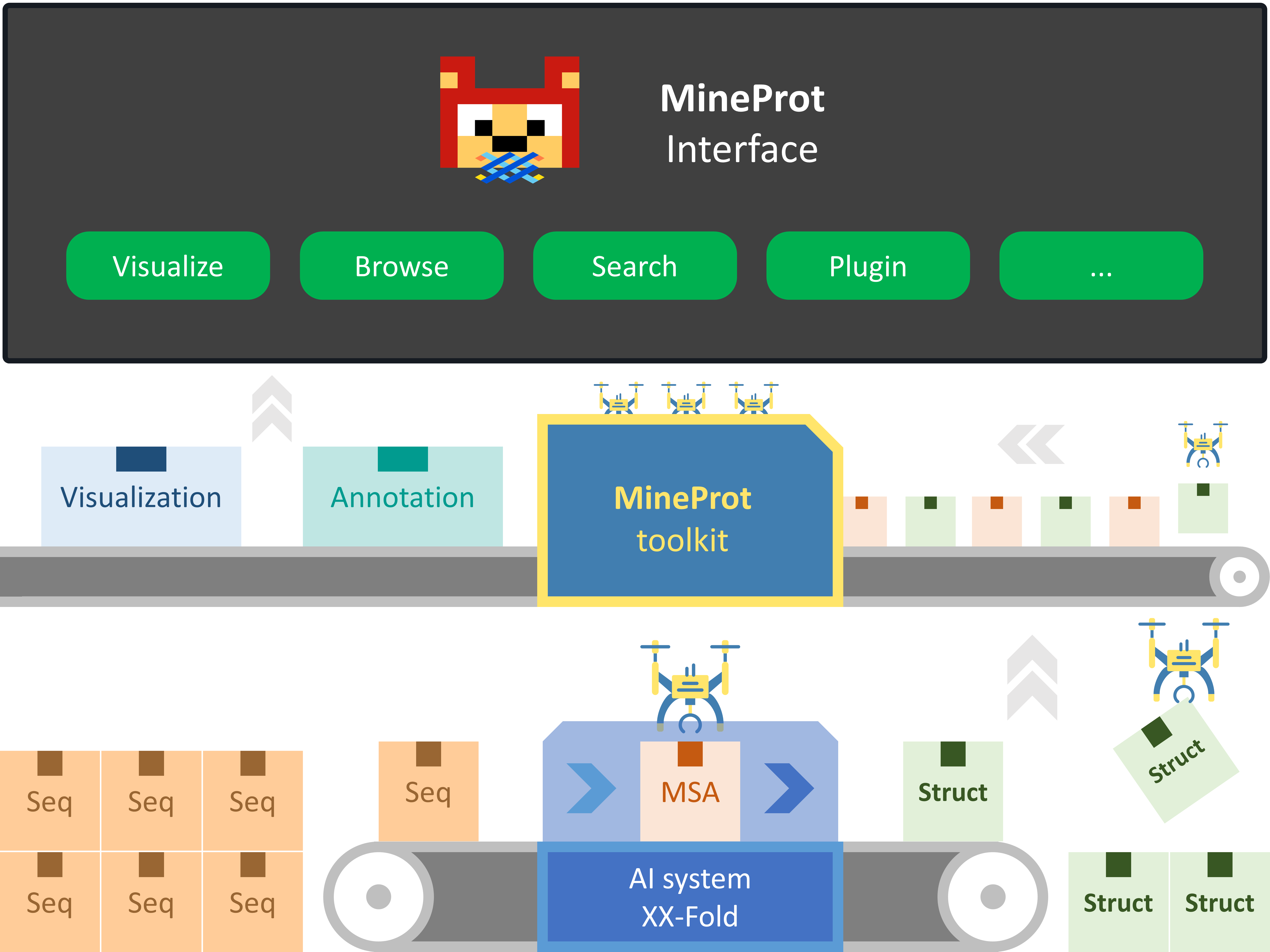
MineProt provides solution for curating high-throughput structuring data from AI systems such as AlphaFold, ColabFold, etc.
By the aid of MineProt toolkit, you can:
- Deploy your own structure server in simple steps
- Take advantage of most information provided by AI systems to curate your data
- Visualize, browse or search your data via user-friendly online interface
- Utilize plugins to extend the functionality of your server
Detailed guides live in docs/: deployment, toolkit and API reference.
Use a Linux x86-64 host with Docker and Docker Compose. The current Web service runs on Python 3.12, FastAPI, and Uvicorn; legacy .php URLs remain supported without PHP, PHP-FPM, or MAXIT.
From a checkout containing the current Python implementation, run:
cd /path/to/MineProt
bash toolkit/setup.sh -c docker -p 8080 -d ./data
After setup completes, open http://localhost:8080. Setup builds the images, starts Elasticsearch, and checks service health before exiting. Repository files and Elasticsearch data are stored under ./data/repo/ and ./data/es/.
For public hosting, add --production: the public Web becomes read-only and
management is available only at http://127.0.0.1:8081 on the server. Toolkit
scripts default to this management URL. Use -a PORT for a different management
port, and --development to restore writable public access. Setup remembers
the mode. See the production deployment guide.
Podman with a working Compose provider is also supported:
bash toolkit/setup.sh -c podman -p 8080 -d ./dataCache defaults to /tmp/mineprot inside the Web container. Add -s 1024 to use a 1024 MiB shared-memory cache, subject to host memory and shared-memory limits. Cached files are temporary and are not preserved when the container is recreated.
Setup retains supported options in .env for subsequent runs. Elasticsearch and the bundled IK plugin remain at 7.12.1. See the deployment guide for configuration, permissions, updates, and deployment without containers.
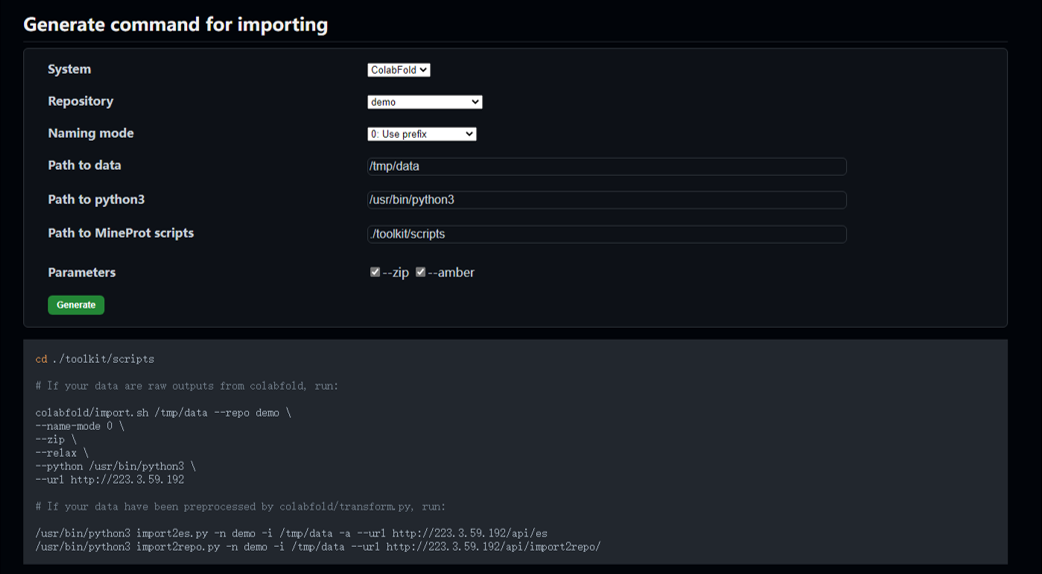
Open /import.php on a writable MineProt service to upload a single PDB/CIF/mmCIF
structure with optional JSON/A3M files, or a result ZIP.
Choose a repository and storage compression, then import directly in the browser.
See browser imports for options and limits.
For command-line imports, use the toolkit below.
Use Python 3.12+ and install the toolkit package from the project root:
python -m pip install -e ./toolkitFor ColabFold monomer results stored as ZIP archives, use the following pipeline.
Add --relax only when rank-1 relaxed PDBs are present:
bash toolkit/scripts/ai/colabfold/import.sh /path/to/your/results --repo demo \
--name-mode 0 \
--zip \
--python "$(command -v python)" \
--url http://127.0.0.1:8081
The pipeline prepares rank-1 models, indexes their metadata and uploads their files into repository demo. UniProt/GO/InterPro annotation is attempted using MSA identifiers; availability depends on the input and external lookups. For AlphaFold3 complexes or a single structure, see the toolkit manual.
Run this on the production server or through an SSH tunnel. In development mode,
set --url to the writable Web address, for example http://127.0.0.1:8080.
Structures are visualized with Mol*. Confidence data such as pLDDT and PAE are stored in JSON; optional MSA-based annotations are indexed in Elasticsearch.
MineProt interface provides final users with following functions:
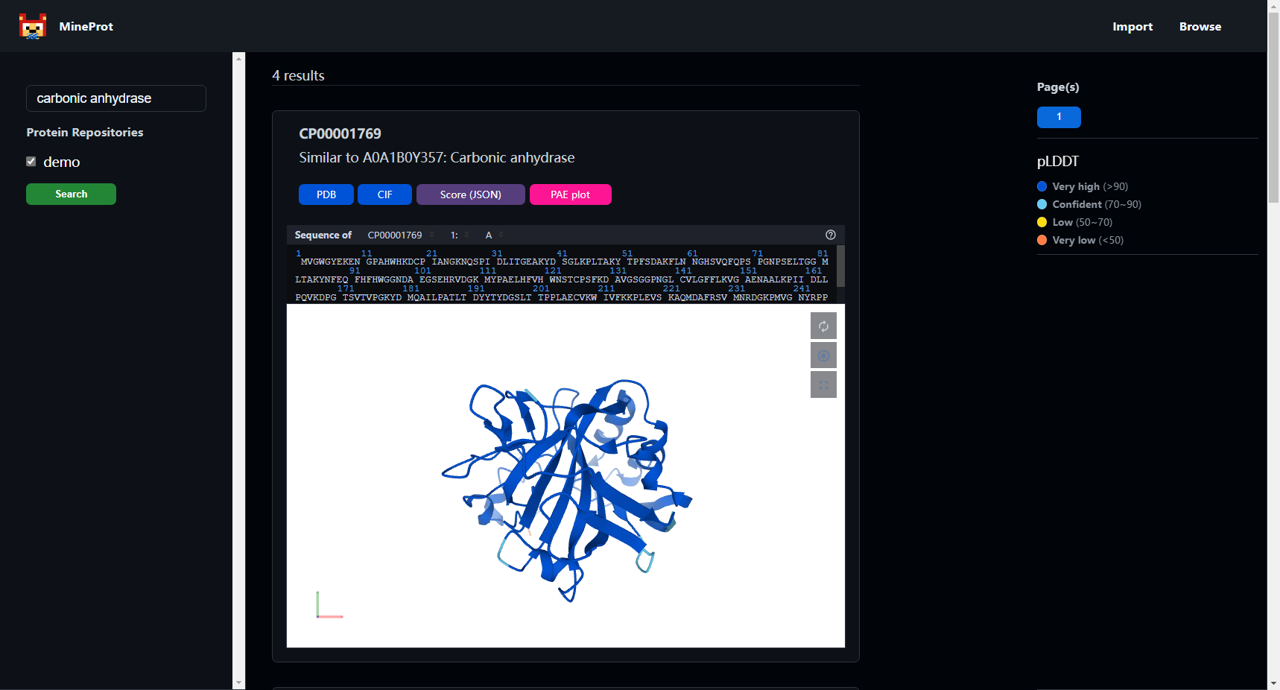
- Search: Type, enter, results.
- Visualization: Mol* powered 3D analysis in your browser.
- Browse: Select one repository, and all information will be available.
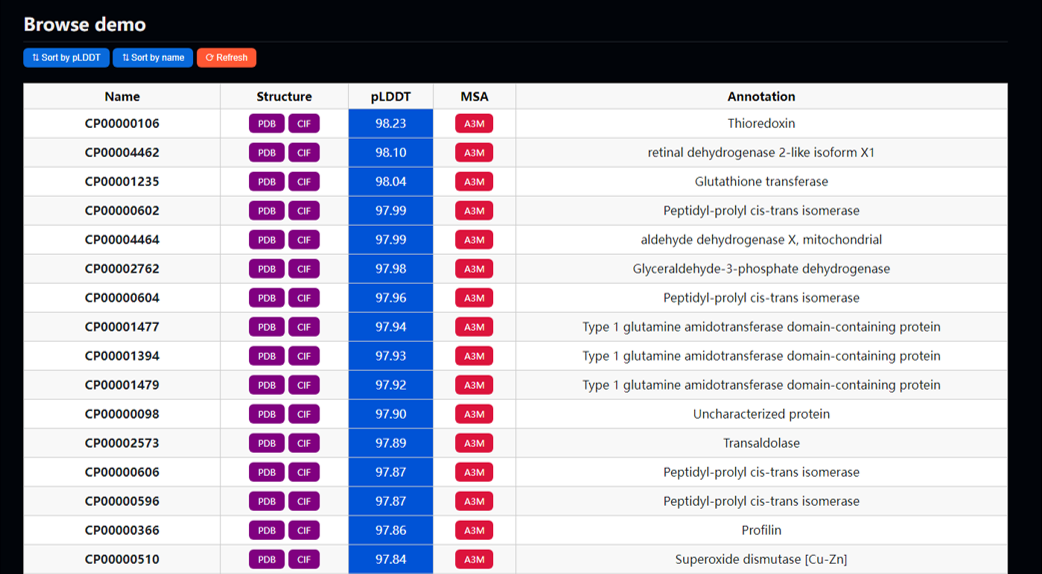
To speed up response of the browse page, MineProt automatically generates cache for each repository on first access. On a writable service, Refresh regenerates the cache. Production public Web blocks explicit cache-management requests and uses automatic cache expiration.
- Salign: Structure search engine powered by US-align.
mineprot_salign.mp4
Server administrators can import structures and prediction archives directly through the import page on a writable service.
Use a current Chrome, Edge, Firefox or Safari release with WebGL enabled for the vendored PDBe Mol* 3.12.0 structure viewers. Internet Explorer is unsupported.
We suggest accessing the web site using devices with resolution higher than 1366x768 (landscape screen) for better user experience.
Usability from mobile devices with portrait screen is not guaranteed.
The bundled US-align executable requires a Linux x86-64 container engine. Setup checks the engine architecture and verifies its archive against app/python/tools.sha256 before building. Foldcomp 1.0.0 is installed from PyPI with the other Python dependencies; no standalone Foldcomp executable is required.
For deployment without containers, prepare:
- Python 3.12 and the packages in
web/requirements.txt, including FastAPI, Uvicorn, Gemmi, and Foldcomp. - Elasticsearch 7.12.1 with the matching IK plugin.
- US-align available on PATH, or configured through
MP_USALIGN.
The Python service serves pages, static assets, repository downloads, and legacy API URLs directly. A reverse proxy can provide TLS and access control. The current Compose deployment does not use PHP or Nginx containers.
See the deployment guide for startup commands and environment variables.
The toolkit is a Python 3.12+ package configured in toolkit/pyproject.toml. Scripts are grouped into ai/, batch/ and misc/, with a standalone import_single.py entrypoint; shared implementations live in toolkit/src/mineprot_toolkit/. See the toolkit manual for installation and usage. The batch repository importer uses Requests; -m 4 additionally uses foldcomp==1.0.0 to compress PDBs into FCZ. -z selects server-side gzip storage and cannot be combined with -m 4. See the batch import guide for format checks, batching and examples. Operations are more convenient with a Bash shell.
Browser plugins require the TamperMonkey plugin.
See the toolkit manual for usage and toolkit/README.md for package development checks.
@article{10.1093/database/baad059,
    title={MineProt: a stand-alone server for structural proteome curation},
    author={Zhu, Yunchi and Tong, Chengda and Zhao, Zuohan and Lu, Zuhong},
    journal={Database},
    volume={2023},
    pages={baad059},
    year={2023},
    publisher={Oxford University Press}
}