
The Excel formula engine for .NET.
Create, read, recalculate and style .xlsx workbooks in C#.
No Excel install. No COM interop. Pure managed code.


Live demo · Functions · Validation · Examples · Styling · Pricing · Contact
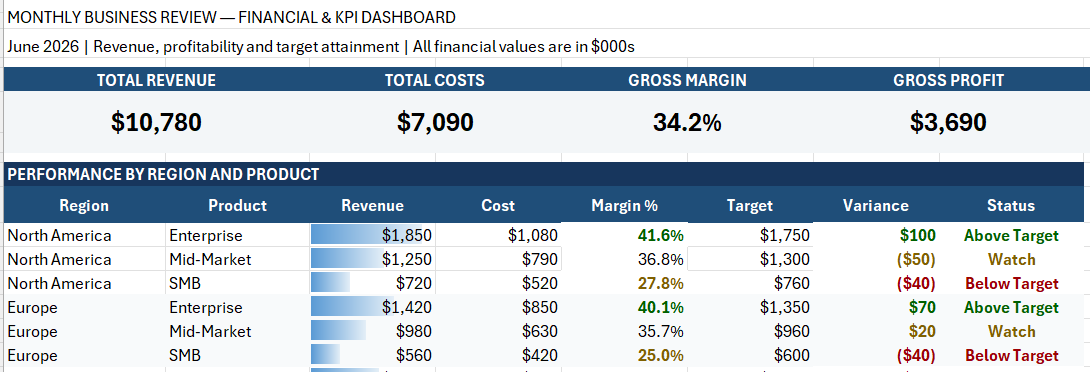
Generated in C#. No Excel, no COM, no template file.
29 live formulas · 18 format rules · 25 merged ranges · 36 styles from 9 fonts · 13.7 KB
FormulaEngineer is a complete .NET Excel solution for creating, reading, recalculating, and professionally styling .xlsx workbooks.
Most .NET spreadsheet libraries can open and create Excel files. Very few can accurately evaluate the formulas inside them.
FormulaEngineer was built around that gap.
It parses Excel formulas, resolves workbook references and dependencies, applies Excel-style type coercion and error behavior, and calculates fresh results in pure managed .NET—without starting Excel or relying on COM automation.
Since version 3.0, FormulaEngineer also provides a comprehensive workbook-presentation API for producing polished reports, financial models, exports, and dashboards.
An .xlsx workbook may contain formula results previously saved by Excel. These cached values can be missing, stale, or incorrect after an application changes the workbook inputs.
FormulaEngineer evaluates the workbook logic directly.
Cached value stored in file
            │
            ├── Input changes
            │
            ▼
Cached result may now be stale
            │
            ▼
FormulaEngineer recalculates the formula
            │
            ▼
Fresh calculated result
Reading a cached value is not the same as recalculating a formula.
FormulaEngineer does not merely read the last result saved inside an .xlsx file. It reads and evaluates the formula itself.
FormulaEngineer supports modern and classic Excel functions across lookup, financial, statistical, engineering, text, date/time, logical, database, dynamic-array, and lambda-helper families.
Formula evaluation includes references, ranges, structured tables, spilled arrays, type coercion, dependency resolution, and Excel error propagation.
The forward-only reader and writer are designed for predictable memory usage, from small business reports to large server-generated exports.
Create workbooks that people can open and use immediately—with styling, conditional formatting, tables, comments, images, shapes, charts, sparklines, and auto-fit.
Run FormulaEngineer in ASP.NET Core, background services, Docker containers, CI/CD pipelines, Azure Functions, AWS Lambda, Windows, Linux, and macOS.
- Accurate formula evaluation — verified against hundreds of real-world formulas and workbook scenarios.
- 461 Excel-compatible functions — across all major business and technical formula families.
- Modern dynamic arrays — including
FILTER,SORT,SORTBY,UNIQUE,SEQUENCE,TAKE,DROP,HSTACK, andVSTACK. - Lambda helpers — including
LET,LAMBDA,MAP,REDUCE,SCAN,BYROW,BYCOL,MAKEARRAY, andISOMITTED. - Advanced lookup behavior — including
XLOOKUP,XMATCH,VLOOKUP,HLOOKUP,INDEX,MATCH, approximate matching, wildcard matching, and reverse search. - Structured table references — including row-level calculated-column formulas.
- Cross-sheet evaluation — formulas can reference values and ranges on other worksheets.
- Dynamic-array spilling — with Excel-style broadcasting, spill references,
#SPILL!, and#CALC!behavior. - Excel-style errors — errors such as
#N/A,#VALUE!,#REF!,#NUM!, and#DIV/0!are preserved as calculation results. - Circular-reference detection — circular dependencies are detected instead of causing uncontrolled recursion.
- Formula reading and writing — write formulas into cells, reopen the workbook, and evaluate them without Excel.
- Streaming workbook I/O — forward-only reading and writing with a flat memory profile.
- Professional styling — fonts, fills, borders, number formats, alignment, protection, merged cells, row heights, column widths, and auto-fit.
- Advanced workbook objects — conditional formatting, rich text, named styles, themes, tables, notes, threaded comments, images, shapes, charts, and sparklines.
- Cross-platform deployment — pure managed code targeting .NET 6 and later.
| Property | Details |
|---|---|
| Package | FormulaEngineer |
| Current version | 3.0.4 |
| Target framework | net6.0 |
| Compatible runtimes | .NET 6 and later |
| Supported platforms | Windows, Linux, macOS |
| Excel installation required | No |
| COM interop required | No |
| Workbook format | Excel .xlsx / OOXML |
| Excel-compatible functions | 461 |
| Formula support | Read, write, and recalculate |
| Workbook I/O | High-performance streaming reader and writer |
| Presentation support | Styling, tables, comments, images, shapes, charts, and sparklines |
| Licence | Commercial with a 30-day free trial |
| Distribution | NuGet |
FormulaEngineer supports 461 Excel-compatible functions and special forms across the major Excel formula families.
| Family | Count | Coverage |
|---|---|---|
| Statistical | 134 | Aggregation, distributions, forecasting, regression, correlation, covariance, ranking, hypothesis testing, and legacy compatibility |
| Math and Trigonometry | 72 | Arithmetic, rounding, powers, factorials, combinatorics, trigonometry, hyperbolic functions, matrices, and random values |
| Engineering | 50 | Unit conversion, base conversion, bitwise operations, error functions, step functions, and complex numbers |
| Financial | 45 | Loans, investments, depreciation, securities, yields, cash flows, and rates |
| Text | 42 | Concatenation, searching, replacement, case conversion, parsing, splitting, and value-to-text conversion |
| Date and Time | 25 | Serial dates, business days, ISO weeks, date arithmetic, and month-end calculations |
| Lookup and Reference | 20 | Lookups, references, spill anchoring, range trimming, and address operations |
| Logical | 20 | Conditions, boolean logic, error handling, named values, custom functions, and lambda helpers |
| Information | 20 | Type checks, cell metadata, error inspection, and worksheet information |
| Dynamic Array | 18 | Generating, reshaping, filtering, sorting, stacking, wrapping, and transforming spilled arrays |
| Database | 12 | Criteria-based aggregation over structured data |
| Published total | 461 | Named functions and supported parser-level special forms |
SUM · SUMIF · SUMIFS · COUNTIF · COUNTIFS · AVERAGEIFS
XLOOKUP · VLOOKUP · HLOOKUP · INDEX · MATCH · XMATCH
FILTER · SORT · SORTBY · UNIQUE · SEQUENCE · TAKE
PMT · PV · FV · NPV · IRR · XNPV · XIRR
DATE · EDATE · EOMONTH · WORKDAY · NETWORKDAYS
FORECAST.LINEAR · PERCENTILE.INC · STDEV.S · CORREL
LET · LAMBDA · MAP · REDUCE · SCAN · BYROW · BYCOL
Browse all 461 supported functions →
Formula evaluation involves much more than parsing a formula string.
FormulaEngineer handles:
- Cell and range references
- Relative and absolute references
- Cross-sheet references
- Named references
- Structured table references
- Dependent formula cells
- Numbers, text, dates, booleans, and blanks
- Array broadcasting
- Horizontal and vertical spilled arrays
- Lookup matching and search modes
- Excel serial-date calculations
- Excel-style type coercion
- Formula error propagation
- Circular-reference detection
Formula results can include:
| Result type | Examples |
|---|---|
| Numbers | Integers, decimals, percentages, and financial results |
| Text | Concatenation, lookup output, and formatted values |
| Dates and times | Excel serial dates and time values |
| Booleans | TRUE and FALSE |
| Blank values | Empty formula results |
| Spilled arrays | Horizontal and vertical dynamic arrays |
| Excel errors | #N/A, #VALUE!, #REF!, #NUM!, #SPILL!, #CALC!, and #DIV/0! |
Excel errors are calculation results—not application crashes.
FormulaEngineer is validated with workbook-style scenarios—not only isolated parser tests.
Validation covers:
- Surrounding worksheet data
- Dependent formula cells
- Cross-sheet references
- Structured table references
- Dynamic arrays and spilled results
- Lookup formulas
- Date and time formulas
- Text formulas
- Financial formulas
- Statistical formulas
- Excel error values
- Cached values versus recalculated values
| Scenario | Example formula | Verified behavior |
|---|---|---|
| Multi-level dynamic sort | =SORT(A2:C13,{2,3},{1,-1}) |
Sorts by category ascending and score descending |
| Unique two-level sort | =SORT(UNIQUE(E2:F40,FALSE,FALSE),{2,1},{1,-1}) |
Produces sorted unique name/product rows |
| Case-sensitive lookup | =INDEX(D2:D20,MATCH(TRUE,EXACT(H2,A2:A20),0)) |
Resolves the exact-case matching row |
| XLOOKUP with exact text | =XLOOKUP(TRUE,EXACT(H2,A2:A20),D2:D20) |
Returns the value associated with the exact-case match |
| Closest-value lookup | =INDEX(A2:A20,MATCH(MIN(ABS(C2:C20-H2)),ABS(C2:C20-H2),0)) |
Finds the row closest to a target value |
| Dynamic sequence | =SEQUENCE(5,1,10,5) |
Produces 10, 15, 20, 25, 30 |
| Sorted filtered results | =SORT(FILTER(A2:B20,B2:B20>=LARGE(B2:B20,H2)),2,-1) |
Filters top records and sorts them descending |
| Structured reference | =[@Price]*[@Quantity] |
Evaluates a calculated table-row formula |
| Excel error behavior | =SEARCH(E2,A2) |
Returns #VALUE! when the text is absent |
| Error handling | =IFERROR(SEARCH(E2,A2),"Not Found") |
Converts the error into the specified fallback |
A fair formula-engine test should measure recalculation—not only cached-value reading.
- Open a real workbook containing formulas.
- Change one or more input cells.
- Ignore the cached formula results stored in the workbook.
- Recalculate the formulas.
- Compare the newly calculated results with Excel.
Review the complete validation methodology →
Install FormulaEngineer from NuGet:
dotnet add package FormulaEngineerOr add the package directly to your project file:
<PackageReference Include="FormulaEngineer" Version="3.0.4" />FormulaEngineer targets .NET 6 and works with later compatible .NET versions.
The 30-day trial starts automatically on first use. No activation code is required during the trial.
Formula text passed to ExcelFormula.From(...) must not include a leading =.
using FormulaEngineer.Api;

using (var writer = new ExcelWriter("sum.xlsx"))
{
    using (var sheet = writer.CreateWorksheet("Data"))
    {
        sheet.WriteRow(10);                              // A1
        sheet.WriteRow(20);                              // A2
        sheet.WriteRow(30);                              // A3
        sheet.WriteRow(ExcelFormula.From("SUM(A1:A3)")); // A4
    }

    writer.Close();
}using FormulaEngineer.Api;
using var reader = new ExcelReader("sum.xlsx");
using var evaluator = new ExcelFormulaEvaluator();
using var sheet = reader.OpenWorksheet("Data");
var result = evaluator.EvaluateCell(
sheet,
row: 4,
col: 1);
Console.WriteLine(result);Output:
60
The result is calculated from SUM(A1:A3). It is not simply read from a previously stored cached value.
Create an invoice containing calculated line totals, subtotal, tax, and final total:
using FormulaEngineer.Api;

using (var writer = new ExcelWriter("invoice.xlsx"))
{
    using (var sheet = writer.CreateWorksheet("Invoice"))
    {
        sheet.WriteRow(
            "Item",
            "Qty",
            "Unit Price",
            "Line Total");

        sheet.WriteRow(
            "Widget",
            4,
            25.00,
            ExcelFormula.From("B2*C2"));

        sheet.WriteRow(
            "Gadget",
            2,
            80.00,
            ExcelFormula.From("B3*C3"));

        sheet.WriteRow(
            "Subtotal",
            "",
            "",
            ExcelFormula.From("SUM(D2:D3)"));

        sheet.WriteRow(
            "Tax (8%)",
            "",
            "",
            ExcelFormula.From("D4*0.08"));

        sheet.WriteRow(
            "Total",
            "",
            "",
            ExcelFormula.From("D4+D5"));
    }

    writer.Close();
}
Reopen the workbook and calculate the final total:
using FormulaEngineer.Api;

using var reader = new ExcelReader("invoice.xlsx");
using var evaluator = new ExcelFormulaEvaluator();
using var sheet = reader.OpenWorksheet("Invoice");

var total = evaluator.EvaluateCell(
    sheet,
    row: 6,
    col: 4);

Console.WriteLine(total);
Output:
318.6
FormulaEngineer produces workbooks that are ready to open, present, and share—not raw grids requiring manual formatting.
using FormulaEngineer.Api;
using FormulaEngineer.Api.Styling;

var headerStyle =
    ExcelStyle.Default.With(
        font: ExcelFontStyle.Default.With(
            bold: true,
            color: ExcelColor.FromRgb(255, 255, 255)),
        fill: ExcelFillStyle.Solid(
            ExcelColor.FromRgb(31, 78, 121)),
        alignment: ExcelAlignmentStyle.Default.With(
            horizontal:
                ExcelHorizontalAlignment.Center));

var currencyStyle =
    ExcelStyle.Default.With(
        numberFormat:
            ExcelNumberFormatStyle.Custom("$#,##0.00"));

using (var writer =
       new ExcelStyledWriter("sales-report.xlsx"))
{
    using (var sheet =
           writer.CreateWorksheet("Sales"))
    {
        sheet.WriteRow(
            new object?[]
            {
                "Product",
                "Units",
                "Revenue"
            },
            headerStyle);

        sheet.WriteRow(
            new object?[]
            {
                "Formula Engine",
                12,
                5988m
            },
            new ExcelStyle?[]
            {
                null,
                null,
                currencyStyle
            });

        sheet.WriteRow(
            new object?[]
            {
                "Streaming Writer",
                8,
                2204m
            },
            new ExcelStyle?[]
            {
                null,
                null,
                currencyStyle
            });
    }

    writer.Close();
}| Capability | Examples |
|---|---|
| Fonts | Family, size, bold, italic, underline, and color |
| Fills | Solid colors and theme-based fills |
| Borders | Per-side styles, colors, and combinations |
| Number formats | Currency, percentage, date, time, accounting, and custom formats |
| Alignment | Horizontal, vertical, indentation, rotation, and wrapping |
| Layout | Column widths, row heights, merged cells, and auto-fit |
| Conditional formatting | Data bars, color scales, icon sets, and formula rules |
| Rich text | Multiple formatted runs inside one cell |
| Tables | Real Excel tables with styles and structured references |
| Notes and comments | Traditional notes and threaded comments |
| Images and shapes | Embedded images and worksheet drawing objects |
| Charts | Workbook charts anchored to worksheet cells |
| Sparklines | Compact in-cell trend visualizations |
| Dashboards | KPIs, summary tables, charts, and conditional formatting |
Explore the styling examples →
FormulaEngineer is designed for both compact business reports and high-volume data exports.
Its streaming reader and writer provide:
- Forward-only workbook processing
- Single-enumeration access
- Predictable memory usage
- A flat memory profile regardless of workbook size
- No dependency on an installed Excel application
- Styling and layout during workbook generation
- Server-friendly processing for APIs and background jobs
Use FormulaEngineer for:
- Financial reports
- Invoice generation
- Operational exports
- Uploaded workbook processing
- Formula-driven business rules
- Automated workbook validation
- Background recalculation jobs
- Large server-side XLSX exports
- Executive dashboards
- CI/CD workbook testing
Formula evaluation is FormulaEngineer's defining capability—but it is not the only one.
| Area | Capabilities |
|---|---|
| Core styling | Fonts, fills, borders, number formats, alignment, and protection |
| Layout and auto-fit | Column widths, row heights, merged cells, wrapped text, and streaming auto-fit |
| Conditional formatting | Data bars, color scales, icon sets, and formula-driven rules |
| Rich text | Multiple fonts, colors, and styles within one cell |
| Tables | Real Excel tables with styles and structured references |
| Notes and comments | Traditional notes and threaded comments |
| Images | Embedded PNG and JPEG images |
| Shapes | Worksheet drawing objects |
| Charts | Professional charts connected to workbook data |
| Sparklines | Line, column, and win/loss sparklines |
| Dashboards | Attractive, formula-driven business dashboards |
Advanced capabilities are opt-in so applications only enable the workbook features they need.
FormulaEngineer can run anywhere compatible .NET applications run.
- ASP.NET Core applications
- REST APIs
- Background services
- Console applications
- Windows services
- Linux services
- Docker containers
- CI/CD pipelines
- Azure Functions
- AWS Lambda
- Blazor applications
- WinForms applications
- WPF applications
No Excel installation, desktop session, Office process, or COM automation is required.
| Resource | Description |
|---|---|
| Formula examples | Create, read, and recalculate workbook formulas |
| Styling examples | Build professionally formatted workbooks |
| CI/CD examples | Use FormulaEngineer in automated environments |
| Supported functions | Browse all 461 supported Excel functions |
| Formula validation | Review real-workbook validation scenarios |
| Live demo | Try formula evaluation in the browser |
| NuGet package | Install the latest FormulaEngineer release |
| Pricing | Review trial, solo, and team licence options |
FormulaEngineer is commercial software with a built-in 30-day free trial.
- Full access to FormulaEngineer features
- No licence activation required
- Starts automatically on first use
- No credit card required
- Available on Windows, Linux, and macOS
- Intended for evaluation and testing
Paid solo and team licences include commercial use, updates, bug fixes, and support according to the selected plan.
Activate a paid .lic file before using the workbook APIs:
using FormulaEngineer.Licensing;

LicenseManager.ActivateFromFile("license.lic");
View current pricing and licence options →
Read the policies and licensing terms →
FormulaEngineer is licensed software, not open-source software. Access to this repository, its documentation, or its examples does not grant a licence to the proprietary FormulaEngineer package.
Need a function that is not yet supported? Want to check whether FormulaEngineer can process a specific workbook?
Send the function name, formula example, and a minimal sanitized workbook when possible.
- Email: nasrullahkazmi@nasvelocityexcel.com
- Contact: nasvelocityexcel.com/contact
- Website: nasvelocityexcel.com
- NuGet: FormulaEngineer
FormulaEngineer — the complete .NET Excel solution.
Install from NuGet · Try the live demo · Explore examples
© 2026 FORMULAENGINEER TECHNOLOGIES (OPC) PRIVATE LIMITED. All rights reserved.