
ok so this is my personal profile site. not a cv, not a portfolio, no "hire me" energy. it's literally just my spotify playlist, my socials, my email, a live clock and a birthday calendar that keeps repeating every year. everything is wrapped in that apple liquid glass look on a gray background cuz i'm obsessed with it rn.
live site: https://oneandm.github.io
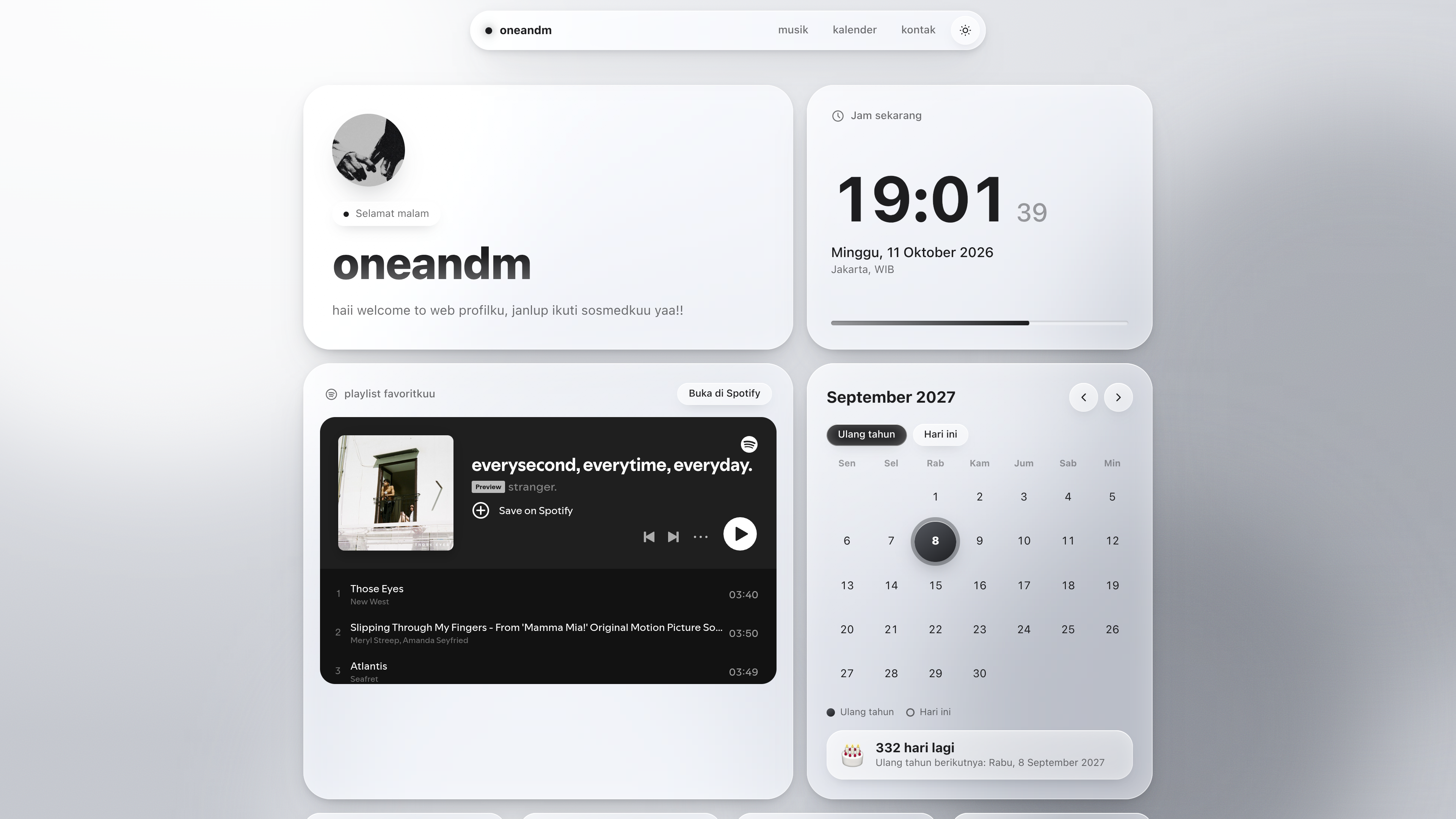
- profile card with my name, a little tagline and an avatar (or just the first letter of my name if i don't add a pic)
- live clock that ticks every second, shows the date and a greeting that changes depending on the time (pagi, siang, sore, malam)
- spotify playlist embedded right on the page so people can actually play stuff without leaving
- birthday calendar with my birthday glowing on the 8th of september, and it shows up every september forever, no manual updating. there's also a countdown to the next one
- socials: facebook, instagram, github, tiktok
- email with a button that copies it to clipboard, so nobody has to select text on their phone like it's 2009
- dark and light mode, both gray. it follows ur device setting by default and remembers what u picked
i wanted it to feel like ios, so every card, the nav bar, buttons and even the little popup are made of "glass". here's how it's faked with only css:
backdrop-filter: blur(...)blurs whatever's behind the card (the floating gray blobs)- a super thin gradient border on the edge so it catches light like real glass
- inner shadows on top and bottom for that shiny rim
- a soft highlight that follows ur mouse or finger when u move over a card
- springy hover and press animations, the little bounce when u tap a button
- the page "focuses in" once when it loads, from blurry to sharp. that's the only intro animation, i didn't wanna spam motion everywhere
- there's also a grain texture over the background so the gray doesn't look flat and boring
if u turn on "reduce motion" in ur device settings, the animations just turn off.
nothing fancy honestly:
- plain HTML + CSS + vanilla JavaScript
- one single file (
index.html), no npm, no framework, no build step - fonts: the apple system font (SF Pro) on iphone/mac, and Inter from google fonts on everything else
- icons are inline svg (the stroke style ones from Tabler Icons)
- clock uses the built-in
Intl.DateTimeFormat, so it knows timezones without any library
since there's no build step, vercel and github pages can just serve the file as is.
.
├── index.html   # the whole website lives here
└── README.md    # u are here
if u add a profile pic, put it next to index.html (more on that below).
open index.html and look for this block near the top of the <script> part. it says "UBAH BAGIAN INI SAJA", that's the only part u need to touch:
const CONFIG = {
  name: "Nama Kamu",
  tagline: "Selamat datang di halaman profilku. Dengerin playlistku, atau mampir ke sosmedku.",
  avatar: "",

  email: "emailkamu@gmail.com",

  spotifyPlaylist: "https://open.spotify.com/playlist/37i9dQZF1DXcBWIGoYBM5M",

  socials: [
    { id: "facebook",  label: "Facebook",  handle: "username",  url: "https://facebook.com/username" },
    { id: "instagram", label: "Instagram", handle: "@username", url: "https://instagram.com/username" },
    { id: "github",    label: "GitHub",    handle: "username",  url: "https://github.com/username" },
    { id: "tiktok",    label: "TikTok",    handle: "@username", url: "https://tiktok.com/@username" }
  ],

  birthday: { day: 8, month: 9 },

  timezone: "Asia/Jakarta",
  tzLabel: "WIB"
};just swap the text between the quotes. name shows up in the nav bar, the big title, the browser tab and the footer. the little avatar circle uses the first letter of ur name if avatar is empty.
- put ur photo in the same folder as
index.html, likefoto.jpg - set
avatar: "foto.jpg" - push it to github with the rest
if the image can't load for some reason it falls back to the letter, so the page won't look broken. a square pic works best cuz it gets cropped into a circle.
- open spotify, go to ur playlist
- click the three dots, then Share, then Copy link to playlist
- paste the whole link into
spotifyPlaylist
u don't need to dig out the playlist id, the code grabs it from the link for u. one thing tho: the playlist has to be public or the embed will be empty. also people who aren't logged in to spotify in their browser usually only get 30 second previews, that's a spotify rule, not a bug.
the default one in the code is spotify's Today's Top Hits, just a placeholder so the page isn't empty while u set things up.
each social is one line. label is the title on the card, handle is the small text under it, url is where it goes. u can add more lines, the grid will just wrap. if u use an id that isn't facebook/instagram/github/tiktok it gets a generic link icon, and if u want a custom icon u can add one to the ICON object in the script (it's just svg path data).
u can also delete a line if u don't wanna show a platform.
birthday: { day: 8, month: 9 } means 8 september. change the numbers to change the date. i left the birth year out on purpose, the calendar doesn't need it and the repo is public anyway.
how the calendar behaves:
- when u open the page it jumps to the month of ur next birthday
- the birthday date glows, and today's date gets a ring
- arrows move month by month, and any september u visit (2027, 2030, whatever) has the glow
- the Ulang tahun button jumps back to the birthday month, Hari ini jumps to the current month
- the card at the bottom counts the days left, and on the actual day it says it's ur birthday 🎉
it switches to the next year by itself once the birthday has passed, so there's nothing to update.
the clock uses timezone for the time and date. the default is Asia/Jakarta.
| where | timezone |
tzLabel |
|---|---|---|
| west indonesia | Asia/Jakarta |
WIB |
| central indonesia | Asia/Makassar |
WITA |
| east indonesia | Asia/Jayapura |
WIT |
tzLabel is only the text shown under the clock, it doesn't change the time. use a proper tz name (the "Continent/City" ones). a typo here will break the page, see the troubleshooting part.
all the text on the site is in indonesian (Selamat pagi, Hari ini, Playlist favoritku, etc). if u want english, these are the spots:
- the arrays
MONTHS,DAYS_IDandDOWin the script - the
greeting()function 'id-ID'inclockFmt, change it to'en-US'for english date format- the labels inside the HTML (Jam sekarang, Playlist favoritku, Buka di Spotify, Salin, ...)
all the colors are css variables at the top of the <style> tag. there's one set for dark and one for light:
[data-theme="dark"]  { ... }
[data-theme="light"] { ... }
stuff worth messing with:
--bg-gradis the main gray background--blob1to--blob4are the floating blobs behind the glass. the glass effect only looks good when there's something with different brightness behind it, so keep some light blobs and some dark ones--glassand--glass-strongcontrol how see-through the cards are. lower the numbers = more transparent--r-xl,--r-lg,--r-mdare the corner roundness of the cards- for the blur amount, search
blur(28px)in the.glassrule (it's there twice, the normal one and the-webkit-one, change both)
if u want a hint of color instead of pure gray, change the blob colors. like a slightly blue-ish gray looks super clean.
easiest way: double click index.html and it opens in ur browser. done.
but if u want it to act like the real thing (some things like the spotify embed behave better on a proper server), run a tiny local server in the folder:
# if u have python
python3 -m http.server 8000

# or if u have node
npx serve
then open http://localhost:8000.
with github (recommended):
- make a new repo on github, upload
index.htmlandREADME.mdto the root of the repo (not inside a folder!) - go to vercel.com and log in with github
- click Add New, then Project, and pick ur repo
- leave everything default. framework preset = Other, no build command, no output directory
- hit Deploy. in like 10 seconds u get a link like
ur-repo.vercel.app
after that every time u push a change to github, vercel redeploys on its own. no need to do anything.
without github (cli):
npx vercelfollow the prompts, and npx vercel --prod to push to production.
- push the files to a github repo
- go to Settings, then Pages
- under Build and deployment, set source to Deploy from a branch
- pick branch
mainand folder/ (root), then save - wait a minute or two, ur site will be at
https://ur-username.github.io/ur-repo-name/
fun fact: if u name the repo exactly ur-username.github.io, the site lives at https://ur-username.github.io/ with no repo name in the url.
git init
git add .
git commit -m "first commit"
git branch -M main
git remote add origin https://github.com/ur-username/ur-repo-name.git
git push -u origin main
or just drag and drop the files on the github website with Add file, then Upload files. that works too, no shame.
on vercel go to Project Settings, then Domains, add ur domain and follow what it tells u to set at ur domain provider. on github pages it's under Settings, Pages, Custom domain.
the page is blank or half broken
open devtools (F12) and check the console. 99% of the time it's a typo in CONFIG: a missing comma, a missing quote, or a wrong timezone name. an invalid timezone crashes the whole script, so double check the spelling like Asia/Jakarta.
the spotify box is empty or says it can't load ur playlist is probably private, or the link is wrong. open the link in an incognito window, if u can't see it there, it's private. adblockers can also block the embed, so try turning it off for the site.
i can't hear the full songs spotify only plays full tracks in the embed if the person is logged in to spotify in that browser. everyone else gets previews.
the glass looks flat, no blur
ur browser might not support backdrop-filter, or hardware acceleration is off. the page still works, the cards just turn into plain solid cards instead of glass.
my avatar doesn't show
check that the file name matches exactly, including capital letters and the extension (foto.jpg is not Foto.JPG), and that it's in the same folder as index.html.
i pushed changes but the site didn't change on vercel check the Deployments tab to see if the build went through. on github pages it can take a couple minutes. and hard refresh the page (ctrl + shift + r) cuz browsers cache a lot.
works on current chrome, edge, safari and firefox (firefox 103 and up for the blur). looks best on safari, ios and mac, since that's what it's copying lol.
once u push this, everything in CONFIG is public. that includes ur email and ur social usernames, which is the point of a profile site, but only put stuff u're ok with strangers seeing. if u don't want spam, make a separate email just for this.
- icons: Tabler Icons (MIT)
- font: Inter by Rasmus Andersson, for non-apple devices
- inspo: apple's liquid glass design
- the music is whatever's in my playlist, not mine obviously
no license file rn. if u want people to be able to legally copy and reuse it, add one (MIT is the easy pick). if u fork it, a star is always nice but ur not required to.