

Upload, Download, Log in and Log out for SolidCraft, against an
EasyPDM server — a small, self-hosted PDM. Needs EasyPDM
0.9 or later. Until 0.9 this lived in the EasyPDM repository (EasyPDM.SolidCraft/ and
EasyPDM.Companion/); its history came along.
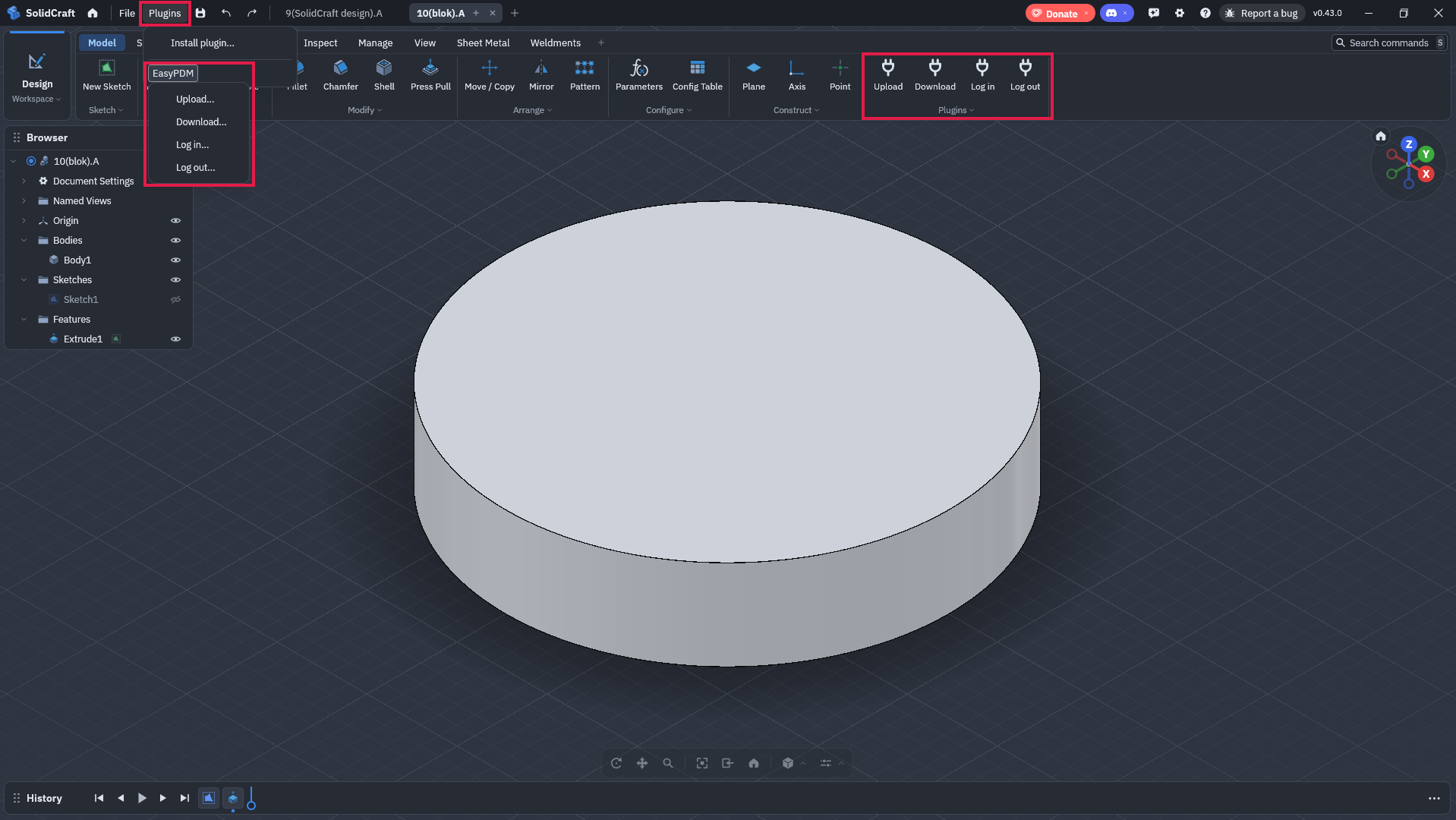
Installing step by step, with screenshots: SolidCraft on the EasyPDM wiki. Downloads: the companion zip for Windows or Linux from the latest release.
SolidCraft plugins are WebAssembly components with no network access (SolidCraft's plugin RFC reserves it for signed plugins from a future curated index; EasyPDM asked for a path for self-hosted servers in tangency-labs/solidcraft#17343). So the integration has two parts:
plugin/— the SolidCraft plugin (Rust,craft:plugin@0.1.0). Its menu entries (Plugins > EasyPDM) prepare an upload in a folder the user grants at install time (the outbox): the design as.sc, a STEP of it and a<id>.request.jsonwith the design properties (part number, revision…) and EasyPDM's link to the item, kept under the design metadata keyio.github.pawelcel.easypdm. The first upload gives the design adesignIdand writes<designId>.link.jsoninto the outbox; the companion fills the item in once the upload has gone through, and the next upload reads it into the design, with the record name and revision as SolidCraft's own part number and revision. The plugin reads only that file, and only until the design knows its item: SolidCraft voids a whole plugin call when one of its reads fails, even one the plugin handles, so it never asks for a file that may not exist.companion/— the EasyPDM SolidCraft companion, a small EasyPDM program on the same computer (easypdm-companion login | logout | status | process | watch). It picks requests up and uploads them the way the FreeCAD and SolidWorks macros do: a design already linked to an item goes to it (a released item gets a new revision only with a comment), otherwise the item is created or picked in the browser through the macros' ticket flow; the design goes up as thecadattachment<record name>.<revision>.sc, with the STEP, a preview fromsolidcraft-cli snapshot(its background gradient cut out, as the FreeCAD add-on's preview is transparent) and the mass fromsolidcraft-cli eval. The outcome is written as<id>.result.jsonand the processed files move tooutbox/done. Downloads are saved inDocuments/EasyPDM/designswith the item link written in and opened in SolidCraft through its local control channel; login and logout come from the plugin's menu too, approved in the browser.
Assemblies of linked designs (component.insert_design): the companion uploads each
linked design first as an item of its own (recursively; a released one is used as it is),
relinks a copy of the assembly to the components' copies named <record name>.<revision>.sc
(component.relink), uploads that copy and sets the BOM from assembly.bom quantities. Download
fetches the BOM children's designs into the same folder and relinks where a link names an older
revision. Which item a linked design is: its own EasyPDM link, the link file of an earlier
upload of it on its own, or Documents/EasyPDM/linked-designs.json (written instead of the
component's file, which SolidCraft may have open). BOM positions the design no longer has are
only reported, never removed. Components living inside one design are not split into items.
SolidCraft has no drawing workspace yet, so there is no title block or drawing PDF for it.
Step by step with screenshots, for Windows and Linux: SolidCraft on the wiki.
Needs SolidCraft 0.43 or later: Upload saves and exports through SolidCraft's file commands,
which a plugin may use only when the user grants it that command group, and 0.42 has no way to
grant one in its window (its README: "this version has no grant UI yet"); 0.43's install dialog
grants the groups and folders the plugin asks for.
easypdm-companion login --server http://host:port— allow the sign-in in the browser.easypdm-companion setup-solidcraft --plugin easypdm.zip— writesDocuments/EasyPDM/easypdm-solidcraft.zip, the plugin with this computer's outbox path set in its upload form (SolidCraft takes only absolute paths inside a granted folder, and a plugin cannot learn its grant's path).- SolidCraft: Preferences > Plugins > Install plugin…, that file; allow the
filecommand group and theoutboxfolder, read and write (SolidCraft's file commands see only folders granted both). easypdm-companion autostart, sowatchruns whenever you are logged in.- To open downloads in SolidCraft: Preferences > Assistant > Agents through MCP > Let AI agents connect.
The Plugins menu then has EasyPDM > Upload / Download / Log in / Log out. The menu entries only leave requests in the outbox; the companion does the work.
The names come from each entry's menu slot: SolidCraft 0.42 and 0.43 title a plugin command in
the Plugins menu with its menu slot's name, and 0.43 additionally moves an entry into its File or
Help menu when the slot names one of those -- labelled there EasyPDM · upload, with the entry's
id. Slots naming File made every command read "File…", so they name the command instead and stay
in the Plugins menu.
plugin/build.sh # needs Rust (target wasm32-unknown-unknown) and wasm-tools- SolidCraft 0.42.0 installs, inspects and runs the plugin headless, but refuses the
filegroup: 0.42 has no way to grant a command group, headless or in its window (the Upload dialog says "permissions that have not been granted: file" and keeps Run off). - With the 0.42 nightly (2026-11-15), which grants through
plugin.install, the upload entry writes the.sc, the STEP and the request; the.screopens in 0.42 with its body intact. - The companion, against a test server, with a script standing in for the browser: a new item
created through the ticket gets the
.sc, STEP, preview and mass; a linked item in progress takes the same revision again; a linked released item is refused without a comment and gets revision B with one. - The round trip in one headless session (0.42 nightly) against the test server: the first upload creates the item through the browser ticket, the second writes the link and part number into the design and goes to the same item without the browser; two uploads in the same second before the companion runs get distinct requests, and both land in one item.
- The whole menu in one headless session against the test server, with the companion in
watch: Log in (approved in the browser), Upload (new item through the ticket), Download (picked in the browser, saved with the link; opening checked against a stand-in control channel, since no SolidCraft window was running), Log out (token revoked on the server). - An assembly linking one part twice: the part uploaded first as a component (
.sc, STEP, preview), then the assembly with the BOM part × 2; download brought both into one folder with the link resolving to the downloaded part; uploading again went through without the browser. - In SolidCraft 0.43's own window, installed through Plugins > Install plugin… with the
filegroup and the outbox granted, against a real server: Upload created the item through the browser, Download picked it in the tab Upload had opened, saved it and opened it in SolidCraft once "Let AI agents connect" was on. Without that setting the design is saved and the result says why it was not opened. - Also in the window: Log in / Log out from the plugin's menu, and an assembly of two linked designs (components as items of their own, the assembly proposed as an Assembly in the form, the BOM set, the transfer panel showing the tree), the preview uploaded with its background cut out, and the browser brought to the front when Download asks for the item.
plugin/wit/plugin.wit is SolidCraft's plugin interface, copied unchanged from
tangency-labs/solidcraft
(crates/craft-plugin/wit/plugin.wit, Apache License 2.0).