

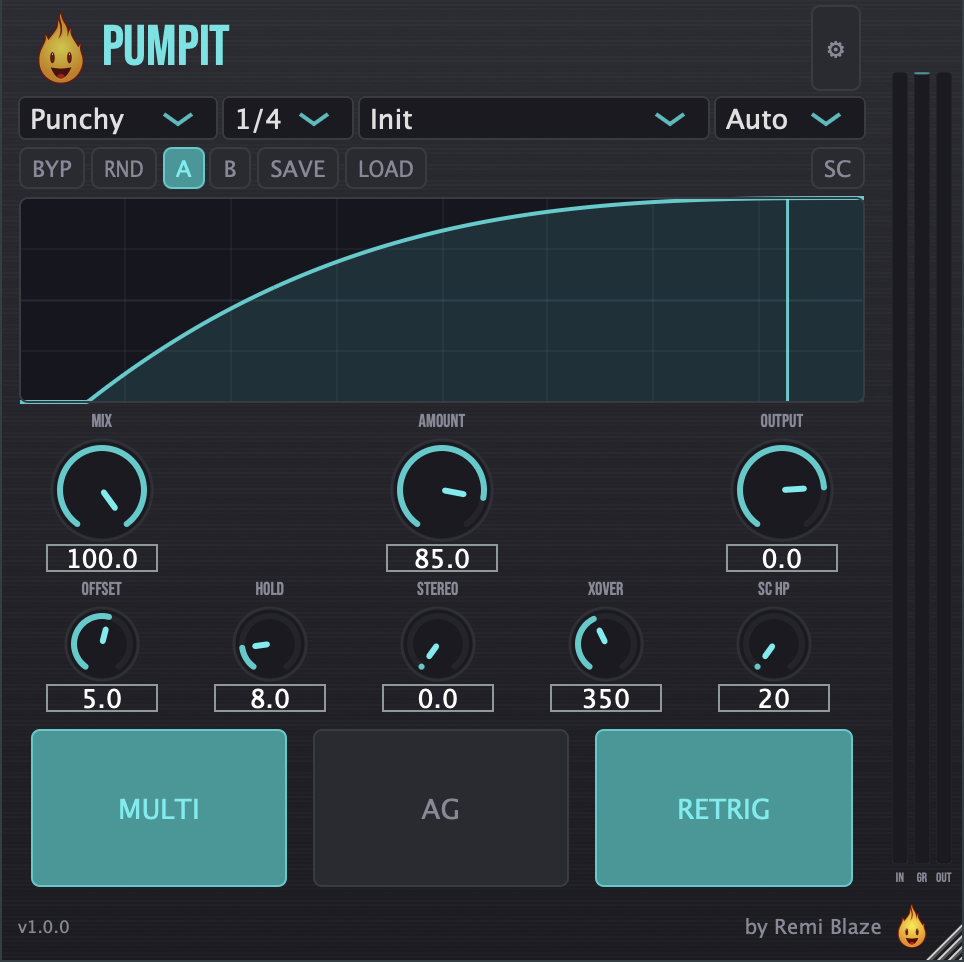
Tempo-synced sidechain ducking with custom curves and multiband control. Get that pumping groove on any track.
PumpIt shapes your signal with a volume-ducking envelope you can sync to tempo, trigger from a sidechain input or MIDI notes, or draw by hand. Ten curve shapes plus a custom editor and a multiband split give you everything from subtle movement to hard four-on-the-floor pumping.
macOS (Apple Silicon and Intel): AU, VST3, CLAP, AAX, Standalone. Signed and notarized by Apple.
Windows 10 and 11, 64-bit: VST3, CLAP, Standalone. Authenticode signed.
AAX ships on macOS only.
Go to the latest release and pick your platform.
macOS
- Download
Pumpit_Installer.pkg. - Double-click it and follow the installer. It is signed and notarized by Apple, so it installs cleanly with no security warnings.
- Restart your DAW and rescan plug-ins. PumpIt appears under Remi Blaze.
Windows 10 and 11, 64-bit
- Download
Pumpit_Installer.exe. - Run it and follow the installer. It is Authenticode signed.
- Restart your DAW and rescan plug-ins. PumpIt appears under Remi Blaze.
No dongle and no extra account on either platform.
Full guide: remiblaze.com/support.
Ducking envelope
- Amount: depth of the volume duck (0–100%).
- Curve: 10 built-in shapes: Smooth, Punchy, Hard, Slow, Long Tail, Half Sine, Log Curve, Exponential, Linear, plus a hand-drawn Custom curve.
- Rate: tempo-synced ducking rate: 1/1, 1/2, 1/4, or 1/8.
- Offset: shift the curve timing earlier or later (−50% to +50%).
- Hold: hold the ducked level before the release stage (0–50%).
Triggering
- Trigger Mode: Auto (tempo-synced), Sidechain (external input), or MIDI.
- Retrigger: restart the envelope when a new trigger arrives.
- MIDI Note: filter MIDI triggering to a specific note, or set to Any.
- SC HP Freq: high-pass filter on the sidechain input (20–500 Hz) so low end doesn't over-trigger the ducking.
- SC Listen: audition the sidechain signal after the high-pass filter.
Multiband
- Multiband: split the signal and duck only the low band.
- Crossover: crossover frequency for the multiband split (100–5000 Hz).
Output & mix
- Input Trim: pre-processing input level (−24 to +24 dB).
- Mix: dry/wet blend (0–100%).
- Output: output level trim (−24 to +6 dB).
- Auto Gain: automatic level compensation derived from the curve's integral.
- Stereo Offset: offset the left/right ducking timing for a wider stereo feel (0–20 ms).
- Bypass: bypass all processing.
Workflow
- Custom curve editor with Catmull-Rom spline interpolation.
- Real-time curve display.
- Randomize parameters for quick inspiration.
- Save and load your own presets (
.presetfiles).
- Phase-coherent multiband: a low/high crossover with an allpass-summed dry path keeps the crossover region free of comb-filtering artifacts at any mix setting.
- Lookahead: 5 ms lookahead with plug-in delay compensation reported to your DAW, so ducking stays aligned to the beat.
- Click-free gain: the ducking gain is smoothed with a 2 ms ramp, keeping even hard and custom curves free of clicks.
- Soft clipper: a soft-clip stage on output smoothly tames peaks toward 0 dBFS.
macOS
- macOS 15.0 or later
- Apple Silicon or Intel Mac (Universal Binary)
- An AU, VST3, CLAP or AAX host
Windows
- Windows 10 or Windows 11, 64-bit
- A VST3 or CLAP host
| # | Preset | Best For |
|---|---|---|
| 1 | Init | Clean starting point |
| 2 | Subtle PumpIt | Gentle movement |
| 3 | Tech House Standard | Classic tech-house pump |
| 4 | Deep House Groove | Smooth deep-house feel |
| 5 | Aggressive PumpIt | Hard, heavy ducking |
| 6 | Bass Only Duck | Multiband low-end ducking |
| 7 | Half Time | Half-time groove |
| 8 | Eighth Note Chop | Fast rhythmic chops |
| 9 | Long Tail PumpIt | Long, drawn-out release |
| 10 | Pad Ducker | Multiband ducking for pads |
| 11 | Remi Blaze PumpIt | Signature pumping tone |
Found a UI glitch, resize bug, or DAW-specific quirk? Open an issue on the Issues tab with your macOS or Windows version, DAW + version, and steps to reproduce.
- Plugin page: remiblaze.com/plugins/pumpit/.
- Developer: Remi Blaze.
- Framework: JUCE.
- License: free under a proprietary Freeware License (see also our terms). Reverse-engineering, repackaging, binary redistribution, or reselling the compiled installer is strictly prohibited.
All product names, company names, and logos mentioned herein are trademarks or registered trademarks of their respective owners. Any such references are used for descriptive or compatibility purposes only and do not imply affiliation with, endorsement by, or sponsorship from their owners.
VST is a trademark of Steinberg Media Technologies GmbH, registered in Europe and other countries.
Apple, macOS, Audio Units (AU), and Apple Silicon are trademarks of Apple Inc., registered in the U.S. and other countries.
AAX, Avid, and Pro Tools are trademarks or registered trademarks of Avid Technology, Inc. in the U.S. and other countries.
Microsoft and Windows are trademarks of the Microsoft group of companies.