
See your codebase as a living, animated tree.
Folders grow into branches, files bloom as leaves — sized by lines of code, colored by language.





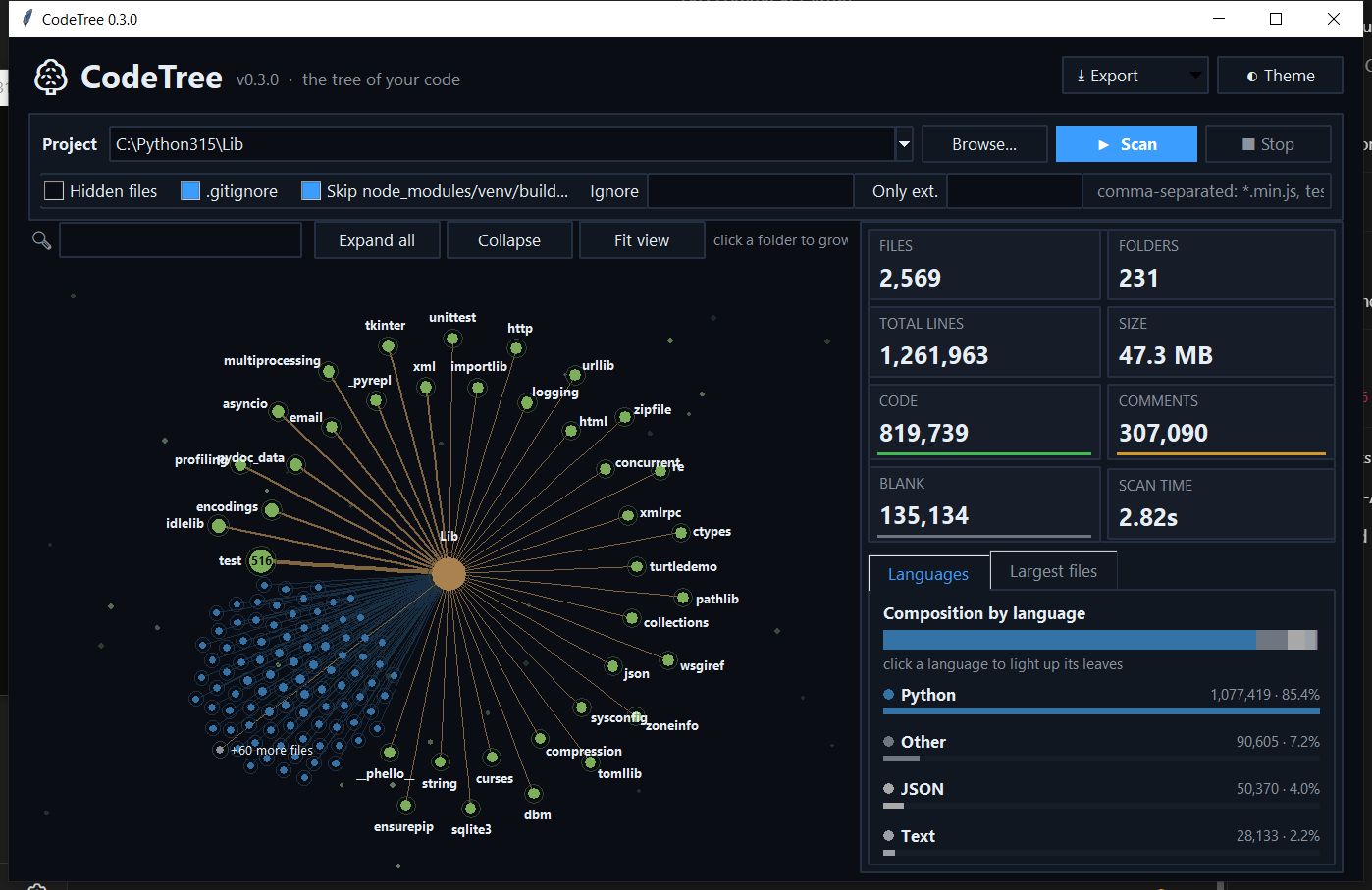
Line counters give you a table. CodeTree gives you a map: you instantly see which folders are heavy, which files dominate, and how comments, blank lines and code are balanced — and you can explore it by clicking, zooming and searching.
- 🌱 A tree, not a table — an animated radial tree that grows from the trunk outward.
- 🎨 Language-aware — 40+ languages detected, every line classified as code, comment or blank.
- ⚡ Fast — scans thousands of files in a couple of seconds, in the background, with a live progress view.
- 🧰 Zero dependencies — pure Python standard library (Tkinter for the GUI).
- 🖥️ GUI by default, terminal when you need it — scriptable with JSON / CSV / Markdown export.
pip install codetree-cliFrom source:
git clone https://github.com/rezamardani01/codetree.git
cd codetree
pip install .
Requires Python 3.8+. The GUI uses Tkinter, which ships with the official Python installers (on some Linux distributions install it with e.g.
sudo apt install python3-tk).
codetree                  # open the GUI on the current folder
codetree path/to/project  # open the GUI on a specific folder
codetree-gui # same, without a console window on Windows| Action | What it does |
|---|---|
| Click a folder | Grow or fold its branch (animated) |
| Drag / mouse wheel | Pan / zoom |
| Hover a node | Highlights its path to the trunk and shows lines, code/comment/blank split, size and share of the project |
| Double-click a file | Opens it in your default editor |
| Right-click | Open, show in folder, copy path |
| Search box | Prunes the tree to matching files and folders |
| Click a language | Lights up all leaves written in it |
| Click a file in "Largest files" | Flies the camera to that leaf |
| Expand all · Collapse · Fit view | Overview controls |
| Theme · Export | Dark/light theme, export JSON / CSV / Markdown |
Shortcuts: F5 rescan · Ctrl+O browse · Ctrl+F search · Ctrl+E export JSON · Esc clear search.
- Trunk (center) = the project root.
- Branches / green nodes = folders. Thicker branch = more lines. The number on a folded node is how many items it hides.
- Leaves = files, arranged in a sunflower pattern at the end of their branch. Bigger leaf = more lines. Color = language.
codetree --cli                          # tree + language table + summary
codetree --cli --depth 2 --sort lines   # limit depth, biggest first
codetree --cli --top 10                 # also list the 10 largest files
codetree -e py -e js -i "*.min.js"      # only these extensions, ignore a pattern
codetree --json report.json             # write reports (use - for stdout)
codetree --csv report.csv --md report.md| Option | Description |
|---|---|
--cli |
Print to the terminal instead of opening the GUI |
--json / --csv / --md FILE |
Export a report (implies --cli) |
-i, --ignore PATTERN |
Glob to ignore, repeatable |
-e, --ext EXT |
Only count these extensions, repeatable |
--hidden |
Include hidden files and folders |
--no-gitignore |
Do not read .gitignore |
--no-default-ignores |
Do not skip node_modules, venv, build, … |
--max-size MB |
Skip files larger than this (default 5) |
--sort name|lines|code, --depth N, --top N |
Terminal tree options |
--no-color |
Disable colors |
-V, --version |
Show the version |
If the GUI cannot start (for example over SSH without a display), CodeTree automatically falls back to terminal output.
from codetree.core import scan, ScanOptions

result = scan(".", ScanOptions(extensions=["py"], ignore=["tests"]))
print(result.total_files, result.total_lines)
for lang in result.languages.values():
print(lang.name, lang.code, lang.comment, lang.blank)- Hidden files and folders are skipped (enable with
--hidden/ the Hidden files checkbox). node_modules,venv,__pycache__,dist,build,.git, lock files and similar noise are skipped by default.- Patterns in the project's root
.gitignoreare respected. - Binary files and files over 5 MB are skipped; everything else is read as UTF‑8 with a lenient fallback.
git clone https://github.com/rezamardani01/codetree.git
cd codetree
python -m unittest discover -s tests -t .
python -m codetree .          # run from source
Project layout:
codetree/
├── core.py   # scanner, language table, line classification, exporters
├── cli.py    # command line interface
├── gui.py    # animated Tkinter tree
└── tests/
Contributions are welcome! Fork the repository, create a branch, add tests for your change and open a pull request. Ideas, bug reports and new language definitions are all appreciated — please open an issue first for larger changes.
Released under the MIT License © Reza Mardani.