




bibliography rodent turns scientific papers (PDF, Word DOCX, JATS XML, HTML and ePub) into structured JSON: title, authors and affiliations, abstract, sections and sentences, tables, figures, equations and a parsed reference list. Every sentence keeps its page number and every row an ID, so you can check each field against the source. It runs on a laptop with no API key. bibr was built for Metacheck and metascience research, and works on its own.
Alpha. Expect bugs and uneven extraction quality, and check important fields against the paper. Evaluation is strongest for English-language social-science papers. See where bibr is strong and where it isn't. The JATS benchmark, bibr against GROBID on 300 open-access papers, is public with its papers, answer key and scores.
To try one paper without installing anything, upload it at try.bibr.org.
To run bibr on your machine you need uv (it installs Python for you). Then:
uv tool install --python 3.12 bibr
bibr chew --sample -o sample.json   # the sample paper that ships with bibr
bibr inspect sample.json            # a summary of the result
If your shell cannot find bibr right after installing, run uv tool update-shell and
open a new terminal. Your own paper works the same way from any folder:
bibr chew paper.pdf -o paper.json.
To use bibr as a Python library in a project, run uv add bibr in a uv project (or
python -m pip install bibr in an existing Python 3.11–3.14 environment).
There is nothing to configure. With no settings, bibr runs in fast mode: local models only, no LLM and no API key.
- First run: bibr downloads about 1.5 GB of models from Hugging Face, once. In our
test the whole first run took about a minute and a half.
bibr chew paper.pdf --dry-runlists what would download. - After that: in our tests, about half a minute for a full-length paper on a CPU, and about 10 seconds for the one-page sample.
- Scanned PDF? Fast mode reads the text layer that a born-digital PDF carries. A scan has none and needs an OCR backend: see Troubleshooting. Word, JATS, HTML and ePub files need no OCR.
bibr inspect summarizes a result:
$ bibr inspect sample.json
Title: The Coefficient of Rodential Efficiency: A Synthetic Benchmark
Authors: 2 (Ada Vole, Boris Capybarov)
DOI: —
Paper type: empirical

Sections: 7
Sentences: 29
Tables: 1   Figures: 0   Footnotes: 0   Equations: 10

References
  Bibliography entries: 10
...
Validation
  4 warnings to review (abstract, authors, in-text citations) · 1 processing note
...
The JSON holds one table per kind of thing, linked by IDs. Trimmed, with "...": "..."
standing for the fields left out:
{
  "schema_version": "12.5",
  "metadata": {"title": "The Coefficient of Rodential Efficiency: A Synthetic Benchmark",
               "language": "en", "paper_type": "empirical", "doi": null, "...": "..."},
  "author": [{"author_id": 1, "given": "Ada", "family": "Vole", "orcid": null, "...": "..."}],
  "affiliation": [{"affiliation_id": 1, "author_ids": [1, 2],
                   "text": "Department of Synthetic Studies, Institute for Fictional Research",
                   "...": "..."}],
  "section": [{"section_id": 2, "header": "Abstract", "section_type": "abstract", "...": "..."}],
  "text": [{"text_id": 4, "section_id": 2, "page_number": 1,
            "text": "CRE separates the groups with a reported effect size of d = 0.82.",
            "...": "..."}],
  "eq": [{"eq_id": 1, "text_id": 4, "verbatim": "d = 0.82", "lhs": "d", "comp": "=",
          "rhs": "0.82", "...": "..."}],
  "bib": [{"bib_id": 1, "title": "Synthetic coefficients for pipeline testing", "year": 2023,
           "container": "Journal of Fabricated Metrics", "doi": "10.9999/jfm.2023.0145",
           "...": "..."}],
  "extraction": {"validation": {"errors": 0, "warnings": 4, "...": "..."},
                 "warnings": [{"code": "LLM_SKIPPED", "message": "..."}], "...": "..."}
}
What you get walks through every table, the validation block and the files written next to the result.
Folders and corpora.
bibr chew papers/ -o results/          # every paper in a folder, one JSON each
bibr batch papers/ --out corpus/       # large corpus: resumable, plus Parquet tables
bibr tables results/ --out tables/     # JSON results → one Parquet file per table
bibr references results/ -o refs.bib   # reference lists → BibTeX (.ris, CSL-JSON .json)
See Batch runs.
Python.
import bibr

result = bibr.chew("paper.pdf")
print(result.title)
references = result.references.df  # pandas DataFrame
result.save("result.json")

bibr.write_tables(bibr.chew("papers/"), "tables/")  # corpus → Parquet, keyed by paper_id
bibr.write_references(result, "refs.bib")  # reference list → BibTeX, RIS, or CSL-JSON
In Jupyter, or anywhere an event loop is already running, use
result = await bibr.achew("paper.pdf") instead. See the
Python guide.
R. Read the JSON with jsonlite, the Parquet tables with arrow, or hand the JSON to Metacheck: R and Metacheck.
Agents and services. With uv tool install --python 3.12 'bibr[mcp]', bibr mcp
exposes extraction as MCP tools for agents such as
Claude Code. With uv tool install --python 3.12 'bibr[serve]', bibr serve runs an
HTTP API.
Web demo. uv tool install --python 3.12 'bibr[demo]', then bibr demo opens the
web demo on your machine (Web demo).
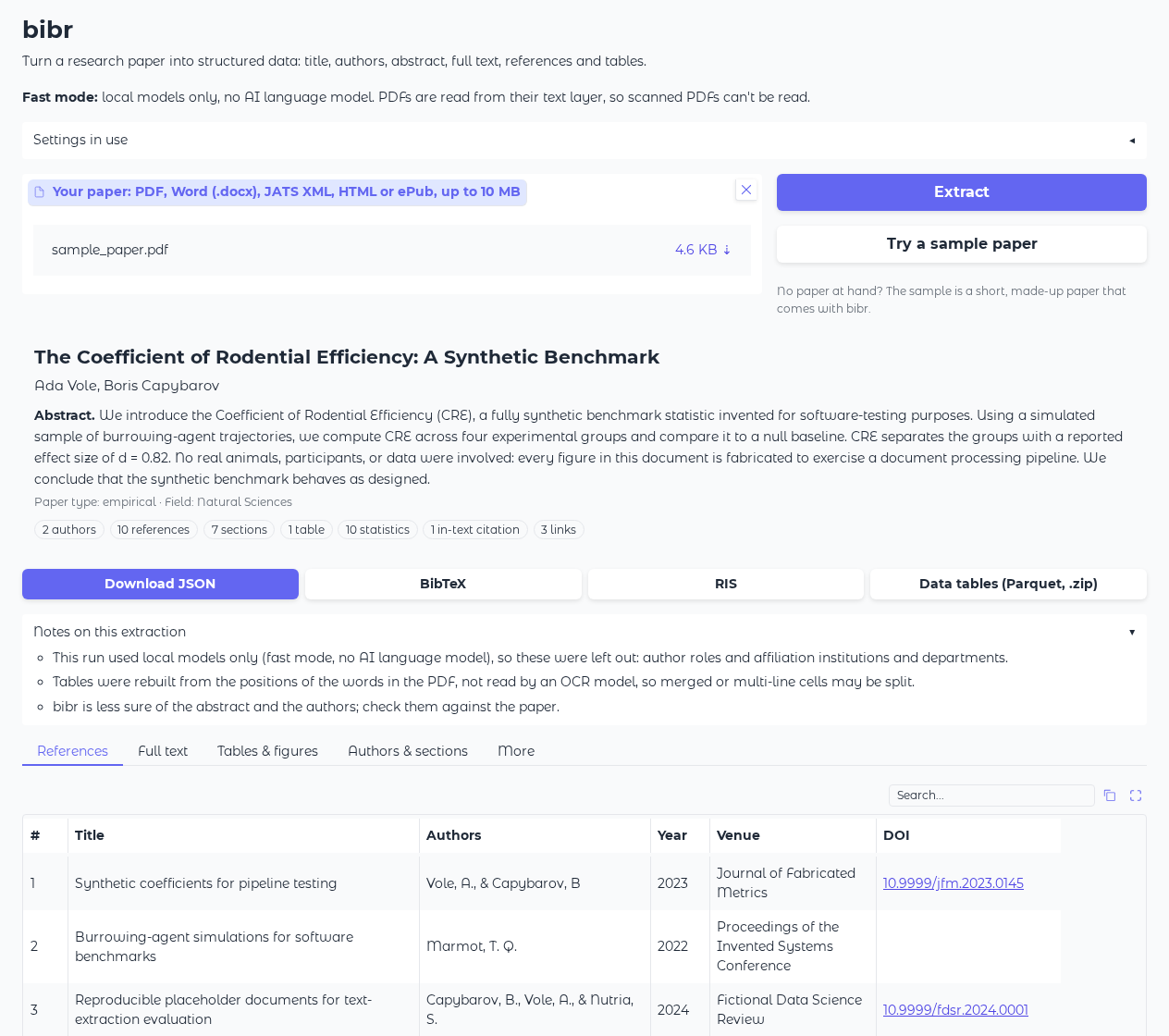
Fast mode reads titles, authors, abstracts and references with bibr's own local models.
An LLM helps with the hard cases. Run bibr setup. Its first question offers fast
mode; press Enter to keep it. Answer no, and it proposes what fits your machine:
- bibr's fine-tuned local model, on an NVIDIA GPU with 5 GB of memory or more, or on Apple Silicon;
- an OCR/LLM server you run yourself; or
- Claude Haiku 5.5 in the cloud, with your Anthropic API key. This sends page images and extracted text to Anthropic, and setup asks for your consent first.
Setup writes a .env file, installs the provider SDK it configures (the Anthropic
and Google SDKs are the anthropic and google extras), and can run a one-page test. The
model guide compares the options.
With nothing configured, the content of your papers stays on your machine: fast mode
calls no LLM, and Crossref lookups happen only with --crossref. One thing to watch: a
key already in your environment counts as a configured LLM. With GOOGLE_API_KEY set
(or LLM_API_KEY, LLM_PROVIDER, LLM_MODEL or LLM_BASE_URL) and no
PIPELINE_MODE in a .env from bibr setup, a run switches to full mode and calls
that LLM; a Google key alone means Google Gemini, which needs the google extra
(uv tool install --python 3.12 'bibr[google]'). --fast keeps a run local whatever is
set, and bibr chew paper.pdf --dry-run shows the mode and where each stage runs.
Details: What leaves your machine.
- Quickstart and Troubleshooting.
- Configuration: settings, OCR backends, LLMs, presets.
- CLI, settings and JSON schema references.
- Known limitations, evaluating extraction quality on your own papers, and how bibr uses LLMs.
If you use bibr in research, please cite the software and report the version you used. Use GitHub's Cite this repository button or the citation metadata to generate a citation. When a Zenodo archive is available for your release, cite its version-specific DOI so readers can identify the exact software used. Otherwise, cite the repository URL together with the version or commit.
Bug reports, test papers, and contributions are welcome. See CONTRIBUTING.md for development setup, tests, and pull requests, and the project history for how the public repository began.
Special thanks to Daniël Lakens (@Lakens) and Lisa DeBruine (@debruine), for putting faith and patience in the project, and being generous with their time and insight to help make bibr 🦫 better for everyone.
Also thanks to the whole Metacheck team, and TU Eindhoven.
We are grateful to the open-source projects that bibr builds on:
- PaddleOCR-VL-1.6 (PaddlePaddle) — default OCR recognizer
- GLM-OCR (Z.ai / Tsinghua University) — explicit compatibility backend and fallback
- Qwen3.5 (Alibaba Qwen) — base of bibr's fine-tuned extraction models
- GROBID — a major source of inspiration for structured scientific document parsing
- FastAPI and Uvicorn — the
bibr serveHTTP API - PP-DocLayoutV3 (PaddlePaddle) — document layout analysis
- wtpsplit — sentence segmentation
- Crossref — reference metadata enrichment
AGPL-3.0-or-later.
The export schema documents in docs/schema/ are dedicated to
the public domain under CC0 1.0,
so other tools can adopt the format freely.