


The official SeatLayer Android SDK for adding an interactive seating chart and native seat picker to ticketing apps. It renders live seat availability, creates temporary holds, finds best-available seats, and exposes every buyer action through typed Kotlin coroutines while your trusted server completes the booking.
Version 0.3.4 adds a complete adaptive Jetpack Compose picker, a
headless protocol-2 state/controller, reusable native Android components, and
View/XML interop while preserving the frozen raw SeatLayerView API.
SeatLayer Android SDK on Maven Central · Android seat-map documentation · SeatLayer reserved-seating platform · Buyer seat-map demo (web) · Native picker reference · 0.2.x migration guide · Bridge reference · SeatLayer iOS seat map SDK · SeatLayer Flutter seat map SDK · SeatLayer React Native SDK · SeatLayer AI Toolkit
Aligned release: Use
0.3.4for both Android artifacts. Pin the exact version in production so core and Compose cannot drift.
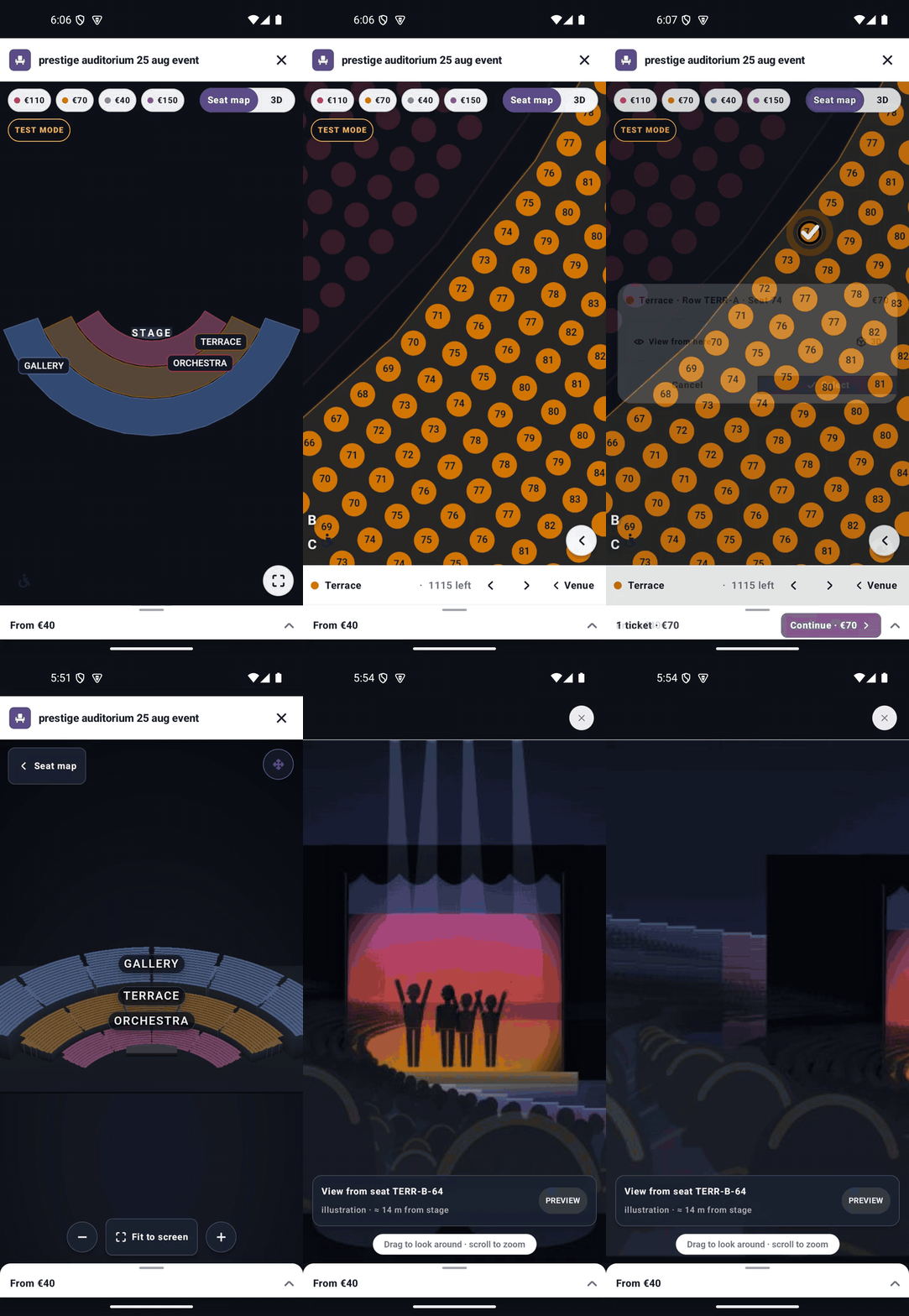
Every piece of buyer chrome is native Android UI. The header, price legend,
floor and section navigation, accessibility filters, seat confirmation, tier
choices, quantity prompts, cart, hold countdown, checkout action, loading and
error states, plus the controls around 3D and panorama are Jetpack Compose
components. SeatLayerPickerView hosts that same native tree in a View/XML
screen, and the headless API also supports an entirely host-owned View layout.
The pinned SeatLayer renderer owns the pixels and gestures that only the venue knows how to draw: seats, labels, section geometry, real venue 3D, and the seat-view panorama. It knows native chrome owns the buyer journey, so it does not place a second tooltip, cart, test badge, or checkout button underneath the Android UI. This keeps chart behavior identical across SeatLayer platforms without making the surrounding application feel like a generic web page.
The integration paths form a ladder. A more custom level keeps the same inventory, snapshots, holds, lifecycle reconciliation, and secure checkout handoff used by the ready-made picker.
| Level | You want | You use | You keep |
|---|---|---|---|
| 1 | The complete buyer flow | SeatLayerPicker |
Adaptive Compose UI and everything below |
| 2 | The flow in your brand | Theme, strings, styles, options, or one of 25 builders | Stock layout, state, and hold ownership |
| 3 | Your own Compose screen | SeatLayerPickerScope plus public components |
Inventory, controller, snapshots, lifecycle, checkout |
| 4 | A View/XML screen | SeatLayerPickerView |
The same ready-made native picker without a Compose host screen |
| 5 | Your own Android Views | SeatLayerPickerStateHolder plus SeatLayerPickerMapView |
The complete headless contract and map renderer |
SeatLayerView remains the low-level protocol-1 map for existing 0.2.x
integrations that deliberately own all buyer chrome and hold orchestration.
flowchart TD
  A["SeatLayerConfiguration<br/>event + publishable access"] --> B{"How much UI<br/>do you own?"}
  B -->|"Nothing"| C["SeatLayerPicker"]
  B -->|"The look"| D["theme · strings · styles<br/>options · builders"]
  B -->|"A Compose screen"| E["SeatLayerPickerScope<br/>+ components"]
  B -->|"A View screen"| F["SeatLayerPickerView<br/>or headless Views"]
  C --> G["SeatLayerPickerCheckoutHandoff"]
  D --> G
  E --> G
  F --> G
  G --> H["Your backend inspects<br/>and books the hold"]
SeatLayerPicker, the complete adaptive Jetpack Compose seat-booking flow.SeatLayerPickerBuilders, themes, strings, options, and per-part styles for changing the product without forking it.SeatLayerPickerScopeand every stock component for a host-owned Compose hierarchy.SeatLayerPickerViewfor the same ready-made picker in View/XML apps.SeatLayerPickerStateHolder,SeatLayerPickerController, andSeatLayerPickerMapViewfor a fully headless or custom-View integration.- The frozen
SeatLayerViewand raw coroutine controller used by existing0.2.xapplications. - Typed immutable snapshots, capability-gated commands, readiness and chart-load telemetry, secure holds, and buyer-safe checkout handoff.
- A hardened, origin-restricted AndroidX WebKit bridge with no unrestricted
addJavascriptInterface. - A pinned immutable
seatlayer-js@0.71.5/mobile.htmlrenderer. - A generic sample covering ready Compose, branded/custom Compose, ready/custom View, and raw integrations.
| Artifact | Use it for |
|---|---|
io.seatlayer:seatlayer-android |
Raw protocol-1 API plus protocol-2 headless state, controller, and map View. No Compose dependency. |
io.seatlayer:seatlayer-android-compose |
Ready-made picker, all native components, themes/styles/builders, and View/XML host. Strictly version-aligned with core. |
Both artifacts ship on the same release train.
- Android API 24 or newer; compile SDK 36
- JDK 17 for local builds
- AndroidX
- Android System WebView support for secure WebKit message listeners
- Document-start JavaScript support when using the protocol-2 native picker
android:enableOnBackInvokedCallback="true"on picker activities when targeting Android 15 or lower and predictive-back animation is required
Add both aligned 0.3.4 artifacts for the native picker:
// app/build.gradle.kts
dependencies {
    implementation("io.seatlayer:seatlayer-android:0.3.4")
    implementation("io.seatlayer:seatlayer-android-compose:0.3.4")
}
// settings.gradle.kts
dependencyResolutionManagement {
repositories {
google()
mavenCentral()
}
}Raw-only applications can omit seatlayer-android-compose.
Releases before 0.2.0 used JitPack coordinates
(com.github.seatlayer:seatlayer-android:v0.1.3). Maven Central is the permanent
channel. Always pin an exact version; never depend on main-SNAPSHOT.
class CheckoutActivity : ComponentActivity() {
    override fun onCreate(savedInstanceState: Bundle?) {
        super.onCreate(savedInstanceState)

        setContent {
            SeatLayerPicker(
                configuration = SeatLayerConfiguration(
                    event = "ev_your_event_key",
                    publicKey = "pk_test_your_key",
                    currency = "USD",
                    maxSelection = 6,
                ),
                modifier = Modifier.fillMaxSize(),
                onCheckout = { handoff ->
                    checkoutBackend.start(
                        holdId = handoff.holdId,
                        amount = handoff.total,
                        currency = handoff.currency,
                    )
                },
                onError = ::reportPickerError,
                onClose = ::finish,
            )
        }
    }
}
The default tree includes adaptive compact/wide layouts, native header and legend, floors and sections, accessibility filters, confirmation, GA/table quantities, dense cart, best available, checkout, 3D/seat-view controls, hold-lapse recovery, light/dark branding, 37 locale dictionaries, lifecycle reconciliation, and Android predictive back.
That is the complete buyer flow: loading and handshake, live inventory, category and accessibility filtering, venue and floor navigation, visible Adult/Child or other runtime-authored tier selection, reserved seats, general admission and tables, cart and holds, expiry recovery, immersive views, and a buyer-safe checkout handoff. Optional controls appear only when the negotiated runtime advertises the capability they drive.
Register the exact renderer origin https://cdn.seatlayer.io on the publishable
key. For login-gated, presale, partner, channel, or other private inventory,
omit publicKey and use the renewable in-memory buyer-access provider shown
under Checkout and security boundary.
Give the picker a definite size and do not place the map in a scrolling list. The canvas owns pan and pinch gestures.
Recomposition retains the active picker. Activity/process destruction creates
a new session; recover an existing hold by restoring its opaque id through
SeatLayerPickerOptions(initialHoldId = ...) and the same renewable
buyer-access provider. Verify that runtime-owned resume path with real
inventory, and never log the hold id.
Three layers can be mixed without forking the SDK:
- Pass
SeatLayerPickerOptions,SeatLayerPickerTheme, localizedSeatLayerPickerStrings, andSeatLayerPickerStylesto configure the ready-made picker. - Use
SeatLayerPickerBuildersto decorate or replace any of 25 independent parts. - Use
SeatLayerPickerScopeand public components such asSeatLayerPickerMap,SeatLayerPickerHeader,SeatLayerPriceLegend,SeatLayerConfirmCard, andSeatLayerPickerCartSheetin a host-owned hierarchy.
SeatLayerPickerScope(
    configuration = configuration,
    callbacks = SeatLayerPickerCallbacks(
        onCheckout = ::openCheckout,
        onClose = onClose,
    ),
) {
    SeatLayerPickerLifecycle()
    SeatLayerPickerBackHandler()

    Column(Modifier.fillMaxSize()) {
        SeatLayerPickerHeader(onClose)
        SeatLayerPriceLegend()
        Box(Modifier.weight(1f)) {
            SeatLayerPickerMap(Modifier.fillMaxSize())
            SeatLayerPickerMapControls()
            SeatLayerConfirmCard()
        }
        SeatLayerPickerCartSheet()
    }
}
See the native picker reference for the full component catalogue, builder context, per-part styling, localization fallback, mandatory test/attribution disclosure, headless state guarantees, and custom View setup.
Use SeatLayerPickerView for the exact ready-made tree in an existing View
screen:
<io.seatlayer.android.compose.SeatLayerPickerView
    android:id="@+id/picker"
    android:layout_width="match_parent"
    android:layout_height="match_parent" />
binding.picker.bind(
lifecycleOwner = this,
configuration = configuration,
onCheckout = ::openCheckout,
onReady = ::observeReady,
onSnapshot = ::observeSnapshot,
onClose = ::finish,
)For fully custom Views, bind a SeatLayerPickerStateHolder to
SeatLayerPickerMapView, collect its state, and invoke its typed controller.
The 0.2.x low-level surface remains available and independent from the native
picker:
class RawMapActivity : ComponentActivity() {
    private val scope = CoroutineScope(SupervisorJob() + Dispatchers.Main.immediate)
    private lateinit var seatMap: SeatLayerView

    override fun onCreate(savedInstanceState: Bundle?) {
        super.onCreate(savedInstanceState)
        seatMap = SeatLayerView(this)
        setContentView(seatMap)

        scope.launch {
            seatMap.controller.events.collect(::handleSeatLayerEvent)
        }
        scope.launch {
            seatMap.load(SeatLayerConfiguration(event = "ev_your_event_key"))
        }
    }

    override fun onDestroy() {
        seatMap.destroy()
        scope.cancel()
        super.onDestroy()
    }
}
load is a suspending function returning ReadyInfo: negotiated protocol,
event mode (live or test), transport, and event key. Await it before sending
commands. The SDK moves WebView work to the Android main thread internally.
Collect controller.events inside repeatOnLifecycle when a raw screen should
stop observation outside its active lifecycle.
SeatLayerView continues to negotiate protocol 1. The native picker uses a
separate protocol-2 profile, so adding Compose does not silently change an
existing raw integration. See the 0.3.4 migration guide
for dependency choices, lifecycle differences, and an adoption checklist.
Seat selection happens inside the map. A raw integration creates a short-lived hold and transfers only its opaque id to the host backend:
scope.launch {
    val hold = seatMap.controller.hold(ttlMillis = 10 * 60 * 1_000)
    if (hold != null) {
        checkoutWith(
            holdId = hold.holdId,
            expiresAt = hold.expiry,
            items = hold.items,
        )
    }
}
HoldResult.timeRemainingMillis can drive a host-owned countdown. The backend,
not the app, inspects those hold items and decides the payable amount.
The coroutine controller covers holds, best available, general admission, tiers, selection, categories, floors, view modes, and camera operations:
val controller = seatMap.controller

val seats = controller.getSelection()
val hold = controller.getCurrentHold()
controller.extendHold()
controller.release()

controller.bestAvailable(quantity = 4)
controller.holdGeneralAdmission(areaId = "floor", quantity = 2)
controller.setSeatTier(seatId = "A-12", tierId = "adult")
controller.selectObjects(listOf("A-12", "A-13"))
controller.setFloor("balcony")
controller.setViewMode(SeatLayerViewMode.Isometric)
controller.setColorblindSafe(true)
controller.zoomToFit()
The complete raw command surface is hold · resumeHold · extendHold ·
release · releaseLabels · bestAvailable · holdGeneralAdmission ·
setSeatTier · getSelection · getCurrentHold · selectObjects ·
deselectObjects · clearSelection · selectCategories ·
deselectCategories · setSelectableObjects · setMaxSelection ·
getSelectionValidity · refreshAccess · getGeneralAdmissionAreas ·
getFloors · setFloor · setColorblindSafe · setViewMode · getViewMode ·
zoomIn · zoomOut · zoomToFit · destroy.
Before using an additive raw command against an older renderer, inspect the
negotiated bundle capability. Unknown events remain available as
SeatLayerEvent.Unknown, and unknown value-class strings are preserved rather
than crashing an older application.
if (controller.bundle.value?.supportsCommand("bestAvailable") == true) {
    controller.bestAvailable(quantity = 2)
}
controller.events emits SelectionChanged · SelectionValidityChanged ·
SelectionValid · SelectionInvalid · SelectionLimitReached ·
BuyerAccessExpired · BuyerAccessUnavailable ·
SelectedObjectsUnavailable · HoldChanged · HoldRestored · HoldExpired ·
GeneralAdmissionClicked · Hint · Error · SeatHovered · DeckTapped ·
Checkout · Unknown. See the bridge reference for the exact
command and event contract.
SeatLayerConfiguration accepts:
| Option | Purpose |
|---|---|
event |
Required public event key. |
apiBase |
Optional SeatLayer API endpoint override. |
publicKey |
Optional publishable SDK key; never provide a secret key. |
maxSelection |
Maximum buyer selection. |
selectedObjects, selectableObjects |
Initial selection and selectable allow-list. |
numberOfPlacesToSelect, selectionValidators |
Exact-count and adjacency/orphan rules. |
buyerAccessToken, buyerAccessTokenProvider |
One-shot or renewable private buyer access. |
locale, messages |
Locale and runtime message overrides. |
currency |
Buyer-facing currency. |
colorblindSafe |
Accessible palette preference. |
initialView |
Flat, isometric, or perspective view. |
showsWebSeatTooltip |
Enables the raw web-rendered tooltip; off by default. |
commandTimeoutMillis |
Per-command timeout; defaults to 15 seconds. |
handshakeTimeoutMillis |
Initial ready timeout; defaults to 30 seconds. |
hostInfo |
Extra host identification sent with the handshake. |
Private bearer values remain memory-only and are never placed in the page URL
or emitted through public diagnostics. The provider is called with a typed
reason (initial, expiring, expired, unauthorized, reconnect, or
manual); a provider failure is reported without leaking its exception message.
Both raw and native-picker integrations load the pinned
https://cdn.seatlayer.io/seatlayer-js@0.71.5/mobile.html document. Native and
web communicate through AndroidX WebKit messages restricted to the exact HTTPS
origin and main frame. File/content access, mixed content, popups, multiple
windows, automatic external navigation, and third-party cookies are disabled.
Renderer termination becomes a typed transport failure instead of a silent
blank screen.
The 0.3.4 production path is the hosted 0.71.5 page. The
repository retains a verified seatlayer-js@0.59.0 JavaScript fixture only for
deterministic legacy tests: seatlayer/src/main/assets/seatlayer.js, SHA-256
89bc29fbccad5d3c30e52cf5381c974b95ac034b32c28b400248b4ebb4ee22a9. The
fixture is not loaded by the production picker.
Give the map a definite height or make it full-screen. Do not place it in a
ScrollView, NestedScrollView, lazy list item, or another gesture-driven
container. The venue canvas owns tap, pan, pinch, panorama drag, and immersive
camera gestures; the SDK disables browser scrollbars, over-scroll, and built-in
WebView zoom controls that would compete with it.
The app selects and holds inventory. A trusted backend inspects and books the hold after payment or order validation.
- Never ship a SeatLayer secret key in the APK, WebView, or configuration.
- Pass only the opaque checkout
holdIdand normal order context to the backend. - Calculate payable totals from server-inspected hold items, not app input.
- Reuse a stable order id as the booking reference for safe retries.
Private events should use a renewable in-memory provider:
SeatLayerConfiguration(
    event = "ev_private",
    buyerAccessTokenProvider = { context ->
        buyerBackend.mintSeatLayerBuyerAccess(context.reason)
    },
)
The SDK loads only the immutable
https://cdn.seatlayer.io/seatlayer-js@0.71.5/mobile.html page. Web messages are
restricted to the exact HTTPS origin and main frame; external navigation,
file/content access, mixed content, popups, multiple windows, and third-party
cookies are blocked. The bridge does not use addJavascriptInterface.
SeatLayerPickerStateHolder.state is a StateFlow of immutable snapshots and
native presentation state. SeatLayerPickerController provides serialized
suspending commands for selection, filters, floors/sections, view modes,
camera, GA/tables, holds, best available, lifecycle refresh, checkout handoff,
undo, back, and close.
Snapshots are accepted only for the configured event and current session, and only at increasing revisions. Optional malformed fields are ignored without discarding a valid snapshot; invalid schema/session/revision/event identity is rejected. Empty UI appears only when the runtime gives affirmative sold-out or all-unavailable evidence.
The ready picker and the public building blocks consume the same semantic state. Custom hosts therefore do not lose typed tiers, immersive targets, accessibility groups, hold ownership, retry state, or capability information.
| Buyer capability | Native Android owns | SeatLayer renderer/runtime owns |
|---|---|---|
| Loading and readiness | Branded skeleton, progress hierarchy, retry/error UI | Document load, protocol handshake, ready snapshot |
| Failure and empty inventory | Actionable messages, retry/close actions, sales-closed and test disclosure | Authoritative failure, sold-out, all-unavailable, and sales state |
| Venue navigation | Legend, floors, section dock/list, overview/step-out controls | Map geometry, focus, camera, authored floor/section data |
| Filters | Category chips, runtime-authored accessibility sheet, limited-view and colorblind controls | Availability counts and authoritative filtered map |
| Reserved seats and tiers | Confirmation card, visible tier choices, guidance, enabled/disabled actions | Seat identity, price, tier metadata, selection validity |
| GA and tables | Quantity prompts, bounds, totals, loading and errors | Capacity, min/max occupancy, hold mutation |
| Cart and holds | Dense ticket list, remove/undo, countdown, lapse recovery, Continue | Authoritative cart, hold TTL/owner, refresh outcome |
| Checkout | One serialized handoff and host callback | Opaque hold capability and priced line items |
| Venue 3D | Native mode, target, previous/next, recenter and navigation controls | 3D scene pixels, camera, target and neighbour metadata |
| Seat-view panorama | Caption, badge, native Back coordination, unavailable state | Panorama pixels, drag gestures, exact target restoration |
| Responsive/system UI | Compact/wide composition, safe drawing, gesture insets and Android Back | Viewport inset application inside the map |
Optional operations are exact capability-gated. An older runtime never receives
a command it did not advertise. In particular, native panorama Back sends
picker.closeSeatView only when that exact command is present. The pinned
hosted 0.71.5 runtime does not advertise it, so its own panorama close control
remains authoritative; this README does not claim hosted native-Back support
for that path.
The confirmation card keeps a seat pending until the buyer accepts it. When a
seat has Adult, Child, guided, restricted, or other runtime-authored tiers, the
tier choices and buyer guidance stay visible. confirmPending(tierId) sends
picker.setSeatTier before accepting the pending seat, so the cart never
briefly confirms the wrong tier.
GA and variable-table prompts validate quantity against runtime capacity and occupancy rules. Confirmed seats, GA quantities, and tables all enter one dense cart projection. Removing a line opens a session-scoped undo window; undo is offered only while that exact line remains absent from the same session.
The picker serializes inventory mutations and repeated checkout taps. Checkout
returns one SeatLayerPickerCheckoutHandoff containing the opaque holdId,
server expiry, currency, priced line items, and display total. The ordinary
snapshot intentionally contains only hold status, expiry, and owner—not the
hold id. A successful handoff transfers ownership to the host; closing before
handoff releases picker-owned inventory, while closing afterwards never
releases the host-owned hold. If the host checkout callback throws, only that
exact handoff is rejected and ownership returns safely.
The ready picker installs lifecycle, haptic, and Android Back behavior. A return from background or host checkout refreshes availability when supported, reconciles server hold state, reports seats lost to another buyer, and presents one hold-lapse recovery message. Select them again reselects only seats that remain available; it never pretends an unavailable seat was recovered.
Hardware and predictive Back consume one semantic layer at a time: quantity
prompt → expanded cart → panorama → venue 3D → seat confirmation → focused
section → host close. Custom Compose hosts install SeatLayerPickerLifecycle,
SeatLayerPickerBackHandler, and SeatLayerPickerHapticEffects, or provide
equivalent behavior around the same controller.
Ordinary recomposition retains the session. A configuration-handled rotation or
window resize moves the renderer between compact and wide layouts without
discarding cart or camera state. Activity/process recreation creates a new
session; recover a host-retained hold with initialHoldId and the same renewable
buyer-access provider, then let the runtime authoritatively resume it. Android
saved state alone is not proof that inventory is still held.
SeatLayerPickerLayoutMode.Adaptive uses compact phone chrome and a wide side
panel according to the space the picker actually receives, so portrait,
landscape, tablet, foldable, split-screen, and resizable windows share one
component tree. Safe-drawing and gesture insets keep stock checkout actions out
of system UI. Physical cutout and host-IME acceptance remain explicit release
checks rather than implied by emulator layout evidence.
SeatLayerPickerThemeMode.Auto follows Android system light or dark appearance
and updates both native chrome and renderer color roles without remounting the
session. A host can pass an explicit mode or theme. Event branding supplies
defaults; an explicit SeatLayerPickerTheme, SeatLayerPickerStyles, or
per-part style wins. Interactive geometry never shrinks below 48dp even when
visual padding or radius is customized.
All stock controls expose TalkBack labels, roles, state, enabled/disabled semantics, and traversal order. The layouts support large font scale without clipping the bottom action, mirror directional UI in RTL, preserve runtime-authored accessibility groups, and avoid relying on color alone for selection, errors, or availability.
Every builder receives SeatLayerPickerPartContext: immutable state, the
accepted snapshot, native presentation state, typed controller, resolved theme,
strings, options, global styles, and the style for that part. Calling
defaultContent() decorates the stock component; omitting it replaces only that
part.
| Builder part | Stock public component |
|---|---|
Header |
SeatLayerPickerHeader |
Legend |
SeatLayerPriceLegend |
FloorSelector |
SeatLayerPickerFloorSelector |
FloorStrip |
SeatLayerFloorStrip |
SectionNavigator |
SeatLayerPickerSectionNavigator |
DockBar |
SeatLayerDockBar |
AccessibilityFilters |
SeatLayerPickerAccessibilityFilters |
Map |
SeatLayerPickerMap |
MapControls |
SeatLayerPickerMapControls and SeatLayerPickerZoomControls |
BestAvailable |
SeatLayerBestSeatsForm |
SeatConfirmation |
SeatLayerPickerSeatConfirmation, SeatLayerPickerTierSelector, and SeatLayerPickerTierChoices |
ConfirmCard |
SeatLayerConfirmCard |
GeneralAdmissionPrompt |
SeatLayerPickerGeneralAdmissionPrompt |
TablePrompt |
SeatLayerPickerTablePrompt |
CartList |
SeatLayerPickerCartList |
CartSheet |
SeatLayerPickerCartSheet |
Venue3D |
SeatLayerVenue3D |
SeatViewChrome |
SeatLayerSeatViewChrome |
HoldCountdown |
SeatLayerPickerHoldCountdown |
HoldLapse |
SeatLayerHoldLapseNotice |
ActionError |
SeatLayerPickerActionError |
CheckoutBar |
SeatLayerPickerCheckoutBar and SeatLayerBookButton |
Loading |
SeatLayerPickerLoadingView |
Error |
SeatLayerPickerErrorView |
Empty |
SeatLayerPickerEmptyView |
The test-mode indicator and required attribution intentionally remain outside
the replacement catalogue. Public standalone controls also include fit,
overview, step-out, view-mode, 3D navigation, colorblind and limited-view
actions, plus SeatLayerPickerUndoNotice. The detailed
native-picker guide documents the options, builders,
headless commands, lifecycle duties, and capability matrix.
For the best BOOK NOW latency, start the Android System WebView engine and warm the immutable mobile runtime while the host's Event Details screen is visible:
lifecycleScope.launch {
    val result = SeatLayerPickerPrewarmer.prewarm(applicationContext)
    check(result.engineStarted)
}
The prewarmer loads only the pinned credential-free runtime page in a temporary
hardened WebView and destroys that WebView when the main document finishes or
times out. It never creates a picker session or receives an Activity, event
key, public key, buyer token, or hold. rendererPageLoaded reports whether the
document warm completed; a false value is a graceful page-warm fallback after
the engine itself started. Concurrent callers share one operation, cancelling
one coroutine cancels only that caller's wait, and a later raw or picker load
waits for any operation already in flight.
The benchmark module measures cold, warm, and prewarmed picker startup with a
release-like, non-debuggable sample. Record release evidence on physical
Android hardware with a current System WebView:
./gradlew :benchmark:connectedBenchmarkAndroidTestEmulator runs are useful for functional checks but are not release timing evidence.
./gradlew validate
./gradlew :sample:installDebug
validate runs focused unit tests, compiles the deterministic Compose
accessibility fixture and release-like Macrobenchmark, checks generated
locale/token source locks, lints and builds both artifacts, generates both
Maven POMs, verifies public API/raw ABI, builds the R8-minified consumer sample,
builds standalone raw Java/Kotlin and Compose apps from temporary Maven
coordinates on both the oldest and current supported build toolchains, verifies
that the raw dependency graph contains no Compose, and checks the retained
fixture checksum.
The external-consumer matrix is intentionally frozen rather than implied:
| Lane | JDK | Gradle | AGP | Kotlin/Compose plugin |
|---|---|---|---|---|
| Oldest supported | 17 | 8.13 | 8.12.0 | 2.3.10 |
| Current | 17 | 9.6.1 | 9.2.1 built-in Kotlin | 2.3.10 |
Both lanes compile SDK minSdk 24 raw Java/Kotlin and ready-made/custom
Compose/View consumers against compileSdk 36. The SDK itself uses Compose BOM
2026.06.00, Activity Compose 1.13.0, Lifecycle 2.10.0, and AndroidX
WebKit 1.16.0.
The sample launches the ready-made Compose picker by default. Every supported
integration path remains runnable through the MainActivity intent:
adb shell am start -n io.seatlayer.sample/.MainActivity \
  --es seatlayerIntegration custom-view \
  --es seatlayerEvent ev_your_event
Supported values are ready-compose, branded-compose, custom-compose,
ready-view, custom-view, and raw-view. The Java/Kotlin source examples
therefore compile the default widget, full branding/part replacement, a custom
Compose composition, the ready-made View host, a pure Android View composition
over the headless controller/map, and the retained raw protocol-1 view.
When intentionally changing public API, review and refresh the checked-in dumps
with scripts/verify-public-api.sh --write; validate rejects accidental API
or raw 0.2.x ABI drift.
For the complete native flow, add the aligned core and Compose artifacts and
place SeatLayerPicker in a bounded screen with your event configuration. It
already includes the interactive seating chart, filters, seat confirmation,
cart, holds, 3D/panorama controls, and checkout handoff. Existing production
apps on 0.2.x can continue to use SeatLayerView and migrate to 0.3.4
when ready.
It is a native Android buyer flow with a hardened WebView used only as the venue renderer. All surrounding chrome and state presentation are Compose components or host-owned Views; seats, venue geometry, authored 3D, and panorama pixels and gestures remain renderer-owned. Application code interacts through typed Kotlin models and controllers rather than JavaScript or DOM APIs.
Yes. SeatLayerPicker is the ready-made adaptive Compose widget.
SeatLayerPickerBuilders replaces one part, and SeatLayerPickerScope plus the
public components builds a completely different Compose layout without losing
inventory, hold, or checkout behavior.
Yes. Inflate SeatLayerPickerView for the same ready-made picker, or combine
SeatLayerPickerStateHolder with SeatLayerPickerMapView and your own Android
Views. The raw SeatLayerView also remains available for existing low-level
integrations.
The raw coordinate is verified from both clean Java and Kotlin consumers, and
SeatLayerView is an ordinary Android View. The public API is Kotlin-first,
however: commands are suspending functions and state uses StateFlow and
SharedFlow. Add Kotlin/coroutines to the module hosting the map for idiomatic
control; the rest of a Java application can remain Java. The Compose picker
itself is configured from Kotlin; a Java-owned screen can inflate its
SeatLayerPickerView wrapper through a small Kotlin binding adapter.
Yes. Use theme and theme mode for color/type roles, localized strings for all buyer copy, global and per-part styles for geometry and surfaces, chrome/options for behavior and visibility, and one of 25 builders to replace a whole part. Required test disclosure and attribution cannot be removed by returning an empty builder.
Yes. The drop-in widget is built from the same public components exposed by
SeatLayerPickerScope. A custom layout receives the same immutable state,
controller, tiers, accessibility groups, immersive metadata, hold ownership,
and checkout handoff as the ready-made picker.
The picker creates a server-timed hold that prevents concurrent buyers from claiming the same inventory. It reconciles the hold when the app returns to the foreground, reports expiry once, and offers to reselect only seats that remain available. The server TTL remains authoritative if Android terminates the process.
Yes. SeatLayer does not process payment inside the seat map. Send the opaque
handoff holdId to your trusted backend, inspect the hold and calculate the
charge there, pay through Stripe, Adyen, Razorpay, or your own provider, then
book with a stable idempotent booking reference.
Unit, component, accessibility, API/ABI, and consumer builds require no hosted credential. A real hosted inventory run needs an authorized development client key entered through an ignored local environment file. The sample never renders or logs it, release/benchmark builds compile it to an empty value, and no key belongs in a command line, screenshot, tracked file, or app release.
Yes. The stock UI supports live system light/dark resolution, event or host branding, RTL mirroring, large font scale, TalkBack semantics, 48dp minimum touch targets, runtime-authored accessibility filters, colorblind-safe presentation, and safe-drawing/gesture insets. Physical cutout, TalkBack, and host-IME acceptance remain part of the device release gate.
- Follow the Android seat-map integration guide for setup, lifecycle, commands, events, and runtime requirements.
- Read the native Android picker guide for the ready widget, customization ladder, all 25 builders, public components, headless controller, adaptive UI, and capability behavior.
- Read the Android bridge reference for protocol negotiation, snapshots, command gating, lifecycle, checkout ownership, and security.
- Migrate from raw Android 0.2.x without breaking the frozen low-level JVM surface.
- Connect seat holds to secure server-side checkout without exposing booking credentials in the app.
- Run the complete checkout example to connect the buyer hold id to payment and idempotent booking.
- Compare SeatLayer's mobile seat map SDKs across native Android, iOS, Flutter, and React Native.
- Explore SeatLayer 3D seating when evaluating immersive buyer experiences.
- Point AI coding agents at the SeatLayer docs index
(
llms.txt) for an agent-readable map of the documentation.
| Surface | Package or source |
|---|---|
| JavaScript | @seatlayer/js |
| React | @seatlayer/react |
| React Native | @seatlayer/react-native |
| Flutter | seatlayer |
| iOS | seatlayer-ios |
| Android | seatlayer-android (this package) |
| Server SDKs | Node.js, Python, PHP, Ruby, .NET, Java, and Go |
See CHANGELOG.md. Releases follow semantic versioning.