







DRAW 2 (which stands for Detect and Recognize A Wide range of cards version 2) is an object detector trained to detect Yu-Gi-Oh! cards in all types of images, and in particular in dueling images.
This project is the plugin part of the DRAW 2 system. It allows users to seamlessly integrate the detector directly into their live streams or recorded videos; and those without any particular technical skills. The plugin can display detected cards in real time for an enhanced viewing experience. The python backend project is available here.
This project is licensed under the GNU Affero General Public License v3.0; all contributions are welcome.
🃏 Latest card pool:
CORI--- last updated13-06-2026
🔧 Latest app version:0.2.1-beta--- last updated01-06-2026
| Date | Type | Description |
|---|---|---|
| 13-06-2026 | 🃏 Card Pool | Card pool updated --- now supports cards up to Chaos Origins |
| 01-06-2026 | 🔧 App Update | Released version 0.2.1-beta --- see release notes |
| 18-05-2026 | 🃏 Card Pool | Card pool updated --- now supports cards up to Blazing Dominion |
| 06-04-2026 | 🃏 Card Pool | Card pool updated --- now supports cards up to Maze of Muertos |
| 06-04-2026 | 🔧 App Update | Released version 0.2.0-beta --- see release notes |
| 09-03-2025 | 🔧 App Update | Released version 0.1.5-alpha --- see release notes |
| 24-08-2025 | 🃏 Card Pool | Card pool updated --- now supports cards up to Justic Hunter |
Follow the installation instruction depending on your operating system so everything works smoothly:
🪟 Windows
-
Download the plugin installer from this link: DRAW2 Plugin Installer
-
Run the installer and follow the on-screen instructions.
-
Once the installation is complete, launch OBS Studio. If everything is set up correctly, you should see in the
Docksmenu a new option calledDraw 2. You can activate the dock and dock it wherever you want.The download is complete, you can enjoy detecting !
🐧 Linux
Coming soon 👀
🍏 MacOS
I'm not familiar enough with OBS on macOS to provide a reliable installation guide. The plugin is able to compile successfully on macOS, but I haven't tested it thoroughly. If you have experience with OBS plugins on macOS and would like to contribute an installation guide, please feel free to submit a pull request.
When the plugin is installed and the model weights are downloaded, you can launch OBS Studio.
- Open the
Docksmenu and selectDraw 2to activate the plugin dock. - In the Draw 2 dock, you can configure the plugin settings by clicking on the gear icon next to
Start DRAWbutton:- Select Deck List: Choose the deck list file that contains the cards you want to detect. 3 deck lists
can be handled at the same time. To add new deck lists, you can click the
Open Folderbutton and drag and drop your deck list files (in ydk format) into the opened folder. - Minimum Out of Screen Time: The minimum time a card just detected can be displayed again.
- Minimum Screen Time: The minimum time a card is displayed.
- Confidence Threshold: Set the minimum confidence level for card detection. Detections below this threshold will be ignored.
- Select Deck List: Choose the deck list file that contains the cards you want to detect. 3 deck lists
can be handled at the same time. To add new deck lists, you can click the
- The plugin provide a new source called
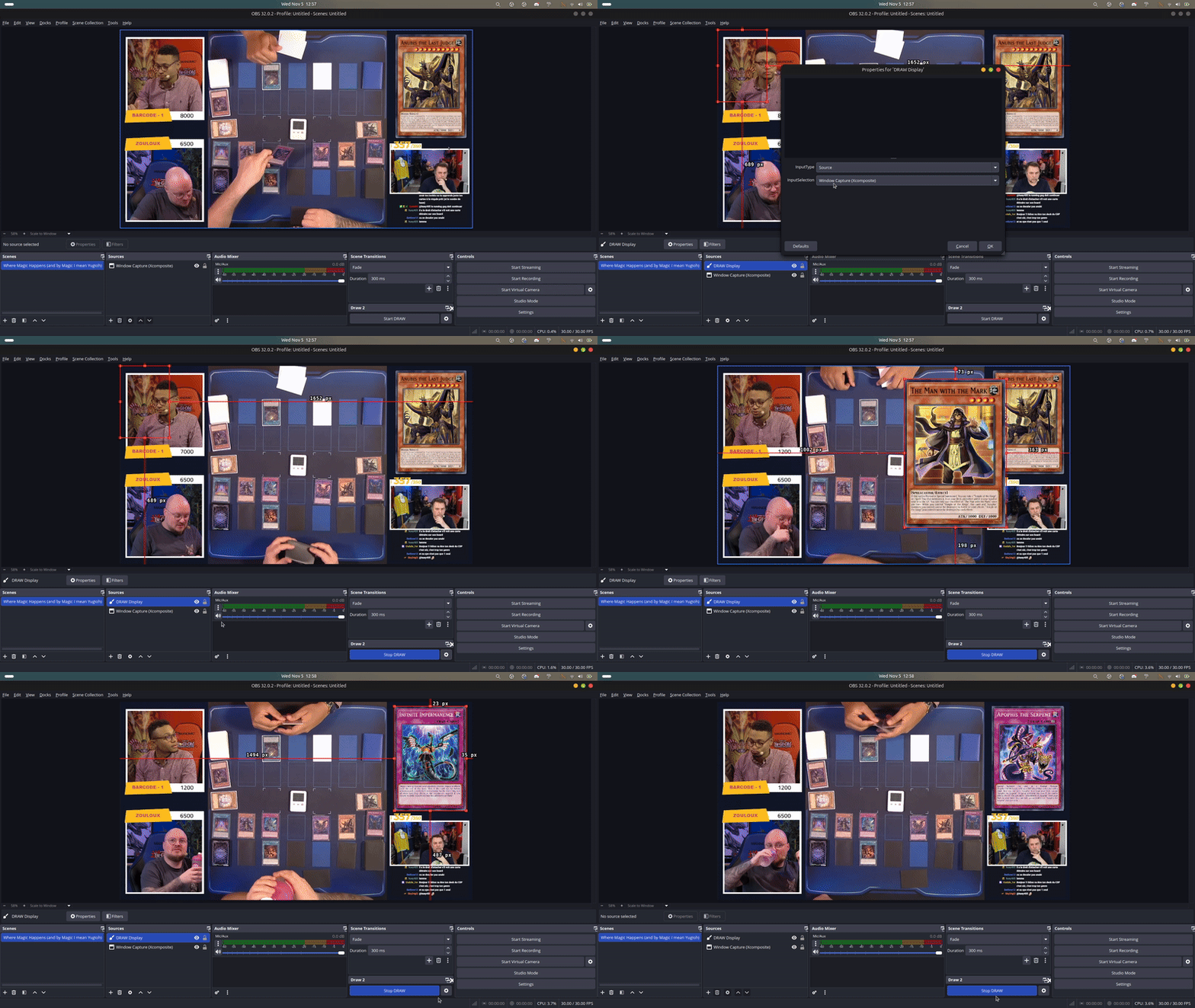
Draw Display. You can add it to your scene like any other source. This source will display the detected cards on the screen. You can choose what source/scene to detect cards from. - Click the
Start DRAWbutton to start the detection process. The plugin will start detecting cards in real time and display them on the screen using theDraw Displaysource. The plugin start detecting from the moment you see theStop DRAWbutton. If you don't see it something went wrong. - In the other case you can enjoy the plugin!
Here is a small overview :)
A medium blog post explainng the main process from data collection to final prediction has been written. You can access it at this adress. If you have any questions, don't hesitate to open an issue.
You can reach me on Twitter @hichtala or by email at hich.tala.phd@gmail.com.